When it comes to event marketing, the way your brand is perceived digitally is just as important as the physical (or virtual) event itself. This is where Splash truly shines. Unlike traditional, clunky registration software, Splash was built specifically for event marketers who prioritize design, brand consistency, and repeatable event programs.
However, many marketing teams purchase Splash for its beautiful aesthetics but fail to utilize its robust backend capabilities. A proper Splash event platform setup goes far beyond picking a pretty template and uploading a logo; it involves configuring a scalable architecture that automates your workflows, syncs seamlessly with your CRM, and turns your events into measurable revenue drivers.
If you want to stop treating Splash as just a “fancy invitation builder” and start using it as a high-octane event marketing tool, this guide will walk you through the essential setup strategies to maximize your ROI.

The Foundation: Building Your Brand Library
The biggest mistake teams make during their initial Splash event platform setup is rushing straight into building an individual event page. To get the most out of Splash, you must first establish your global brand foundation.
Splash’s superpower is its ability to enforce brand compliance across hundreds of events, whether they are hosted by your global marketing team or local field sales reps.
Establish the Theme Library: Do not start from scratch for every event. Work with a designer to create 3 to 5 master “Themes” (e.g., one for Executive Dinners, one for Webinars, one for Trade Show After-Parties).
Lock Down Brand Assets: Upload your official corporate fonts, exact hex color codes, and high-resolution logo files into the centralized asset library.
Set Permissions (The “Hub and Spoke” Model): If you have a large team, use Splash’s user roles to restrict design access. Allow your core marketing team to create and lock the master themes, while giving field marketers “content-only” access. This ensures local teams can launch their own events rapidly without accidentally violating brand guidelines.
Architecting the Registration Flow
Your registration form is the ultimate conversion point. If your setup is too complex, you lose attendees; if it’s too simple, you lose critical marketing data.
Progressive Profiling: Splash allows for dynamic registration forms. Instead of bombarding an attendee with 15 questions, keep the initial form short (Name, Email, Company). Use Splash’s logic to ask secondary questions (Dietary restrictions, Job Title) only if it’s strictly necessary for that specific event type.
Ticket Types and Hidden Tracks: Configure your ticketing architecture carefully. You can create hidden ticket types (e.g., a VIP All-Access Pass) that only appear when a user enters a specific promo code or accesses the page via a targeted UTM link.
Calendar Invites (The Forgotten Step): A crucial part of your Splash event platform setup is configuring the automated calendar file (ICS). Ensure the calendar drop includes the exact venue address, virtual streaming link, and a compelling agenda. Attendees are highly likely to forget an event if it isn’t cemented in their Google or Outlook calendar.

Mastering Splash’s Native Email Engine
Splash is not just a landing page builder; it is a dedicated event email marketing tool. To get more from the platform, you must fully automate your attendee communication cadence within Splash itself, rather than exporting lists to third-party tools manually.
The Core Cadence: Set up automated triggers for the absolute essentials: the “Confirmation/Thank You” email, the “Know Before You Go” (sent 24-48 hours prior), and the “Post-Event Follow-Up.”
Design Consistency: Splash allows you to pull design elements (colors, header images) directly from your event page into your emails. This ensures the visual journey from the initial invitation to the final thank-you note is 100% cohesive.
Targeted Filtering: Use Splash’s email sender tool to filter audiences dynamically. For example, you can write a specific “Reminder” email and set it to send only to “Approved” guests who have not yet “Checked In.”
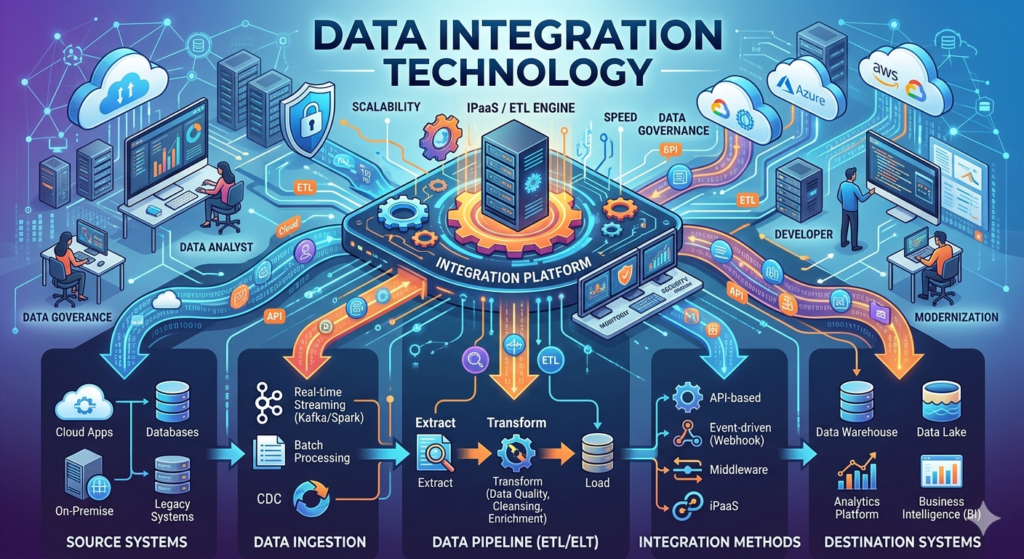
The Technical Backbone: CRM & Martech Integrations
An isolated event platform is a dead end for data. To prove the ROI of your events, your Splash setup must be intimately connected to your broader marketing technology stack.
The CRM Sync (Salesforce/HubSpot): This is the most critical step. Configure the integration so that when a person registers in Splash, a lead is instantly created or updated in your CRM. Map custom questions from Splash (e.g., “What is your biggest business challenge?”) directly to custom fields in Salesforce so your sales team has that context before the event even begins.
Marketing Automation (Marketo/Pardot): Sync Splash with your marketing automation platform to trigger post-event nurture campaigns. If someone checked into your VIP dinner via the Splash Host App, that data should automatically push them into a high-intent email sequence in Marketo the very next morning.
Tracking Pixels and UTMs: Ensure your Google Analytics, LinkedIn Insight Tag, and Facebook Pixels are embedded in your Splash master themes. This allows you to track exactly which paid ad campaigns are driving the most event registrations.
The Splash Host App: Executing Onsite
The final piece of the puzzle is the physical execution. Splash provides a powerful iOS and Android app designed specifically for onsite check-in.
Ditch the Clipboards: A proper setup involves pre-configuring iPads with the Splash Host App. Ensure your onsite staff knows how to use the app to swipe guests in, register walk-ins on the fly, and trigger instant arrival notifications (e.g., pinging a sales rep via Slack the moment their target account walks through the door).
Offline Mode: Always ensure your team tests the “Offline Mode” during the setup phase. Conference center Wi-Fi is notoriously unreliable, and the Splash app can continue to check people in and sync the data once a connection is re-established.
Conclusion
Splash is a phenomenal tool for scaling beautiful, brand-compliant event programs. However, its true power lies beneath the surface design. By dedicating time to a strategic Splash event platform setup—building reusable themes, mapping data to your CRM, and automating your email workflows—you transform Splash from a simple invitation builder into a sophisticated, revenue-generating event marketing engine. Stop reinventing the wheel for every webinar or dinner, and start building a scalable event infrastructure.

Abhishek Kapoor
Abhishek Kapoor is the founder and creative head of BrandWorks Worldwide. His is an ex-Cvent and has worked in the event space for the last 13 years, providing branding and registration expertise to many clients globally.