Cvent Attendee Hub alternatives: the short answer
Cvent Attendee Hub alternatives range from simple networking apps to full enterprise platforms. Here are seven worth considering, what each costs, and what to check before you switch.
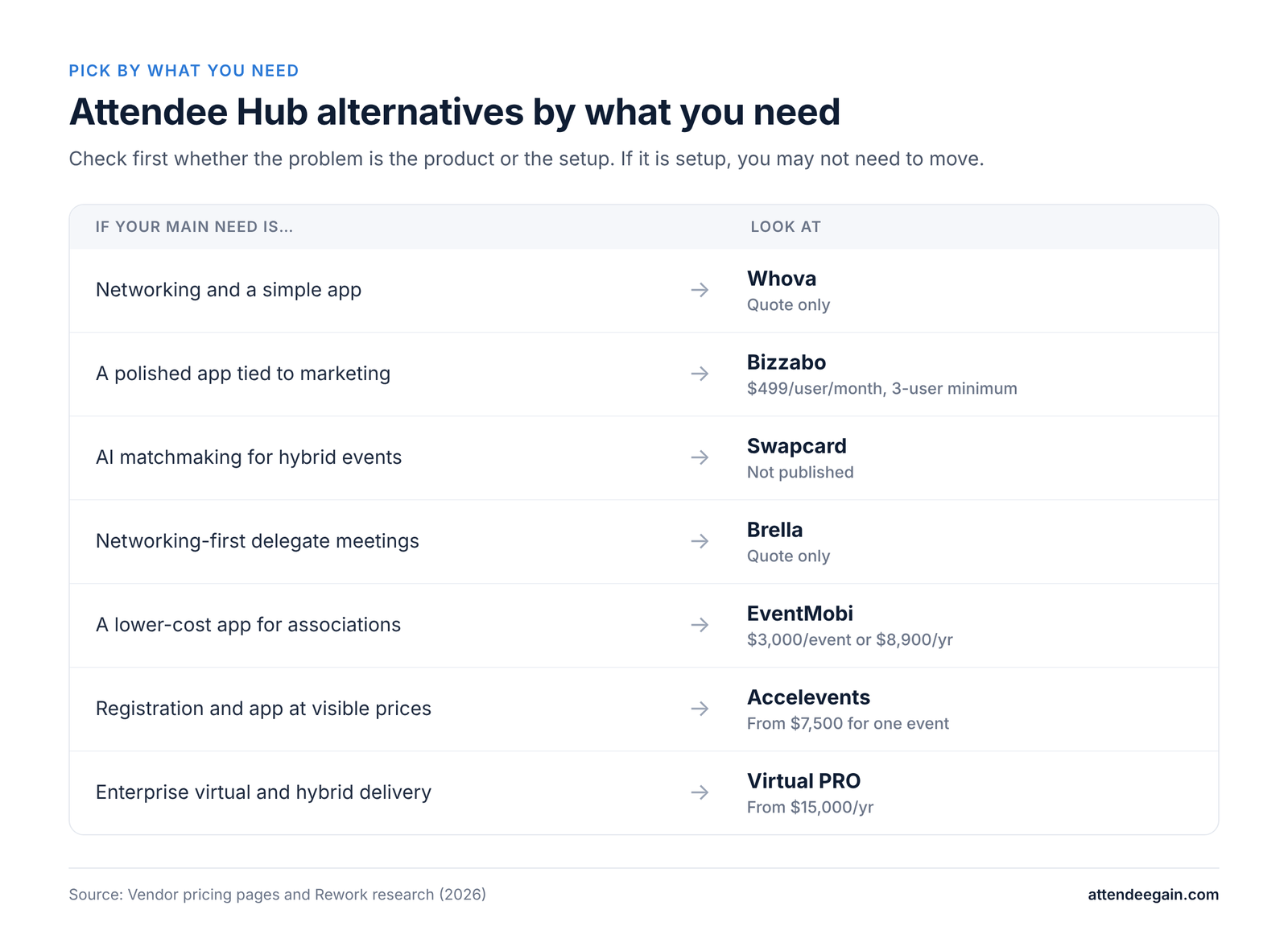
If Attendee Hub is too expensive or too much for your events, the best alternative depends on what you need fixed:
- Attendee networking and a simple app: Whova.
- A polished app tied to a marketing platform: Bizzabo.
- AI matchmaking for hybrid events: Swapcard.
- Networking-first meetings between delegates: Brella.
- A lower-cost app for associations and nonprofits: EventMobi.
- Registration, app and fundraising on published prices: Accelevents.
- Enterprise virtual and hybrid delivery: Virtual PRO (formerly Hubilo).
What Attendee Hub does
Attendee Hub is Cvent’s event app and attendee experience. Cvent lists a mobile event app, virtual experiences, chat and Q&A, polling, gamification, networking, AI-driven agenda building, exhibitor and sponsor activation, and live or on-demand video. It is licensed as its own solution next to Registration and OnArrival, with no published price.
Why teams look for alternatives
- Cost. It is quoted on top of registration and onsite, and the total can be hard to forecast.
- Complexity. Configuring agenda, sessions, notifications and sponsor placements takes admin time.
- Customization. Branding and layout are constrained by the Cvent ecosystem. This is a common complaint but not one we could verify with data.
- Fit. Smaller or single-event teams may not use half of it.
Before you switch
Check whether the problem is the product or the setup. An app that attendees ignore may be missing push notifications, a clean agenda, sponsor offers or an onsite push to download it. If the fix is configuration, you can keep your registration and reporting in Cvent and save a migration.
The 7 best Cvent Attendee Hub alternatives
1. Whova: best for networking and a simple app
Whova’s app centers on the agenda, attendee profiles and networking, and it scores highly in independent roundups for engagement. It suits conferences, associations and academic events. The catch: pricing is quote-only, and registration and badging are add-ons. See our Whova expertise.
2. Bizzabo: best for a polished app tied to event marketing
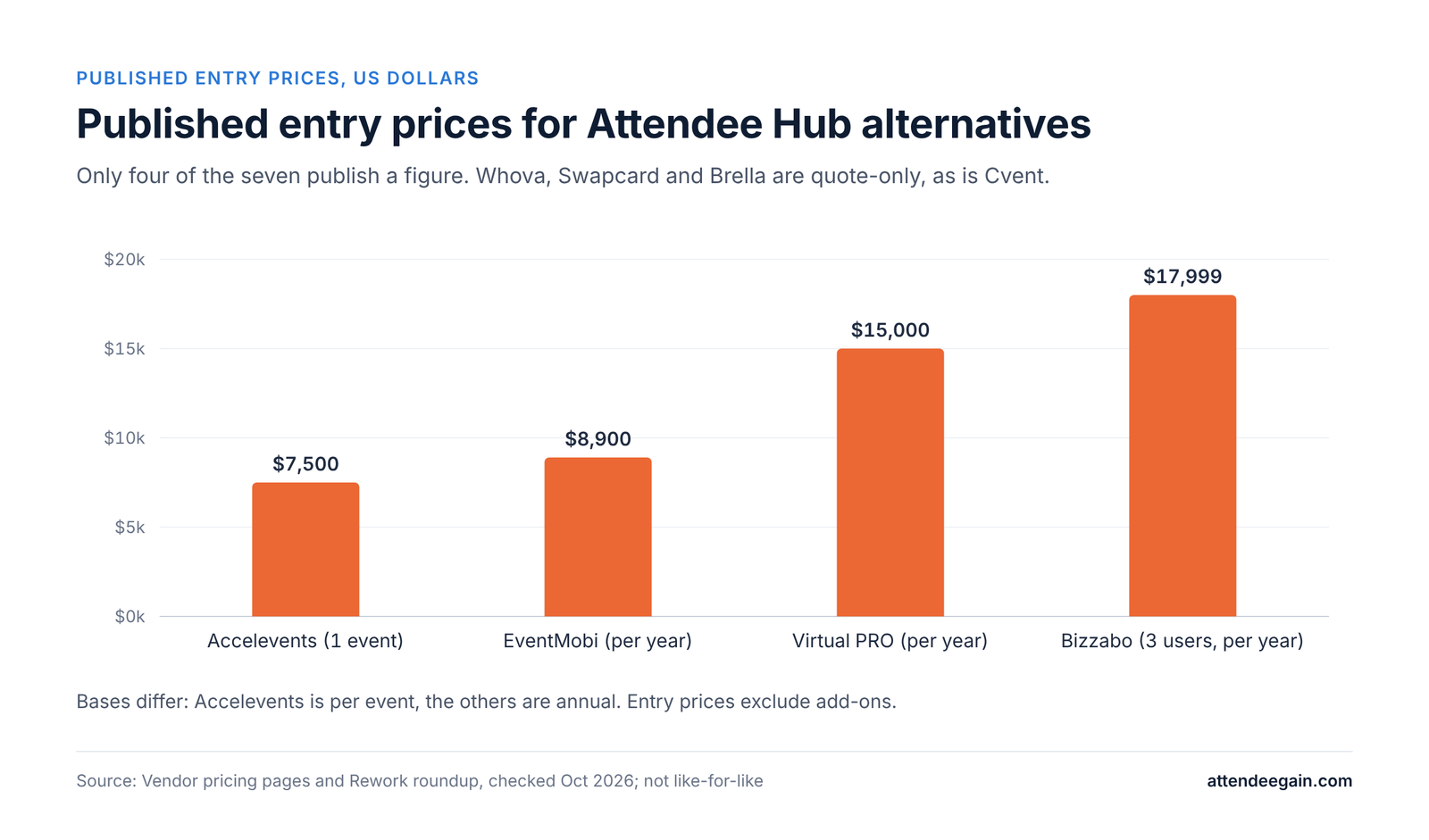
Bizzabo pairs a strong attendee app with marketing and CRM integration, and it has its own onsite hardware. The catch is the price floor: $499 per user per month with a three-user minimum, roughly $17,999 a year. See our Bizzabo expertise.
3. Swapcard: best for AI networking at hybrid events
Swapcard is built around attendee matchmaking and hybrid delivery. Pricing varies by size and features and is not published.
4. Brella: best for networking-first conferences
Brella focuses on AI matchmaking and meeting booking between delegates. It is narrow outside networking, so it is usually paired with a registration platform. Quote-only.
5. EventMobi: best low-cost app for associations and nonprofits
EventMobi lists $3,000 per event or $8,900 a year, with no registration fees. Hardware and badges cost extra, and it has no Cvent-style portfolio features.
6. Accelevents: best for visible pricing
Accelevents publishes its prices: Professional from $7,500 for one event and Business from $13,500 for unlimited events, with unlimited admin seats and 24/7 support. Billing period and transaction fees are not stated on the page, so ask.
7. Virtual PRO (formerly Hubilo): best for enterprise virtual and hybrid
Virtual PRO is purpose-built for virtual and hybrid delivery, with a published entry price of $15,000 a year for PRO 1 and a quote for PRO MAX. It is overkill for in-person only events.
Not on this list on purpose: Eventbrite and Zoho Backstage are ticketing and small-event tools, not Attendee Hub replacements. Swoogo is strong on registration but its virtual and app features are lighter. See our Swoogo expertise if registration is your real problem.
Alternatives compared: pricing and fit
| Platform | Best for | Published price | Main catch |
|---|---|---|---|
| Cvent Attendee Hub | Enterprise programs | None (quote) | Licensed on top of Registration and OnArrival |
| Whova | Networking, conferences | None (quote) | Add-ons for registration and badging |
| Bizzabo | Polished app, marketing link | $499/user/month, 3-user minimum | High price floor |
| Swapcard | AI networking, hybrid | None (quote) | Pricing varies by scope |
| Brella | Networking-first events | None (quote) | Narrow outside networking |
| EventMobi | Associations, nonprofits | $3,000/event or $8,900/year | Hardware and badges extra |
| Accelevents | Visible pricing | From $7,500 (1 event), $13,500 (unlimited) | Billing period not stated |
| Virtual PRO | Enterprise virtual/hybrid | From $15,000/year | High entry price |
Prices come from vendor pages or third-party roundups and change often. Confirm with the vendor.
Comparing total cost
An app price is only part of the cost. Add registration, onsite check-in and badging, integrations, implementation and the staff hours to run it. If you move the app but keep Cvent for registration, you also need the attendee data to flow between the two, which usually means an integration to build and test.
Migrating from Attendee Hub: what to plan
Switching the app means more than swapping a download link. Plan for:
- Data flow. Registration data must reach the new app: attendees, sessions, speakers, sponsors. Decide whether it comes by export, API or a connector, and test it with real records.
- Single sign-on and attendee access. Decide how attendees log in and whether it matches your registration platform.
- Content. Agenda, speaker bios, maps, sponsor listings and push notifications must be rebuilt.
- Onsite. Check-in and badge scans still need to talk to the app if you use them for session tracking or gamification.
- Reporting. Engagement data will sit in a different system than registration. Decide where the combined report lives.
- Timing. Do not switch in the weeks before an event. Pilot on a smaller event first.
Questions to ask any vendor
- What is the total cost for our scenario, itemized, including implementation and payment fees?
- Which registration platforms do you integrate with natively, and who builds and maintains the connection?
- What certifications do you hold, and can we see the current report?
- What does support look like during our event week?
- Can we speak to a customer with our event size and registration platform?
- What happens to our data if we leave?
FAQ
What is Cvent Attendee Hub? Cvent’s event app and attendee experience: mobile app, chat and Q&A, polling, networking, gamification, AI agenda building, exhibitor activation, and live or on-demand video.
How much does Attendee Hub cost? Cvent does not publish a price. It is quoted separately from Registration and OnArrival.
What is the best alternative to Attendee Hub? It depends on the problem: Whova for networking, Bizzabo for a polished app tied to marketing, EventMobi for lower cost, Accelevents for published prices.
Can I use another app and keep Cvent for registration? Often yes, but the attendee data has to flow between the two systems, and that integration needs building and testing.
Is Attendee Hub worth it? If you already run registration and onsite in Cvent and use its sponsor and engagement tools, usually. If you use only the basic app, a lighter option may cost less.
How long does it take to switch? It depends on the integration and content volume. Plan weeks, not days, and pilot on a smaller event.
Need help with Attendee Hub or choosing an app?
AttendeeGain sets up and optimizes Cvent, including Attendee Hub, and advises on alternatives. Tell us what is not working and we will say whether to fix it or move. See our Cvent expertise or contact us.
Sources: Cvent pricing, Accelevents pricing.