November 2026

Cvent vs Swoogo: which event platform fits your team

Cvent vs Swoogo (2026): Which Event Platform Fits Your Team?

Cvent vs Swoogo: the short answer

Cvent vs Swoogo is a choice between enterprise breadth and registration-led flexibility.

Choose Cvent when you need the whole event lifecycle in one contract: venue sourcing, hotel room blocks, native virtual production and governance across a large team. Choose Swoogo when registration is the heart of your events and you want flexible logic, predictable pricing and fast, human support without enterprise overhead.

The two are not really rivals for the same buyer. Cvent is built to run an organisation’s entire meetings and events operation. Swoogo is built to make registration, event websites and onsite check-in fast and flexible, and it leaves venue sourcing and video streaming to other tools.

We build events on both. This guide covers what the feature lists leave out: what each one costs a real team, how long it takes to get the first event live, and where each one will frustrate you.

Cvent vs Swoogo at a glance

CventSwoogo
Best fitEnterprise programmes across every format and departmentRegistration-led conference, field and internal event programmes
PricingQuote only; Professional and Enterprise editionsProfessional from US$11,800 a year; Enterprise is custom
Events and registrationsDepends on licensed modulesUnlimited events and registrations on every plan
UsersProfessional includes 15 user loginsProfessional includes 1 full user and 1 reporting user
Venue sourcingYes: supplier network, RFPs, Passkey room blocksNo; hotel block management only
Virtual eventsNative: Attendee Hub, Cvent Studio, plus ON24 and GoldcastEvent Hub with your own streaming provider (Zoom, Vimeo, ON24 and others)
Onsite check-inOnArrival kit or fully staffed OnArrival 360Go Onsite included; Go Onsite Pro adds kiosk mode
Mobile attendee appAttendee HubGo Attend, an add-on
IntegrationsLong native list, priced as a module30+ integrations with no extra integration fees
Support24/7, 1,800+ client services teamIn-house, first response within 15 minutes in business hours

Cvent vs Swoogo feature-by-feature

Registration

This is the closest contest. Cvent handles complex attendee paths with enterprise governance built in: approvals routed through managers, housing and travel captured in the same flow, and a long list of CRM connectors. Swoogo’s strength is unlimited conditional logic at the field, page and path level, plus progressive registration that collects details over time. In practice, a planner can build surprisingly complex Swoogo flows without help, while the equivalent Cvent build usually needs an experienced operator.

Event websites

Both offer drag-and-drop builders with custom CSS and HTML. Swoogo’s sites are white-labelled on every plan and it lists 40+ widgets and 12+ themes. Cvent’s Site Designer goes further with custom code, but takes longer to master. If brand control matters and your team is small, Swoogo is quicker to a finished site.

Venue sourcing and room blocks

Cvent wins outright. Its supplier network lets planners send RFPs to many venues and compare bids, and Passkey manages hotel room blocks with real-time pickup. Swoogo has no venue sourcing; it manages hotel inventory inside registration, but sourcing happens elsewhere.

Virtual and hybrid

Cvent produces virtual events natively through Attendee Hub and Cvent Studio, and added ON24 and Goldcast in 2025. Swoogo’s Event Hub is a branded virtual space, but the video comes from a streaming provider you already use. That is a strength if you like your provider and a gap if you want one vendor for everything.

Onsite check-in

Swoogo includes its Go Onsite check-in app on every plan, with offline check-in; kiosk mode is in the paid Pro upgrade. Cvent’s OnArrival ranges from a self-service hardware kit to a fully staffed service, and Cvent also sells trade-show lead capture and meeting scheduling as add-ons. For a single conference, Swoogo is simpler. For trade shows with exhibitor lead capture, Cvent covers more.

Integrations and data

Swoogo lists 30+ integrations plus a REST API and webhooks, with no extra integration fees. Cvent’s native list is longer and includes connectors that regulated industries rely on, but integrations are a priced module. If you need a life-sciences or travel connector, check Cvent’s list; if you need Salesforce, HubSpot or Marketo, both are covered.

Cvent vs Swoogo pricing: what you will actually pay

Swoogo publishes a price; Cvent does not. But Swoogo’s number needs reading carefully.

Swoogo Professional is listed at US$11,800 a year with one full user and one reporting user, unlimited events, unlimited registrations, the check-in app and 30+ integrations. Pricing is per user, and the page estimates cost by team size, so a team with several builders will pay more than the headline. Enterprise is custom and adds advanced logic, SSO, a customer success manager and a 99.9% uptime SLA. Paid upgrades include Go Onsite Pro, mobile event apps, premium support, pro services, extra domains, SSO, sub-accounts and Call for Speakers.

Cvent is quote only, with a Professional edition (choose modules, 15 user logins) and an Enterprise edition (Registration, Attendee Hub, OnArrival and Essentials included, with API and SSO). Venue sourcing, Passkey, lead capture, Jifflenow, Surveys and Webinar Premium are extras, as are services such as OnArrival 360 and Event Build.

Cost line to ask aboutCventSwoogo
Platform licenceQuote, by edition and modulesFrom US$11,800/yr (Professional)
More builders on the teamProfessional includes 15 loginsPriced per additional user
Attendee mobile appAttendee Hub, by editionGo Attend add-on
Kiosk check-inOnArrivalGo Onsite Pro add-on
IntegrationsIntegrations moduleIncluded, no extra fees
SSOEnterprise editionAdd-on or Enterprise
StreamingNative optionsYour own provider’s fees

Whichever you shortlist, get a year-one quote for your real calendar: number of builders, number of events, onsite needs and the streaming setup. For a small team running many events, Swoogo’s model is usually easier to predict. For a large organisation with many users across departments, the comparison can tilt the other way.

Cvent vs Swoogo implementation and support

Swoogo says you can build your first event in a day, and its support is in-house with a first response within 15 minutes during business hours. On G2, as quoted on Swoogo’s own comparison page in July 2026, Swoogo scored 9.7 for ease of use against Cvent’s 7.8, and 9.9 for quality of support against Cvent’s 8.7. Treat vendor-published scores with care, but the direction matches what most users report.

Cvent has a 24/7 client services team of more than 1,800 people and a formal training and certification programme through Cvent Academy. That depth exists because the platform is deep. Many teams buy implementation or event-build services for their first events, or bring in a partner.
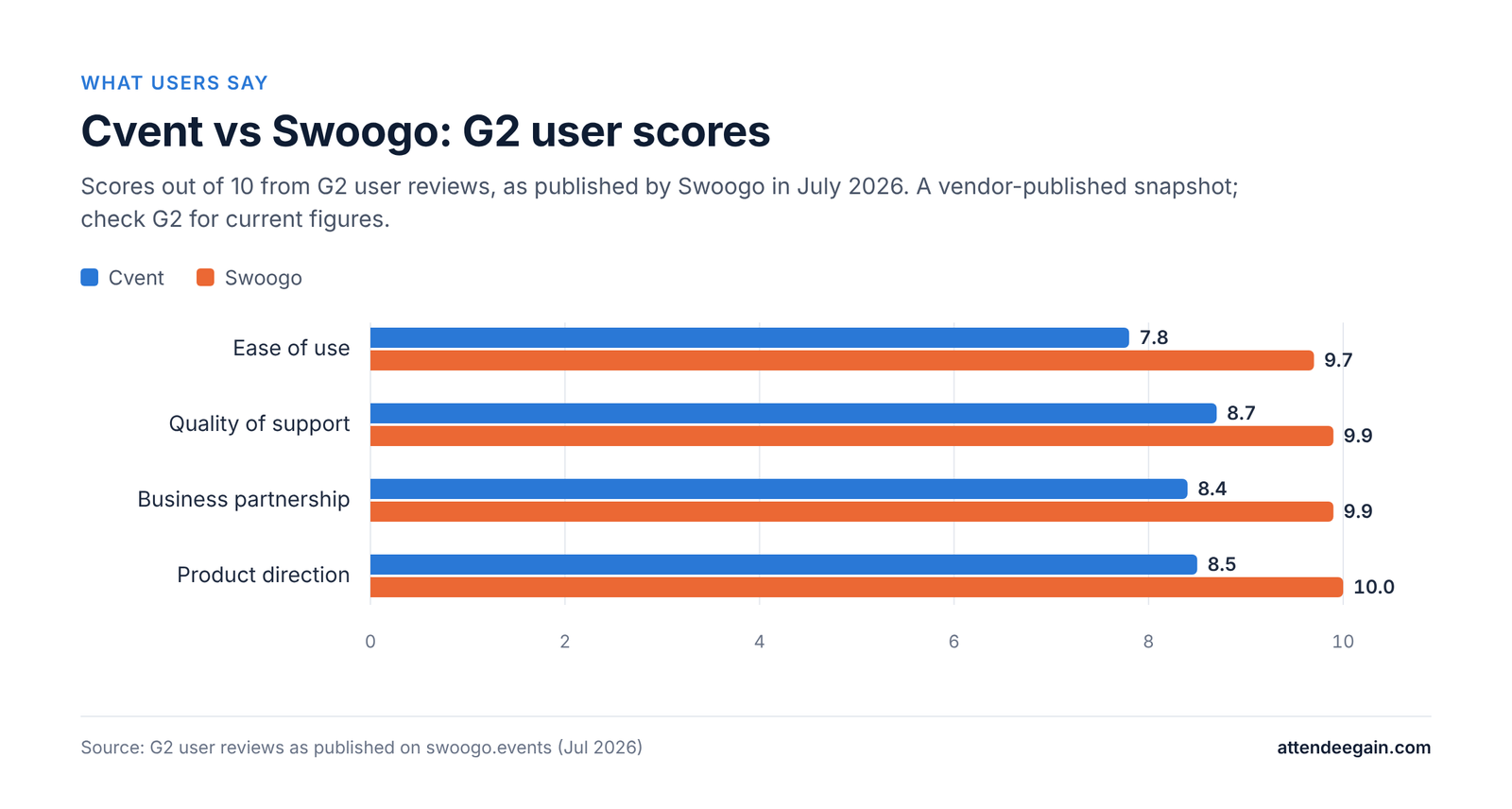
Bar chart of G2 user scores out of 10. Ease of use: Cvent 7.8, Swoogo 9.7; Quality of support: Cvent 8.7, Swoogo 9.9; Business partnership: Cvent 8.4, Swoogo 9.9; Product direction: Cvent 8.5, Swoogo 10.0.

Where teams typically struggle:

  • Swoogo: assuming the headline price covers the whole team; discovering late that the attendee app and kiosk check-in are upgrades; planning a virtual event without budgeting for a streaming provider.
  • Cvent: building registration before agreeing attendee types and approval rules; under-estimating how long integrations take to map and test; paying for modules nobody on the team has been trained to use.
CventSwoogo
Who runs it day to dayA trained operatorAn event planner or coordinator
First event liveWeeks, with services or a partnerSwoogo says a first event can be built in a day
Support model24/7, tiered by what you buyIn-house, 15-minute first response in business hours

Sponsors and exhibitors

Cvent is built for trade shows and large exhibitor programmes. Exhibitor management is in the Professional edition, and LeadCapture, iCapture, Appointments and Jifflenow add lead scanning, lead qualification and scheduled meetings as separately priced modules.

Swoogo covers the sponsor basics well: customisable sponsor pages, tailored sponsor registration and communications, 1:1 meetings, reports on individual attendee interactions, and sponsor spotlighting across events. It does not offer a dedicated trade-show lead-capture product on the scale of Cvent’s.

For a conference with a dozen sponsors, Swoogo is enough. For an expo with hundreds of exhibitors scanning badges, Cvent is the safer choice.

AI features in 2026

  • Cvent launched CventIQ in June 2025: 20+ AI features including AI-assisted venue RFP proposals, writing help, personalised session recommendations, live transcripts and feedback summaries. The Goldcast acquisition added AI video repurposing.
  • Swoogo launched an MCP server in March 2026 that lets AI assistants such as Claude, ChatGPT and Gemini query live event data in plain language, for example “which companies have the most registrants?”, and make some event updates. Rule-based automations for session assignment and registrant updates are included in Professional.

Cvent’s AI is broader and built into its own screens. Swoogo’s approach is to plug event data into the AI tools your team already uses.

Cvent vs Swoogo security and compliance

CventSwoogo
SOC 2 Type IIYesYes
ISO 27001 and 27701YesYes
PCI DSSYesLevel 1
SSOEnterprise editionAdd-on or Enterprise
Multi-factor authenticationEnterprise editionIncluded
Uptime SLAAsk in your contract99.9%, Enterprise plan

Both clear standard enterprise procurement. Regulated industries should ask Cvent about its additional certifications and life-sciences integrations such as Veeva.

Reliability

Swoogo’s Enterprise plan includes a 99.9% uptime SLA backed by compensation. Cvent does not publish an SLA figure on its pricing page; ask for it in writing. Bizzabo, a competitor of both, has published a claim that Cvent had about seven weeks of partial outages or degraded performance in the first half of 2025. Treat that as a competitor’s reading of Cvent’s public status page, and check both vendors’ status histories for the months your events run.

Switching between Cvent and Swoogo

Attendee data, contacts and past reports export from either platform; registration paths, websites, email templates and integrations are rebuilt. Moving from Cvent to Swoogo usually means finding a new home for venue sourcing, hotel blocks and virtual production. Moving from Swoogo to Cvent usually means more training and more time per build, in exchange for more capability. Switch between event seasons and run one event in parallel before closing the old account.

Cvent vs Swoogo: which should you choose?
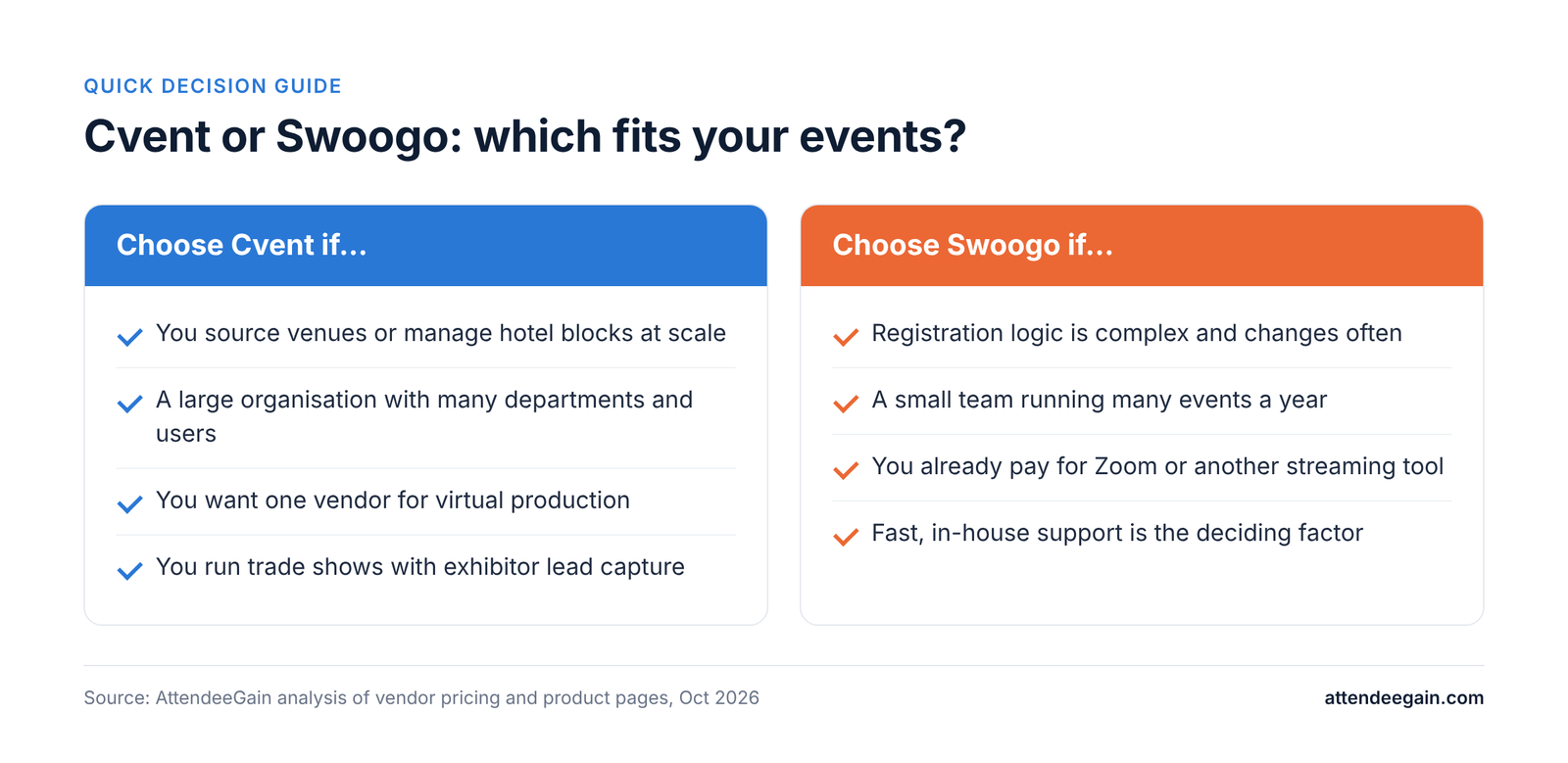
Cvent vs Swoogo decision guide: when to choose Cvent and when to choose Swoogo; the same points appear in the table below.
Your situationBetter fitWhy
You source venues or manage hotel blocks at scaleCventSupplier network and Passkey; Swoogo has no equivalent
Registration logic is complex and changes oftenSwoogoUnlimited conditional logic a planner can manage
Small team running many events a yearSwoogoUnlimited events on a predictable per-user price
Large organisation, many departments and usersCventGovernance, budgets, approvals, 15+ logins in Professional
Virtual-first programme wanting one vendorCventNative production and webinar line-up
You already pay for Zoom or another streaming toolSwoogoEvent Hub wraps the provider you have
Trade shows with exhibitor lead captureCventLead capture and meeting scheduling add-ons
Responsive support is the deciding factorSwoogoIn-house team, 15-minute first response

One more option teams overlook: some organisations run both, with Cvent for sourcing and large conferences and Swoogo for fast, frequent field events. That only makes sense if the data can be joined up in your CRM, so plan the integrations first.

Cvent vs Swoogo FAQs

Is Swoogo cheaper than Cvent? Usually for small and mid-sized teams. Swoogo Professional starts at US$11,800 a year with unlimited events, while Cvent quotes every deal. The comparison changes as you add Swoogo users and upgrades, so price your real team.

Does Swoogo do venue sourcing? No. Swoogo manages hotel blocks within registration but has no venue marketplace or RFP tool. Cvent’s supplier network is its biggest structural advantage.

Can Swoogo run virtual events? Yes, through its Event Hub, but the live video comes from a streaming provider you connect, such as Zoom or Vimeo. Cvent has native virtual production.

Which is easier to use? Swoogo, by most accounts. Cvent’s depth is why it runs a formal certification programme.

Is the Swoogo mobile app included? The Go Onsite check-in app is included on every plan. The Go Attend attendee app is a paid upgrade.

Can we use both Cvent and Swoogo? Some organisations do, splitting sourcing and flagship events from frequent smaller ones. It works only if both feed the same CRM cleanly.

Sources: Cvent pricing, Swoogo pricing, Swoogo vs competitors, ZoomInfo: Cvent vs Swoogo.

Need help deciding?

We build on both Cvent and Swoogo. Talk to our team about your event calendar and we will tell you which platform fits, or how to get more out of the one you already have. See our Cvent expertise and Swoogo expertise pages, or compare options on our event registration platforms and onsite solutions pages.

Cvent vs Swoogo (2026): Which Event Platform Fits Your Team? Read More »

Bizzabo vs Swoogo: event experience OS or registration workhorse

Bizzabo vs Swoogo (2026): Event Experience OS or Registration Workhorse?

Bizzabo vs Swoogo: the short answer

Bizzabo vs Swoogo is a choice between a better room and a better registration form.

Choose Bizzabo if the onsite experience is the point: networking, sponsor leads and engagement data, especially with its Klik SmartBadge wearables. Choose Swoogo if registration is the point: complex, branching forms, frequent events and a team that wants to build everything itself without paying for hardware it will not use.

Both sit in the same middle ground. They are more capable than ticketing tools like Eventbrite, and neither offers Cvent-style venue sourcing. Both include unlimited events and registrations. The difference is where each one puts its depth: Bizzabo at the event itself, Swoogo at the form the attendee fills in before they arrive.

We build on both. Below, we check each vendor’s claims against the other’s published pricing, because some of what you will read online does not hold up.

Bizzabo vs Swoogo at a glance

BizzaboSwoogo
Built forB2B marketing teams running flagship conferencesEvent producers who own registration and the event website
Published price$499 per user per month, billed annually, 3-user minimum ($17,999 a year)Professional US$11,800 a year; Enterprise custom
Users at that price31 full user and 1 reporting user
Events and registrationsUnlimitedUnlimited
Signature strengthKlik SmartBadge networking and lead captureUnlimited conditional logic on every plan
Attendee mobile appIncluded; custom-branded app is an add-onGo Attend, an add-on
Check-in appOnsite Command App listed in the core plan; Advanced Onsite is an add-onGo Onsite included; Go Onsite Pro is an add-on
CRM and martech integrationsAdd-on30+ integrations included
Virtual productionStreaming studio, simulive, breakout roomsEvent Hub plus your own streaming provider
Venue sourcingNoNo

Bizzabo vs Swoogo feature-by-feature

Registration and event websites

This is Swoogo’s home ground. Unlimited conditional logic runs across forms, emails and web pages on every plan, so one question can show or hide a dozen later fields, and different attendee types can see different content on the same site. Bizzabo’s registration flows, ticketing and website builder are capable and fast to stand up, and its advanced registration flows are in the core plan. For a typical B2B conference, both work. For forms that branch on many variables, Swoogo is the safer bet.

Onsite, badging and Klik

This is where they split. Swoogo’s Go Onsite check-in app is included, with offline check-in; Go Onsite Pro adds kiosk mode. Bizzabo offers check-in through its Onsite Command App, rentable Bizzabox kits and technicians, plus Klik SmartBadge wearables. Klik lets attendees swap contact details with a tap, lets exhibitors capture leads without a scanner, and shows organisers which sessions and booths drew a crowd. Swoogo has nothing equivalent.

Networking and matchmaking

Bizzabo has two layers: Klik for casual tap-based introductions, and a Networking add-on for 1:1 scheduling and smart matchmaking. Swoogo supports 1:1 and one-to-many meetings and integrated chat, but structured matchmaking is lighter. If matchmaking is a hard requirement, test it on Swoogo before you sign.

Virtual and hybrid

Bizzabo includes a streaming studio with simulive sessions and breakout rooms, and sells a fuller Virtual Event Experience as an add-on. Swoogo’s Event Hub gives virtual attendees a branded space, with video from your own provider. Choose Bizzabo if you want one vendor running the production; choose Swoogo if you already have a streaming tool you like.

Integrations

Swoogo includes 30+ integrations in Professional, with no integration fees. Bizzabo lists martech and CRM integrations, including HubSpot, Marketo, Salesforce MCAE and Eloqua, as a paid add-on. If CRM sync is essential, Swoogo’s headline price is closer to the real price.

Bizzabo vs Swoogo pricing: the numbers worked out

Both vendors publish real prices, which is rare in this category. But “unlimited” means unlimited events and registrations, not unlimited users.

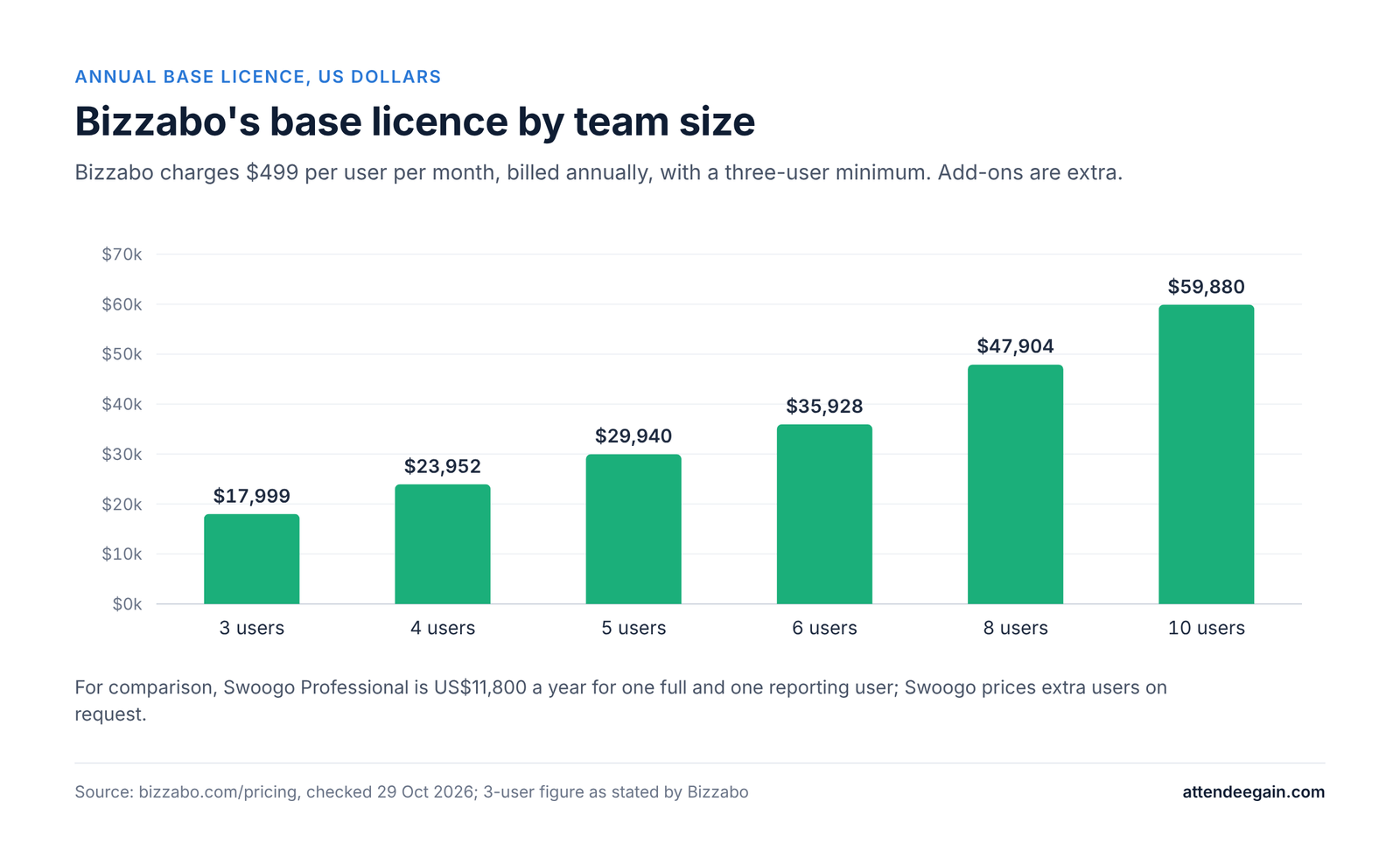
Bizzabo charges $499 per user per month, billed annually, with a minimum of three users. Because the per-user rate is public, you can work out the base licence for any team size:

Team sizeBizzabo base licence per year
3 users (minimum)$17,999 (Bizzabo’s stated figure)
5 usersabout $29,940
10 usersabout $59,880
Bar chart of Bizzabo's annual base licence by team size: 3 users $17,999; 4 users $23,952; 5 users $29,940; 6 users $35,928; 8 users $47,904; 10 users $59,880.

Add-ons then sit on top: martech and CRM integrations, sponsor and speaker portals, networking, a custom-branded app, API access, SSO, branding, Advanced Onsite, virtual production and Klik.

Swoogo Professional is US$11,800 a year and includes one full user and one reporting user. Swoogo prices extra users on request and does not publish the per-user rate, so a five-person team should expect a higher number and ask for a written quote. Upgrades include Go Onsite Pro, the Go Attend app, premium support, pro services, extra domains, SSO, sub-accounts and Call for Speakers.

A claim to check. Swoogo’s comparison page says Bizzabo charges per registration plus setup, integration and support fees. Bizzabo’s own pricing page lists unlimited registrations in its base plan. On Bizzabo’s current published pricing, the per-registration claim does not hold, though its integration add-on is real. Ask both vendors to put their fee structure in writing.

Cost line to ask aboutBizzaboSwoogo
Extra team members$499 per user per monthPriced on request
CRM integrationsAdd-onIncluded
Attendee appIncluded; branded app is an add-onGo Attend add-on
Kiosk or advanced onsiteAdvanced Onsite add-on, Bizzabox rentalGo Onsite Pro add-on
WearablesKlik, quoted per eventNot offered
SSOAdd-onAdd-on or Enterprise

Bizzabo vs Swoogo implementation and support

Bizzabo includes a structured onboarding plan, a dedicated Event Success Specialist, pre- and post-event success calls and 24/7 support. It says new customers typically drive registration to their sites and apps within two months. The heaviest work is deciding which add-ons your programme needs before the first event, not after.

Swoogo says a first event can be built in a day, and its in-house support promises a first response within 15 minutes in business hours. The heaviest work is designing conditional logic up front: mapping who sees which question, page and email before anyone starts building.

Bar chart of G2 user scores out of 10. Ease of use: Bizzabo 8.6, Swoogo 9.7; Quality of support: Bizzabo 8.9, Swoogo 9.9; Business partnership: Bizzabo 9.1, Swoogo 9.9; Product direction: Bizzabo 8.8, Swoogo 10.0.

On G2, as published by Swoogo in July 2026, Swoogo scored 9.7 for ease of use against Bizzabo’s 8.6, and 9.9 for quality of support against 8.9. Both are strong; Swoogo leads on both measures.

What stalls rollouts:

  • Bizzabo: CRM sync, SSO or Klik discovered as extras after signing; Klik ordered too late for the event date.
  • Swoogo: a team of four signing a two-seat plan; logic built page by page without a plan, so later changes break earlier branches.

Sponsors and exhibitors

Bizzabo includes lead management, sponsored sessions and app branding in the core plan, sells a sponsor portal as an add-on, and has Klik for tap-based lead capture and booth-traffic data. For sponsor-heavy conferences, that combination is hard to beat.

Swoogo offers customisable sponsor pages, tailored sponsor registration and communications, 1:1 meetings and reports on individual attendee interactions. It is solid for sponsor logistics but has nothing like Klik for capturing leads on the show floor.

AI features in 2026

  • Bizzabo has an organiser assistant, Event OS Copilot (November 2024), and an attendee assistant, Bizzy (April 2026), which answers questions about sessions, speakers and logistics. Matchmaking uses registration and engagement data.
  • Swoogo launched an MCP server in March 2026 so AI assistants such as Claude, ChatGPT and Gemini can query live event data and make some updates. Rule-based automations are included in Professional.

Bizzabo puts AI in front of attendees; Swoogo puts event data in front of your team’s AI tools.

Bizzabo vs Swoogo security and compliance

BizzaboSwoogo
SOC 2 Type IIYesYes
ISO 27001YesYes, plus ISO 27701
PCI DSSNot listed on its pricing pageLevel 1
GDPR and CCPAYesYes
Organiser SSOAdd-onAdd-on or Enterprise
Uptime SLAAsk in your contract99.9%, Enterprise plan

Reliability

Bizzabo publishes a 99.99% uptime figure for the first half of 2025 on its own comparison page. Swoogo’s Enterprise plan carries a 99.9% uptime SLA with compensation. A published figure and a contractual SLA are different things, so ask Bizzabo whether its figure is backed by an SLA in your contract, and ask Swoogo whether its SLA applies on Professional.

Switching between Bizzabo and Swoogo

Data moves; builds do not. Moving from Bizzabo to Swoogo means rebuilding registration with conditional logic, which is usually an upgrade, and deciding what replaces Klik. Bizzabo says Klik works with third-party platforms, so keeping it for a flagship event is an option. Moving from Swoogo to Bizzabo means checking that every branch of your current forms can be rebuilt, and pricing the add-ons you will need.

Bizzabo vs Swoogo: which should you choose?

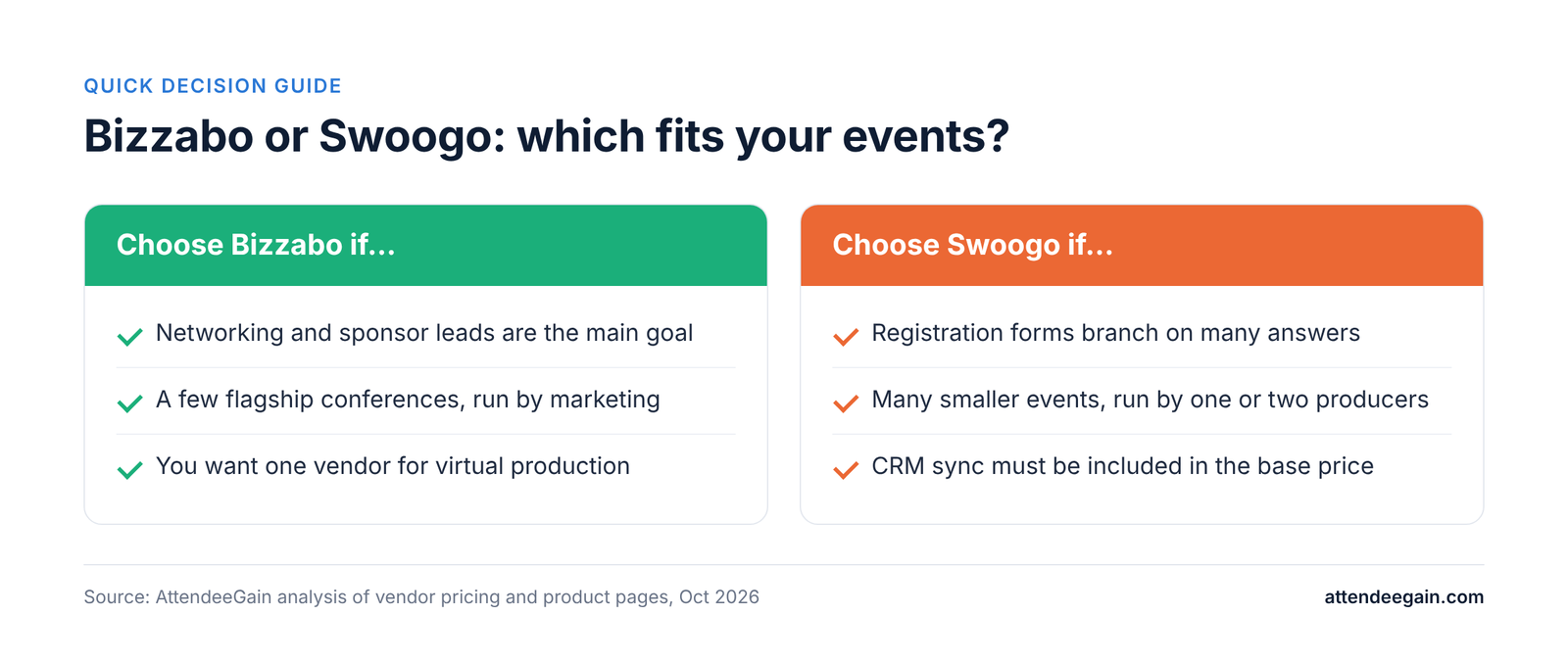
Bizzabo vs Swoogo decision guide: when to choose Bizzabo and when to choose Swoogo; the same points appear in the table below.
Your situationBetter fitWhy
Networking and sponsor leads are the main KPIBizzaboKlik wearables and the Networking add-on
Registration forms branch on many answersSwoogoUnlimited conditional logic on every plan
A few flagship conferences, run by marketingBizzaboBuilt around the onsite experience
Many smaller events, run by one or two producersSwoogoTwo seats and unlimited events from US$11,800
CRM sync must be in the base priceSwoogo30+ integrations included
One vendor for virtual productionBizzaboBuilt-in streaming studio
You need venue sourcing or room blocks at scaleNeitherLook at Cvent

If you are torn, decide which part of the event you are actually trying to fix: the form attendees fill in, or the room they walk into.

Bizzabo vs Swoogo FAQs

Is Swoogo cheaper than Bizzabo? For small teams, usually. Swoogo starts at US$11,800 a year for two seats; Bizzabo starts at $17,999 a year for three. As the team grows, Bizzabo’s cost is easy to calculate from its public rate, while Swoogo’s extra seats need a quote.

Does Bizzabo charge per registration? Not on its current published pricing, which includes unlimited events and registrations. Its add-ons, such as CRM integrations and Klik, are where costs rise.

Does Swoogo have anything like Klik? No. Swoogo’s onsite layer is the Go Onsite check-in app, with a Pro upgrade for kiosk mode.

Which has better registration logic? Swoogo. Unlimited conditional logic across forms, emails and pages is its core strength.

Do either of them do venue sourcing? No. For venue sourcing and hotel room blocks at scale, Cvent is the main option.

Can I buy either one for a single event? Both sell annual subscriptions. Bizzabo states it requires an annual subscription.

Sources: Bizzabo pricing, Swoogo pricing, Swoogo vs Bizzabo, Bizzabo: Cvent vs Bizzabo.

Need help deciding?

We build on Bizzabo and Swoogo. Talk to our team and we will help you price your real team size and pick the platform that fits. See our Bizzabo expertise and Swoogo expertise pages, or explore our event registration platforms and onsite solutions pages.

Bizzabo vs Swoogo (2026): Event Experience OS or Registration Workhorse? Read More »

Cvent vs Bizzabo: an implementation partner comparison

Cvent vs Bizzabo (2026): An Implementation Partner’s Honest Comparison

Cvent vs Bizzabo: the short answer

Cvent vs Bizzabo is really a question of how your organisation runs events, not which tool has more features.

Choose Cvent when events are an operation: many events a year, venue sourcing, hotel room blocks, approval workflows and several departments sharing one system. Choose Bizzabo when events are a marketing channel: a smaller number of B2B conferences where attendee experience, networking and fast setup matter more than procurement depth.

Most Cvent vs Bizzabo articles online are written by a third vendor trying to sell you something else. This one is written by a team that builds events on both platforms for clients. We have no reason to push you toward either, only toward the one that will still feel like the right call a year after you sign.

Here is how to read the rest of this guide. If you already know your event type, jump to the “Which should you choose?” section. If cost is the question, start with pricing. If you have been burned by a slow rollout before, read the implementation section first.

Cvent vs Bizzabo at a glance

CventBizzabo
Best fitEnterprise event programs across departments, formats and regionsB2B marketing teams running conferences and field events
Pricing modelQuote only; Professional and Enterprise editions$499 per user per month, billed annually, 3-user minimum (from $17,999 a year)
Events includedDepends on the licensed modulesUnlimited events and registrations
Venue sourcing and room blocksYes: Cvent Supplier Network and PasskeyRoom block management only; no venue marketplace
Onsite check-inOnArrival: kiosks, on-demand badges, session check-inOnsite Command App, Bizzabox rental kits, Klik SmartBadge wearables
Mobile appAttendee HubMobile app in the core plan; custom-branded app is an add-on
CRM and martechSalesforce, Marketo, HubSpot, Dynamics, Eloqua and moreHubSpot, Marketo, Salesforce MCAE, Eloqua and more, sold as an add-on
API and SSOIncluded in Enterprise editionAdd-ons
WebinarsCvent Webinar, plus ON24 and Goldcast after 2025 acquisitionsBuilt-in streaming studio, simulive, breakout rooms
Learning curveSteep; Cvent runs formal certificationShorter; structured onboarding for every customer

Cvent vs Bizzabo feature-by-feature: where each platform is stronger

Registration

Cvent handles registration logic that gets complicated fast: many attendee types, approval workflows, group registration, housing and travel captured in the same path. If your event needs “VIPs skip payment, staff need manager approval, partners book hotel rooms in the same form”, Cvent does it natively.

Bizzabo’s registration flows are cleaner to build and faster for attendees, with advanced flows included in the core plan. It covers most B2B conference needs well. Where teams hit limits is very unusual logic or bulk edits across many ticket types.

Event websites

Both give you a no-code website builder with room for custom code. In our builds, Cvent’s Site Designer can be pushed a long way with custom HTML, CSS and JavaScript, but it takes experience to do it without breaking the registration path. Bizzabo is quicker to get to a polished page. Cvent rewards a skilled builder; Bizzabo rewards a small team on a deadline.

Mobile app and engagement

Cvent’s Attendee Hub is broad: personalised agendas, chat, Q&A, polls, gamification and exhibitor activation. Bizzabo’s app is included in the core plan and leans into networking, especially when paired with Klik SmartBadge wearables, which let attendees swap details with a tap and give organisers live movement data.

Onsite check-in and badging

This is where events are won or lost at the door. Cvent’s OnArrival offers kiosk self check-in, on-demand badge printing and session check-in, with a self-service kit or a fully staffed service. Bizzabo offers an Onsite Command App in the core plan, rentable Bizzabox kits, technician support and Klik. On both platforms, the hardware and staffing are a separate line on the quote. See our onsite solutions.

Integrations

Cvent’s integration list is longer and its Salesforce connector is the more mature of the two, which matters when events feed campaign attribution. Bizzabo connects to the major CRMs and marketing automation tools, but those connectors are a paid add-on, as are API access and SSO. Check exactly which connectors are in your quote before you sign. We cover this in our platform integration work.

Virtual events and webinars

Bizzabo has native streaming, simulive sessions and breakout rooms in the core plan. Cvent now has the broader webinar line-up after acquiring ON24 and Goldcast in 2025. Analysts have questioned how quickly those acquired products will feel like one platform, so test the specific webinar workflow you need, not the brochure.

Venue sourcing and room blocks

This is Cvent’s clearest advantage. Its supplier network and Passkey room block management have no real equivalent in Bizzabo. If your team sources venues or manages hotel blocks at scale, this alone can decide the comparison.

Cvent vs Bizzabo pricing: what you will actually pay

Bizzabo publishes a floor; Cvent publishes nothing. Neither number is the one you will pay.

Bizzabo lists $499 per user per month, billed annually, with a 3-user minimum, so the entry point is $17,999 a year. That includes unlimited events and registrations, the website builder, email campaigns, the mobile app and 24/7 support. It requires an annual subscription; you cannot buy it for one event. The paid add-ons are where quotes grow: martech and CRM integrations, sponsor and speaker portals, advanced networking, a custom-branded app, API access, SSO, private-label branding and Klik wearables.

Cvent is quote only. Its pricing page describes two editions. Professional lets you license only the modules you need and includes 15 user logins. Enterprise bundles Registration, Attendee Hub, OnArrival and Essentials with unlimited logins, API access, SSO and budget management. Venue sourcing, Passkey, LeadCapture, iCapture, Jifflenow, Surveys Premium, Webinar Premium and integrations are listed as extras, as are services like OnArrival 360 and Event Build.

Cost line to ask aboutCventBizzabo
Platform licenceQuote, by edition and modulesFrom $17,999/yr (3 users)
Extra usersProfessional includes 15 logins$499 per user per month
CRM integrationsIntegrations module; Integrations 360 serviceMartech and CRM add-on
Onsite hardware and staffOnArrival kit or OnArrival 360Bizzabox rental, technicians, Klik
API and SSOEnterprise editionAdd-ons
Build helpImplementation and Event Build servicesBizzabo Studios, professional services

Our advice from quoting both for clients: ask each vendor for a year-one quote that names every module, every service and every onsite cost for your actual event calendar. Compare that number, not the entry price. Then ask, in writing, what the year-two price will be.

Cvent vs Bizzabo implementation: the part comparison articles skip

The platform is only half the decision. The other half is who builds your events, and how long it takes before the first registration page goes live.

Bizzabo gives every customer a structured onboarding plan and a dedicated Event Success Specialist. Its own comparison page says new customers typically drive registration to their sites and apps within two months. A marketing coordinator can realistically own the platform day to day.

Bar chart of G2 user scores out of 10. Ease of use: Cvent 7.8, Bizzabo 8.7; Ease of setup: Cvent 7.4, Bizzabo 8.6; Ease of admin: Cvent 7.8, Bizzabo 8.8; Quality of support: Cvent 8.7, Bizzabo 8.9; Business partnership: Cvent 8.4, Bizzabo 9.1; Product direction: Cvent 8.6, Bizzabo 8.9.

Cvent asks more of your team. Cvent runs formal training and certification through Cvent Academy, which tells you something about the depth. Teams without a dedicated Cvent operator usually buy implementation or event-build services, or work with a partner. The payoff is that once it is configured well, repeat events become templates and the operational control is hard to match.

What we see go wrong on each:

  • Cvent: registration paths built without a plan for attendee types, so every later change risks breaking something; Site Designer customisation that looks good on desktop and fails on mobile; integrations switched on before field mapping is agreed.
  • Bizzabo: add-ons discovered after signing, usually CRM sync or SSO; Klik ordered too late for international shipping; teams expecting Cvent-level approval workflows that are not there.
CventBizzabo
Who can run it day to dayA trained operator, ideally certifiedA marketing or events coordinator
Vendor onboardingImplementation services, sold separatelyStructured onboarding included
Time to first live eventWeeks, longer with integrationsBizzabo cites about two months to drive registration
Support24/7, 1,800+ client services team24/7/365, dedicated success contact

Sponsors and exhibitors

Sponsors renew when they can see what they got. Both platforms help, in different ways.

Cvent sells several sponsor tools as separate modules: LeadCapture for exhibitor lead scanning, iCapture for trade-show lead qualification, Appointments for facilitated meetings, and Jifflenow for trade-show meeting scheduling. Exhibitor management is part of the Professional edition. This suits large trade shows with many exhibitors and formal meeting programmes.

Bizzabo includes lead management, sponsored sessions and app branding in the core plan, and sells a dedicated sponsor portal as an add-on. Its standout is Klik: exhibitors capture leads with a tap instead of a scanner, and organisers get booth-traffic data to show sponsors.

Sponsor needCventBizzabo
Lead captureLeadCapture and iCapture modulesLead management included; Klik for tap capture
Sponsor self-service portalExhibitor management in ProfessionalSponsor portal add-on
Scheduled sponsor meetingsAppointments, JifflenowNetworking add-on
Proof of booth trafficScan and meeting dataKlik engagement heatmaps

AI features in 2026

Both vendors are moving quickly, so treat this as a snapshot and ask for a live demo of anything that matters to you.

  • Cvent launched CventIQ in June 2025, a set of 20+ AI features including AI-assisted venue RFP proposals, writing assistance for event content, personalised session recommendations, live session transcripts and feedback summaries. The Goldcast acquisition added AI repurposing of event video into clips and posts.
  • Bizzabo launched an organiser assistant, Event OS Copilot, in November 2024 and an attendee assistant, Bizzy, in April 2026, which answers attendee questions about sessions, speakers and logistics. Its matchmaking uses registration and engagement data.

The difference mirrors the platforms: Cvent applies AI across planning and sourcing, Bizzabo across the attendee experience.

Cvent vs Bizzabo security and compliance

Both meet the standard enterprise bar, which is what procurement will ask about first.

CventBizzabo
SOC 2 Type IIYesYes
ISO 27001YesYes
GDPR and CCPAYesYes
SSOEnterprise editionAdd-on
Multi-factor authenticationEnterprise editionAsk in your quote
HostingAWS, with regional data residencyAWS and Google Cloud

If you are in life sciences or another regulated industry, ask Cvent about its additional certifications and its Veeva integration; that is where Cvent has the edge.

Reliability

A platform outage during check-in is the most visible failure an event team can have. Bizzabo’s comparison page claims 99.99% uptime in the first half of 2025 and says Cvent had about seven weeks of partial outages or degraded performance in the same period, citing each vendor’s public status page. That is a competitor’s reading of Cvent’s status history, not an independent audit. Cvent’s scale is itself evidence its infrastructure has been tested at volume. Whichever you choose, ask both vendors for their uptime record and SLA in writing, and check their status pages for the months your events run.

Switching between Cvent and Bizzabo

Contacts, attendee history and past reports export from either platform. What does not move is the build: registration logic, website pages, email templates and integrations are rebuilt. Plan the switch between event seasons, run your first event on the new platform while the old one is still available for reporting, and allow time to remap CRM fields, which is where most switching problems surface.

Cvent vs Bizzabo: which should you choose?

Cvent vs Bizzabo decision guide: when to choose Cvent and when to choose Bizzabo; the same points appear in the table below.

Match the platform to how your events actually run, not to the longest feature list.

Your situationBetter fitWhy
50+ events a year across departments, with approvals and budgetsCventTemplates, approval workflows and budget management at scale
You source venues or manage hotel room blocksCventSupplier network and Passkey have no Bizzabo equivalent
A few flagship B2B conferences run by marketingBizzaboFaster to build, strong networking, unlimited events on one subscription
Networking and sponsor leads are the main KPIBizzaboKlik wearables capture interactions passively
Heavy Salesforce attribution and complex field mappingCventLonger, more mature integration list
Small team, short runway, no dedicated operatorBizzaboShorter learning curve, onboarding included
Webinar programme alongside in-person eventsCvent, with a testBroadest webinar line-up, but check how unified it feels
Under a few hundred attendees, a handful of events a yearNeither, probablyBoth are priced and built for larger programmes

If you are already on one platform and frustrated, the problem is often the build, not the software. A registration path rebuilt properly or an integration remapped can fix what feels like a platform failure, at a fraction of the cost of switching.

Cvent vs Bizzabo FAQs

Is Bizzabo cheaper than Cvent? Bizzabo’s published entry price is $17,999 a year for three users, while Cvent quotes every deal. Once integrations, onsite hardware and services are added, the gap narrows and can reverse, so compare full year-one quotes.

Can I buy Bizzabo or Cvent for a single event? Bizzabo requires an annual subscription. Cvent licences are also annual, though Cvent offers Essentials for smaller, repeatable in-person events.

Which is easier to learn? Bizzabo. Cvent is deeper and more configurable, which is why it runs a formal certification programme.

Does Bizzabo do venue sourcing like Cvent? No. Bizzabo offers room block management but not a venue marketplace. Cvent’s supplier network and Passkey are its clearest advantage.

Which has better onsite check-in? Both are capable. Cvent’s OnArrival is a mature check-in and badging system; Bizzabo pairs its Onsite Command App with Bizzabox kits and Klik wearables. On both, speed at the door depends on how much hardware and staff you budget for.

Can I switch from Cvent to Bizzabo, or the other way? Yes, but plan it between event cycles. Contacts and past attendee data move easily; registration logic, website builds and integrations are rebuilt, not migrated.

Sources: Cvent pricing, Bizzabo pricing, Bizzabo: Cvent vs Bizzabo, ZoomInfo: Bizzabo vs Cvent.

Need help deciding?

We implement both platforms. If you are choosing between them, or stuck with a build that is not working, talk to our team and we will tell you which one fits your events, including when the honest answer is to stay where you are. See our Cvent expertise and Bizzabo expertise pages for what we build on each, or contact us.

Cvent vs Bizzabo (2026): An Implementation Partner’s Honest Comparison Read More »

Cvent vs RainFocus: which enterprise platform fits

Cvent vs RainFocus (2026): Which Enterprise Platform Fits?

Cvent vs RainFocus: the short answer

Both are enterprise platforms, and both are expensive and complex. They are built for different shapes of enterprise programme.

Choose RainFocus if you run very large, content-heavy flagship events and multi-event programmes where attendee data, personalisation and cross-event journey tracking are the point. Think of global user conferences with thousands of sessions and deep marketing attribution. Docket describes it as built for teams running 50 or more events a year.

Choose Cvent if your programme spans many event types and departments, and you need venue sourcing, hotel room blocks, budget approvals and onsite operations in one system.

RainFocus was founded in 2014 and built from the ground up; Cvent was founded in 1999 and grew partly through acquisitions. Neither is a cost-saving move, and both expect a trained, often certified, admin team.

Cvent vs RainFocus at a glance

CventRainFocus
Founded1999, Virginia2014, Utah
Best fitEnterprise programmes across many event types and departmentsVery large, data-driven flagship and multi-event programmes
Signature strengthVenue sourcing, room blocks, onsite operationsAttendee data, personalisation, cross-event journey tracking
PricingQuote only; Docket estimates about $19.5k to $79k+ a yearQuote only; Docket reports about $50k to $200k+ a year
ImplementationWeeks to monthsDocket estimates 6 to 12 weeks
G2 rating4.34.6 (per Docket, 100+ reviews)
G2 ease of use7.88.3 (per Swoogo, July 2026)
Venue sourcingYes, about 340,000 venuesNo
Certification expectedYesYes

Feature-by-feature

Data, personalisation and analytics

This is RainFocus’s reason to exist. It offers granular behaviour tracking, customisable real-time dashboards, detailed data segmentation and cross-event attendee journeys, which suits marketing teams that treat their flagship conference as a data source. Cvent offers real-time dashboards, session and engagement metrics, and post-event reporting; reviewers say custom reports have a learning curve. For deep attendee-level personalisation at very large scale, RainFocus is the specialist. If you want help getting more out of Cvent reporting, see our analytics and reporting services.

Registration and websites

RainFocus offers a drag-and-drop editor with high layout flexibility and built-in group workflows. Cvent offers templates, branding and complex multi-path logic. Reviewers of both say advanced options take time to master.

Venue sourcing and logistics

Cvent wins clearly: its supplier network, Passkey room blocks, event diagramming and budget approvals have no RainFocus equivalent.

Onsite

Both offer kiosk and self-service check-in and on-demand badge printing. Cvent’s OnArrival also offers a fully staffed option. Reviewers of each mention setup complexity at scale.

Sponsors and exhibitors

RainFocus provides sponsor dashboards, lead visibility and ROI tracking based on detailed attendee-sponsor behaviour data; per-exhibitor pricing may apply. Cvent provides exhibitor portals, booth selection and lead retrieval through LeadCapture and iCapture, often with device or per-exhibitor costs.

Virtual and hybrid

Both support in-person, virtual and hybrid. Cvent now has the broader webinar line-up after adding ON24 and Goldcast. Some RainFocus reviewers mention issues with virtual session access and streaming integrations.

Integrations and APIs

Cvent has a wide set of pre-built connectors, with fees on some and older SOAP APIs on some modules. RainFocus offers a REST API and deep data handling, but integration setup is described as complex and custom endpoints may cost extra.

Pricing

Neither publishes prices. Third-party estimates put RainFocus at the top of the market: Docket reports about $50,000 to $200,000 or more a year, depending on event volume and modules. Docket estimates Cvent licences at about $19,550 to $79,000 or more, with per-registrant fees and implementation on top. Both are reported to charge separately for some integrations and API access.

Annual cost comparison. Cvent typical licence estimated at $19.5k to $79k+ a year; RainFocus $50k to $200k+; Bizzabo published entry price $17,999 for 3 users; Swoogo $11,800 for 2 users.

What to get in writing from both:

Line itemWhy
Per-registration or per-registrant feesCosts that scale with attendance
Mobile app, onsite check-in and badge hardwareOften separate lines
Lead retrieval and per-exhibitor feesCan be large across a big show
Integration and API access feesReported for both
Term length, auto-renewal and annual escalatorsBoth are commonly multi-year
Event-day support packageMay be extra

At this price level, the decision should rest on capability fit and total cost of ownership, including the staff time to run each platform.

AI features

Cvent’s CventIQ (June 2025) covers AI-assisted venue RFPs, writing help, session recommendations, transcripts and feedback summaries, and Goldcast adds AI video repurposing. RainFocus’s strength is data-driven personalisation; ask it to demonstrate its current AI features on your own data, as we found less public detail than for Cvent.

Security and compliance

Both serve large enterprises. Cvent holds SOC 1 and SOC 2 Type II, ISO 27001 and 27701, and PCI DSS, with SSO and MFA in its Enterprise edition. RainFocus offers SSO, MFA and audit logs; reviewers say advanced role setup can need vendor help. Ask RainFocus for its current certification reports before procurement.

Reliability

Neither publishes an uptime figure on the pages we reviewed. Accelevents notes that RainFocus shares uptime information mainly with enterprise customers. For a flagship event, ask both for uptime history, an SLA in the contract, and their event-day escalation path.

Switching between them

Both hold years of attendee history and configuration, which is what makes switching hard. Ask each what is exportable, in what format and how quickly. Rebuild time is significant on both: Docket estimates 6 to 12 weeks for a RainFocus implementation. Plan any move around your flagship event, never just before it.

Which should you choose?

Cvent vs RainFocus decision guide: when to choose Cvent and when to choose RainFocus; the same points appear in the table below.
Your situationBetter fitWhy
A global flagship conference with thousands of sessions and heavy personalisationRainFocusData and personalisation depth
Many event types across departmentsCventBreadth and governance
Venue sourcing, hotel blocks and budgetsCventNo RainFocus equivalent
Marketing attribution across a multi-event journeyRainFocusCross-event attendee tracking
Webinar programme alongside in-person eventsCventON24, Goldcast and Cvent Webinar
Budget under about $50,000 a yearNeither, probablyLook at Bizzabo, Swoogo or a Cvent Professional package

Frequently asked questions

Is RainFocus more expensive than Cvent? Third-party estimates put RainFocus higher, at about $50,000 to $200,000 or more a year. Get quotes on the same calendar.

Who uses RainFocus? Large enterprises running very large, data-rich conferences and multi-event programmes.

Does RainFocus do venue sourcing? No. That is one of Cvent’s clearest advantages.

Which is easier to use? RainFocus scores higher for ease of use on G2 (8.3 against Cvent’s 7.8, as published by Swoogo), but both are complex and expect trained admins.

How long does implementation take? Docket estimates 6 to 12 weeks for RainFocus; Cvent takes weeks to months depending on scope.

Sources: Cvent pricing, Accelevents: Cvent vs RainFocus.

Choosing an enterprise platform?

We build and integrate Cvent for enterprise programmes, including reporting and CRM data flows. Talk to our team. See our Cvent expertise and platform integration services, or contact us.

Cvent vs RainFocus (2026): Which Enterprise Platform Fits? Read More »
Cvent vs Stova: two enterprise suites compared

Cvent vs Stova (2026): Two Enterprise Suites Compared

Cvent vs Stova: the short answer

Cvent and Stova are the two broadest enterprise event suites in this comparison set. Both cover registration, websites, apps, onsite and virtual. Cvent is larger and adds a venue-sourcing marketplace and hotel room blocks that Stova does not match. Stova is the choice for organisations already on Aventri or MeetingPlay, and for teams that want strong attendee engagement and social features without moving to Cvent.

What is Stova? Stova is the combined company formed from Aventri, MeetingPlay and eventcore. MeetingPlay and Aventri merged, and the business rebranded as Stova in 2022. If you are researching “Cvent vs Aventri”, this is the same comparison today.

Diagram: Aventri, MeetingPlay and eventcore combined into Stova, which has used the Stova name since 2022.

Choose Cvent if venue sourcing, hotel blocks, budget approvals and deep CRM integration are central to your programme, and you have the people to run a complex platform. Choose Stova if you are already on Aventri or MeetingPlay, value mobile engagement and networking, or want a second enterprise quote to negotiate against.

Cvent vs Stova at a glance

CventStova
OriginsFounded 1999; grew through acquisitions including Splash, Goldcast and ON24Merger of Aventri, MeetingPlay and eventcore; Stova name since 2022
Best fitLarge enterprises, government, higher education, associationsMid-size to large enterprises, agencies, Aventri and MeetingPlay customers
PricingQuote only; Professional and Enterprise editionsQuote only; no published figures
Venue sourcing and room blocksYes: supplier network and PasskeyNot at Cvent’s scale
OnsiteOnArrival kiosks, on-demand badges, session check-inOn-demand badge printing and check-in
EngagementAttendee Hub app, gamification, networkingStrong social features: AI matchmaking, interactive feeds, community walls
VirtualAttendee Hub, Cvent Studio, plus ON24 and GoldcastDedicated virtual event hub
G2 rating4.34.3 (per Docket)
Learning curveSteep; formal certificationVaries; users also report a learning curve

Feature-by-feature

Registration

Both support branded registration pages, custom fields, multiple attendee types and payments. Cvent goes further on approval workflows, housing and travel in the same path, and governance across many events. Reviewers of both report that complex setups take time; Stova users mention friction configuring group discounts and conditional workflows.

Onsite

Cvent’s OnArrival is mature: self-service kiosks, on-demand badges, session check-in with capacity control, and a fully staffed option. Stova offers on-demand badge printing and check-in; reviewers note performance can vary with event size and venue connectivity. For very large events, ask both for references at your scale. See our onsite solutions.

Engagement and the attendee app

This is Stova’s strongest area, inherited from MeetingPlay: AI matchmaking, interactive feeds and community walls. Cvent’s Attendee Hub offers personalised agendas, gamification and networking. Some Stova users report app performance issues at busy moments, so load-test before a flagship event.

Virtual and hybrid

Both run virtual and hybrid events. Cvent now has the broadest line-up after adding ON24 and Goldcast. Stova offers a dedicated virtual hub with modular features.

Venue sourcing

Cvent’s supplier network of roughly 340,000 venues and Passkey room-block management are its clearest advantage. Stova does not offer an equivalent marketplace.

Integrations

Both connect to Salesforce, HubSpot, Marketo and Eloqua. Cvent’s integration library is longer; some modules still use older SOAP APIs. Stova reviewers mention integrations that need manual configuration and documentation that could be better. On both, confirm which connectors are priced separately.

Sponsors and exhibitors

Cvent sells LeadCapture, iCapture, Appointments and Jifflenow as modules, often with per-device or per-exhibitor costs. Stova offers QR lead capture and exhibitor management; device and user limits can raise costs. Ask both for a sponsor-side quote, not just an organiser quote.

Pricing

Neither publishes prices. Both quote by modules and scale.

Cvent sells Professional and Enterprise editions, with modules such as venue sourcing, Passkey, lead capture, surveys and webinars as extras. Docket’s third-party research estimates typical annual licences at about $19,550 to $79,000 or more, with per-registrant Attendee Hub fees on top.

Stova quotes per programme. Swoogo, a competitor, states that Stova charges per registration, plus integration fees and penalties if you exceed your registration block. Accelevents says Stova may offer per-event pricing. We could not confirm either claim against Stova’s own materials, so treat both as questions to ask.

Ask both vendorsWhy it matters
Is there a per-registration or per-registrant fee?Fees that grow with attendance can surprise a successful programme
What happens if we exceed our registration block?Overage penalties are reported for Stova and documented for Cvent contacts and emails
Which integrations cost extra?Both are reported to charge for some connectors
What does onsite hardware and staffing cost per event?Often the largest variable line
Can we sign one year, not three?Both are commonly sold on multi-year terms

Because both are quote-only and similar in scope, they make good leverage against each other. Get both quotes on the same event calendar.

AI features

Cvent’s CventIQ (June 2025) covers AI-assisted venue RFPs, writing help, session recommendations, transcripts and feedback summaries. Stova’s AI is centred on attendee matchmaking. Ask Stova for its current AI roadmap; we found less public detail on it than on Cvent’s.

Security and compliance

CventStova
SOC 2Type IICertified
ISO 27001YesAsk
SSO and MFAEnterprise editionSSO available
Permission controlsVery granularLess granular, per reviewers

Reliability

Both run large live programmes. Reviewers of each report occasional performance issues: Cvent with some virtual features, Stova with app performance during busy events. Ask both for uptime history, an SLA in the contract and live-event support contacts, and run a load test before your largest event.

Switching between them

The most common move is from Aventri or MeetingPlay to either Stova’s current platform or Cvent. Docket estimates 4 to 6 weeks for an enterprise Stova implementation. Whichever way you go, export attendee history, session data and exhibitor leads first; registration paths, websites and integrations are rebuilt. If you are an Aventri customer being migrated within Stova anyway, that is a natural moment to price Cvent alongside it.

Which should you choose?

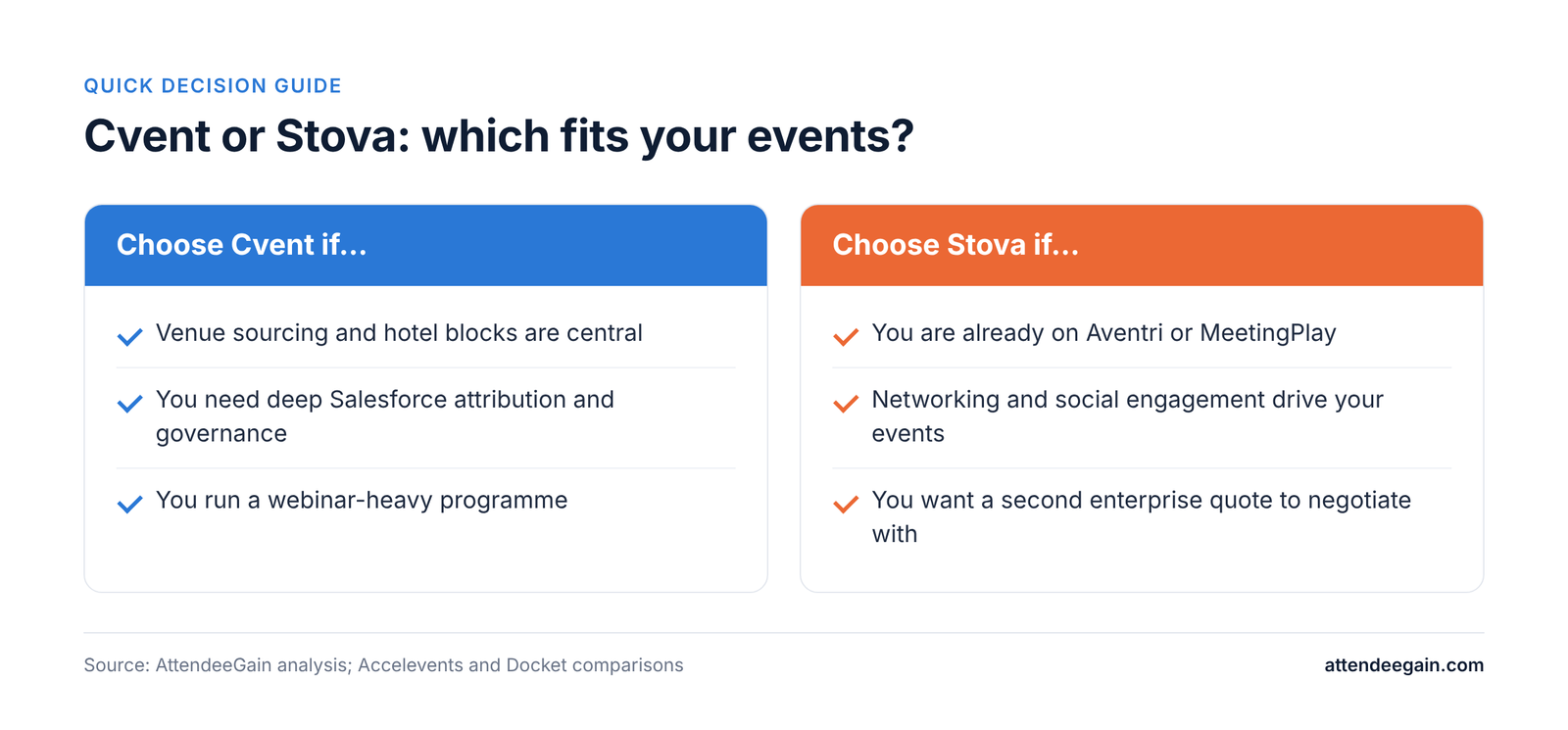
Cvent vs Stova decision guide: when to choose Cvent and when to choose Stova; the same points appear in the table below.
Your situationBetter fitWhy
Venue sourcing and hotel blocks are centralCventSupplier network and Passkey
Already on Aventri or MeetingPlayStova first, then compareLowest migration effort; price Cvent alongside
Networking and social engagement drive your eventsStovaMeetingPlay-era engagement features
Deep Salesforce attribution and governanceCventBroader, more mature integrations and controls
Webinar-heavy programmeCventON24, Goldcast and Cvent Webinar in one group
Want leverage in negotiationQuote bothSimilar scope, both quote-only

Frequently asked questions

Is Stova the same as Aventri? Stova is the company formed from Aventri, MeetingPlay and eventcore; it adopted the Stova name in 2022.

Is Stova cheaper than Cvent? Neither publishes prices. Get quotes on the same event calendar and check for per-registration fees.

Does Stova offer venue sourcing like Cvent? Not at Cvent’s scale.

Which has the better attendee app? Stova is known for engagement and social features; Cvent’s Attendee Hub is broader. Load-test either before a flagship event.

Which is easier to learn? Both have a learning curve. Cvent’s is steeper and formalised through certification.

Sources: Cvent pricing, Accelevents: Stova vs Cvent.

Weighing an enterprise switch?

We build and integrate Cvent programmes for enterprise teams, including migrations from other platforms. Talk to our team. See our Cvent expertise and platform integration services, or contact us.

Cvent vs Stova (2026): Two Enterprise Suites Compared Read More »
Cvent vs Hubilo, vFairs and Airmeet: virtual and hybrid compared

Cvent vs Hubilo, vFairs and Airmeet (2026): Virtual and Hybrid Compared

Cvent vs Hubilo, vFairs and Airmeet: the short answer

Cvent vs Hubilo is no longer a straight fight between two virtual event platforms, because Hubilo has a new owner and Cvent has spent the past year buying video and webinar tools. This guide compares Cvent with Hubilo, vFairs and Airmeet on what each does best, what it costs and what to check before you buy, from the point of view of an implementation partner.

Choose Cvent if virtual is one part of a wider programme that includes registration, onsite and hybrid events. Choose Airmeet if webinars and virtual events are the core job and you want a published starting price. Choose vFairs if you run virtual fairs or expos with booths. Treat Hubilo with extra due diligence: Brandlive announced its acquisition in September 2025, and the release does not say what happens to its event platform or customers.

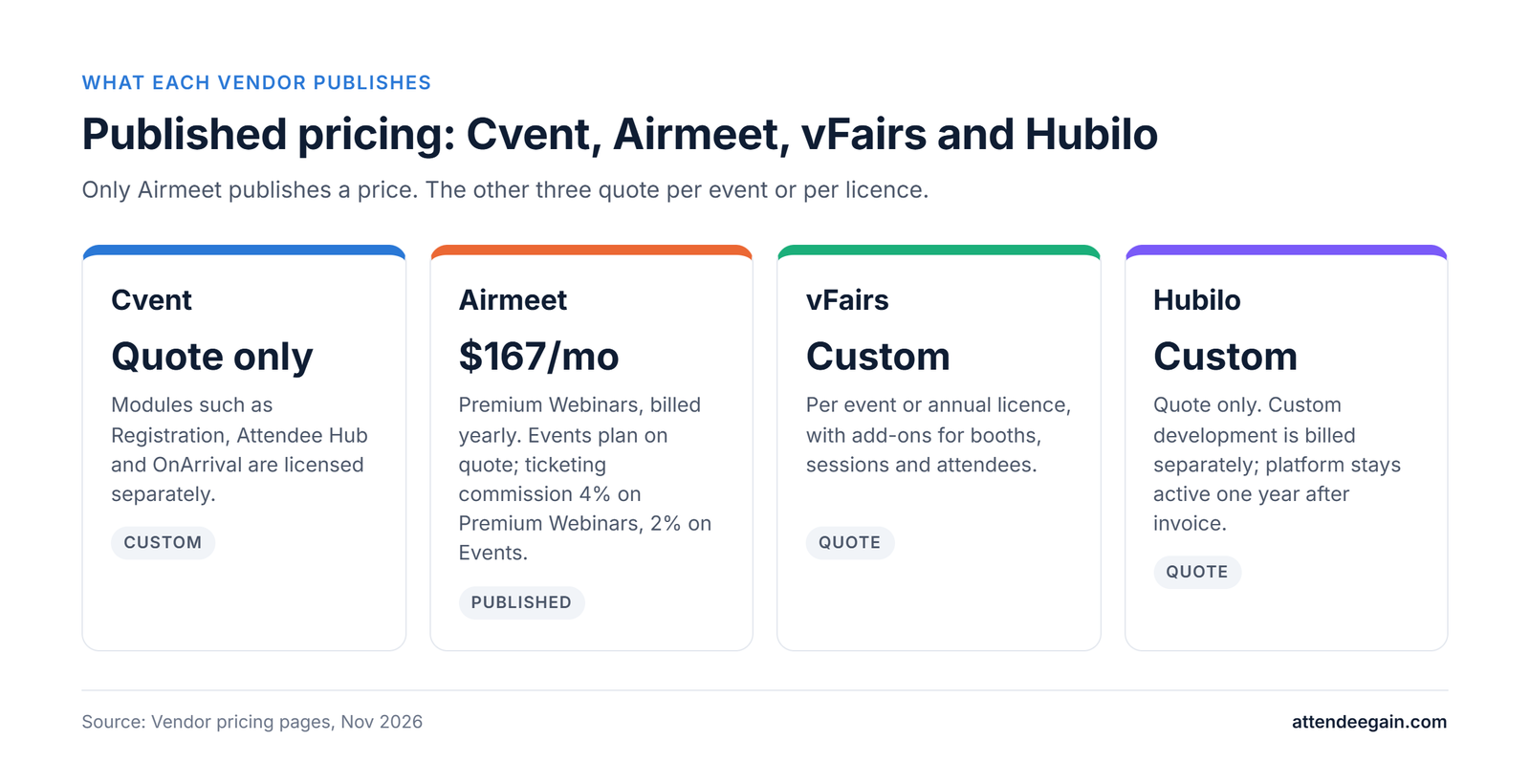
Only Airmeet publishes a price. Cvent, vFairs and Hubilo all quote on request, so comparing them means writing the same brief for each.

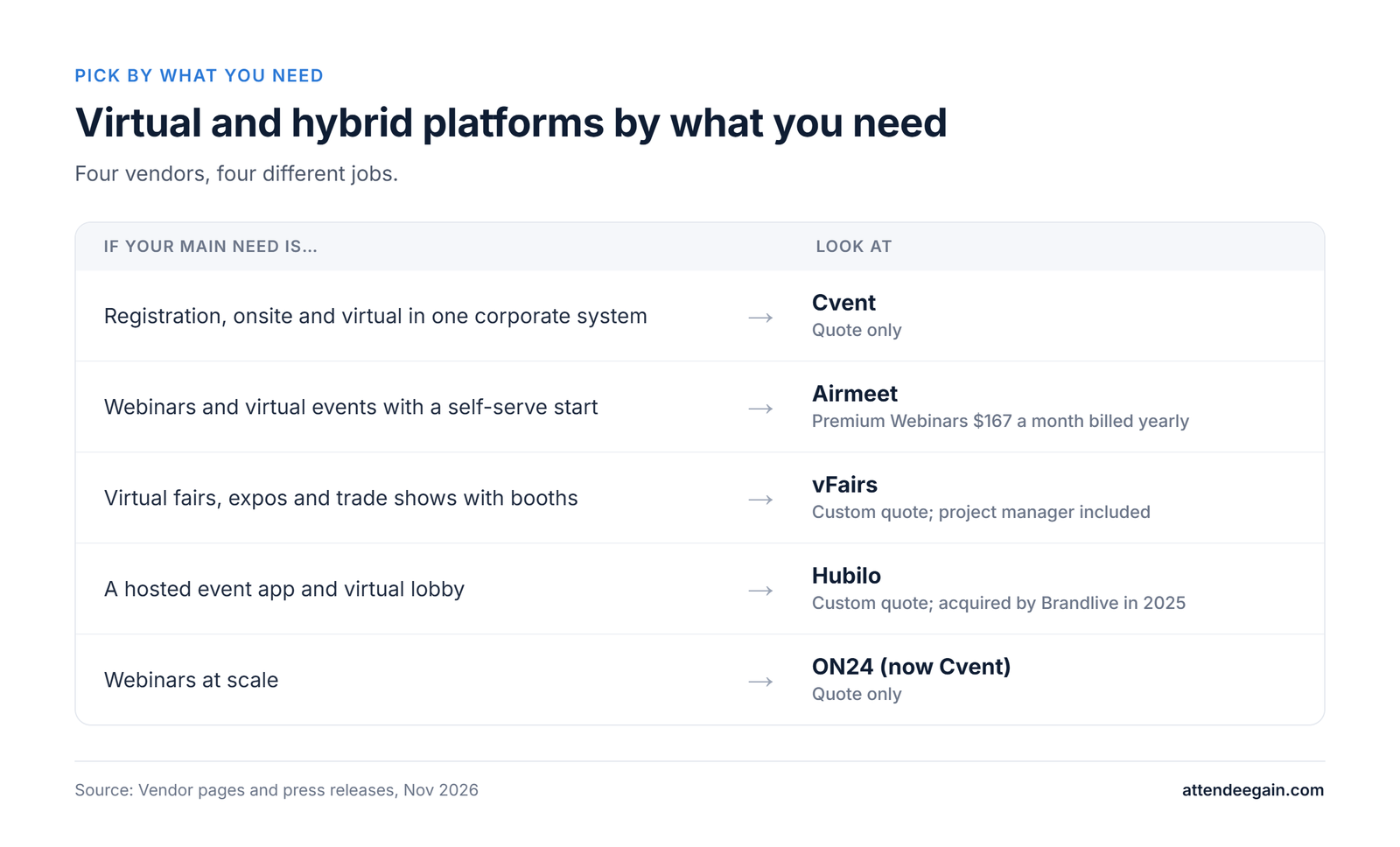
Virtual and hybrid platforms by need. Corporate registration, onsite and virtual: Cvent, quote only. Webinars and virtual events: Airmeet, Premium Webinars $167 a month billed yearly. Virtual fairs and expos: vFairs, custom quote. Hosted event app: Hubilo, custom quote, acquired by Brandlive in 2025. Webinars at scale: ON24, now part of Cvent.

Cvent vs Hubilo, vFairs and Airmeet at a glance

PlatformBest forPricingNotes
CventCorporate and association programmes: registration, onsite, virtual and hybridQuote onlyOwns ON24 and Goldcast
AirmeetWebinars, virtual and hybrid eventsPremium Webinars $167 a month billed yearly; Events plan on quoteTicketing commission 4% on Premium Webinars, 2% on Events
vFairsVirtual fairs and expos with boothsCustom quote; annual licence availableProject manager included
HubiloHosted event app and virtual lobbyCustom quoteAcquired by Brandlive, announced September 2025

What changed: Cvent and Hubilo both have new owners

Cvent bought Goldcast, an AI video platform, in December 2025 and closed its roughly $400 million acquisition of ON24 on 1 April 2026. ON24 now operates as a wholly owned Cvent company. The result is a single vendor with registration, onsite, webinars and video.

Brandlive, an enterprise video platform for town halls and webinars, announced it was acquiring Hubilo in September 2025. It described the deal as its fifth acquisition in 18 months and said it gained a 30-person R&D hub in Bengaluru. The release talks about new AI tools for Brandlive customers and does not say what happens to Hubilo’s event platform or existing customers. If you are on Hubilo or considering it, ask in writing about the product roadmap, support and contract terms.

Ownership changes. Cvent bought Goldcast in December 2025 and closed the ON24 deal on 1 April 2026 for roughly $400 million. Hubilo was acquired by Brandlive, announced in September 2025; the release does not say what happens to the Hubilo event platform or its customers.

Cvent vs Hubilo, vFairs and Airmeet: feature by feature

Registration and ticketing

Cvent’s registration is the deepest of the group, with approvals, multiple attendee types and CRM sync, and it is licensed as a separate module. Airmeet supports ticketing with a commission of 4% on Premium Webinars, 2% on Events and 0% on Managed Events. vFairs lists Stripe, PayPal and Authorize.net among its payment gateways. Hubilo says registration and ticketing on its own domain carry no extra charge.

Virtual and hybrid experience

Airmeet covers live, simulive and on-demand webinars on its Premium Webinars plan, and adds in-person, virtual and hybrid events, multi-track sessions and a customer success manager on Events. vFairs builds virtual fairs and expos, with extras for sessions, booths and accessibility features. Cvent’s Attendee Hub and webinar tools, now joined by ON24 and Goldcast, cover virtual and hybrid within the Cvent ecosystem.

Onsite and in-person

Cvent’s OnArrival is mature: self-service kiosks, on-demand badges and session check-in with capacity control. Hubilo, vFairs and Airmeet are strongest on the virtual side, so if the in-person half of your hybrid event is large, ask each of them for a demo of onsite check-in.

AI, analytics and integrations

Cvent’s recent purchases point to AI video and webinar content, including ON24’s content engine, which turns recordings into blog posts, clips and follow-up emails. Brandlive plans AI tools for video production, analytics and audience segmentation, and Airmeet lists CRM integrations on its Premium Webinars plan. In every case, ask for a demo that uses your own data and CRM.

Cvent vs Hubilo, vFairs and Airmeet pricing

Airmeet is the only one with a list price. Premium Webinars is $167 a month billed yearly ($199 monthly) for two team seats, up to 150 events a year and 100 to 10,000 attendees per webinar. The Events plan is a custom quote with a free trial, and Managed Events, where Airmeet staff run the event, start at $4,999 for brand conferences. Airmeet prices by attendee limits and bills overage afterwards.

vFairs prices each event or annual licence to the brief, with add-ons for extra sessions, booths, attendees and managed services, and a dedicated project manager on every plan. Hubilo quotes custom packages, bills the app upfront and keeps the platform active for one year after the invoice. Cvent licenses modules separately, so a virtual-only quote can look low until registration and Attendee Hub are added.

Published pricing for four virtual and hybrid event platforms. Cvent: quote only. Airmeet: Premium Webinars $167 a month billed yearly, Events plan on quote. vFairs: custom quote per event or annual licence. Hubilo: custom quote, development billed separately.

How to compare quotes fairly

Send each vendor the same brief: number of events, attendees per event, live versus on-demand, ticketing, number of exhibitors, languages, integrations and whether any part is in person. Ask what happens to the price if attendance beats forecast, how long recordings stay available, and who owns the attendee data when the contract ends.

Implementation, support and security

Cvent projects can be large because they touch registration, CRM, approvals and onsite, and many teams use an implementation partner. vFairs includes a dedicated project manager, Airmeet’s Events plan includes a customer success manager, and Hubilo assigns an account manager who agrees any custom development costs in advance. Ask each vendor for security documentation and data residency terms early.

Which should you choose?

  • Choose Cvent if virtual is one part of a bigger programme and you want registration, onsite, webinars and video from one vendor.
  • Choose Airmeet if webinars and virtual events are the main job and you want a published starting price.
  • Choose vFairs if you run virtual or hybrid fairs and expos with many booths.
  • Choose Hubilo only after written answers on ownership, roadmap and support, given the Brandlive acquisition.

FAQ

Is Hubilo still operating? Brandlive announced the acquisition in September 2025, and Hubilo’s pricing page still takes quote requests. The release does not say what happens to Hubilo’s event platform, so ask the vendor directly.

Does Airmeet publish pricing? Yes, for Premium Webinars at $167 a month billed yearly. Events and Managed Events are quoted; Managed Events start at $4,999 for brand conferences.

Who owns ON24 now? Cvent. It closed the roughly $400 million deal on 1 April 2026, and ON24 now operates as a wholly owned Cvent company.

Is vFairs a good fit for virtual fairs? vFairs builds virtual fairs and expos with booths, and says its pricing is tailored to each event. Ask for references from events of your size.

Can Cvent replace a virtual event platform? For many corporate programmes, yes. Attendee Hub covers the mobile app, networking and live or on-demand video, and ON24 and Goldcast add webinars and AI video. Test it against your own agenda and audience size.

Which is cheapest? Only Airmeet publishes a price, so ask the others to quote the same scenario before you compare.

Need help choosing or setting up?

AttendeeGain implements Cvent and works with Bizzabo, Swoogo, Whova and Splash. Tell us your event size and format and we will tell you which platform fits and what it will take to run it. See our Cvent expertise or contact us. For hybrid events with a large in-person side, see onsite solutions.

Sources: Airmeet pricing, vFairs pricing, Hubilo pricing, Brandlive press release on Hubilo, Cvent pricing.

Cvent vs Hubilo, vFairs and Airmeet (2026): Virtual and Hybrid Compared Read More »

Bizzabo vs Eventbrite: licence or ticket fees

Bizzabo vs Eventbrite (2026): Licence or Ticket Fees?

Bizzabo vs Eventbrite: the short answer

Bizzabo vs Eventbrite is a choice between a platform you license by the seat and a ticket shop you pay for per sale. Bizzabo is an event experience platform for flagship conferences. Eventbrite is a ticketing and discovery tool for public events. This comparison is written from the point of view of an implementation partner that builds on Bizzabo.

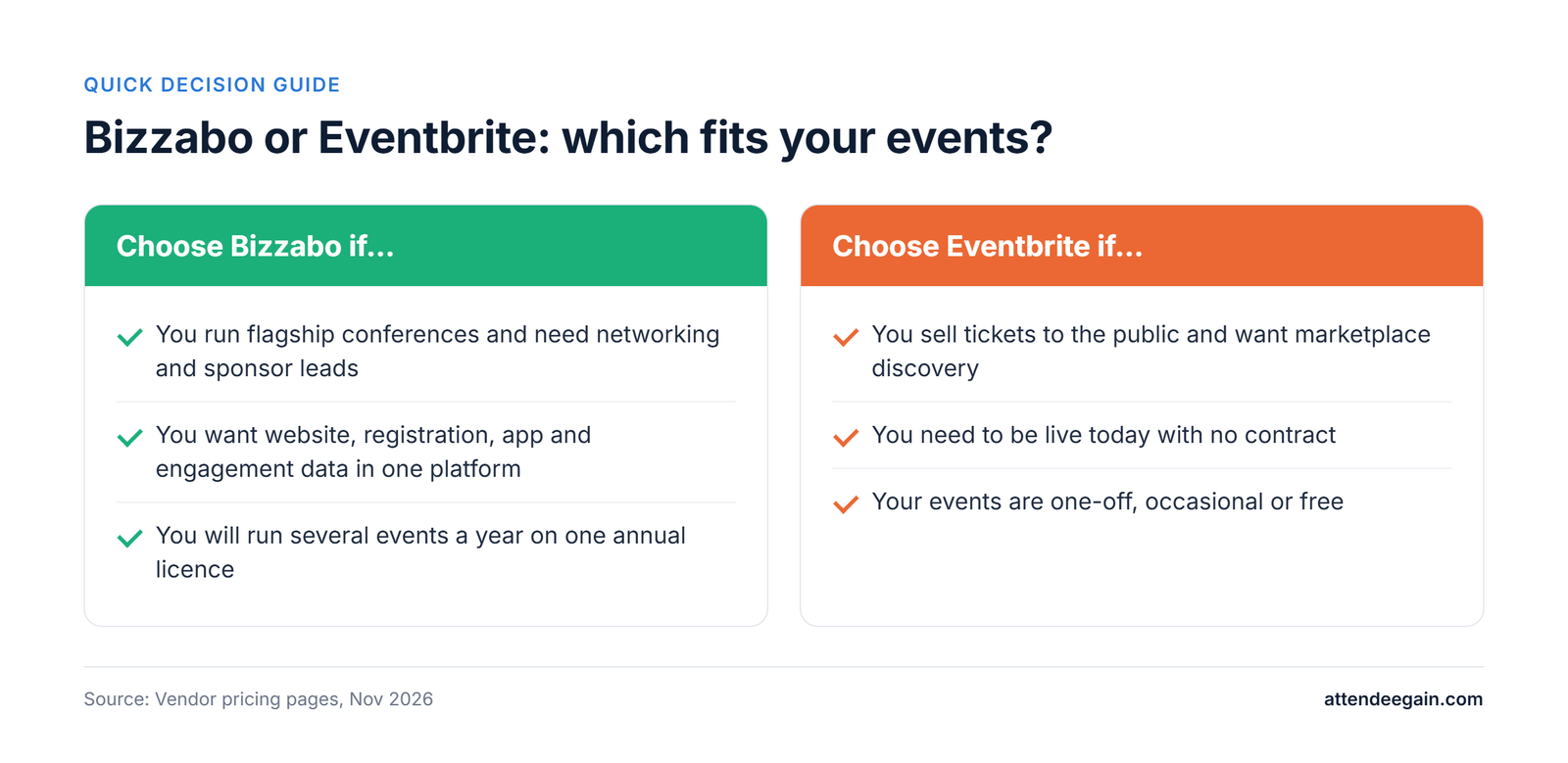
Choose Bizzabo if you run conferences where networking, sponsor leads and attendee data matter, and you will run several events a year on one annual licence. Choose Eventbrite if you sell tickets to the public, want to be live today and do not want a contract.

The two are priced differently, not just at different levels. Bizzabo charges $499 per user per month, billed annually, with a three-user minimum, which is $17,999 a year before add-ons. Eventbrite charges 3.7% + $1.79 per paid ticket plus 2.9% processing, and nothing for free events.

Decision guide. Choose Bizzabo if you run flagship conferences and need networking and sponsor leads; want website, registration, app and engagement data in one platform; and run several events a year on one annual licence. Choose Eventbrite if you sell tickets to the public and want marketplace discovery; need to be live today with no contract; and run one-off, occasional or free events.

Bizzabo vs Eventbrite at a glance

BizzaboEventbrite
Built forFlagship B2B conferences and event programmesPublic ticketed events and community events
Pricing modelAnnual licence, per userPer paid ticket; free events cost nothing
Published price$499 per user a month, 3-user minimum ($17,999 a year)3.7% + $1.79 per ticket plus 2.9% processing
ContractAnnual subscription onlyNo contract
Events and registrationsUnlimited on the licenceUnlimited free events; fees on paid tickets
Mobile appIncluded; custom-branded app is an add-onOrganiser app and check-in app
Onsite networkingKlik SmartBadge wearables, quoted separatelyNot featured
Marketplace discoveryNoYes

Bizzabo vs Eventbrite: feature by feature

Registration and ticketing

Eventbrite is fast: set up an event, publish and sell, with fees paid by the buyer by default. It also sells through its own marketplace. Bizzabo gives you contact management, ticketing, advanced registration flows, branding and an event website builder on one licence, which matters when you need custom forms, several attendee types or white-labelled pages.

Event app and attendee engagement

Bizzabo includes a mobile app and sells networking, a speaker portal, Sponsor ROI and a custom-branded app as premium add-ons. Eventbrite’s event-management page describes an organiser app for ticket sales and attendance, and does not describe an attendee agenda or networking app. If attendees need a session agenda and a way to meet each other, plan for Bizzabo or another platform.

Onsite check-in and badging

Bizzabo’s Klik SmartBadge adds branded wearable badges with networking, lead capture and passive attendee tracking. It is quoted per event and can be bought without an Event Experience OS subscription. Eventbrite offers a check-in app and an app marketplace; check whether the badge printing and lead capture you need are available there.

Marketing and discovery

Eventbrite lists your event on its marketplace and includes email marketing, social ads in select markets and more than 100 integrations such as Salesforce, Mailchimp and HubSpot. Bizzabo includes email campaigns but does not bring buyers to you, so your own promotion drives registrations.

Integrations, reporting and security

Bizzabo lists martech and CRM integrations (HubSpot, Marketo, Salesforce MCAE and Eloqua) as a paid add-on, with API access, SSO and a corporate IP address also priced separately. Eventbrite offers customisable sales reporting and real-time analytics. If CRM-led reporting and single sign-on matter, price the Bizzabo add-ons before you compare.

Bizzabo vs Eventbrite pricing in 2026

Bizzabo’s Event Experience OS costs $499 per user a month, billed annually, with a minimum of three users, so the starting price is $17,999 a year. It includes unlimited events and registrations. Klik SmartBadge, virtual production, onsite services and the premium add-ons are quoted separately, and Bizzabo sells annual subscriptions only.

Eventbrite charges nothing for free events and has no subscription for paid ones. On paid tickets the service fee is 3.7% + $1.79 and card processing is 2.9%, which comes to $5.09 on a $50 ticket, $8.39 on $100 and $14.99 on $200. Buyers pay by default.

Bar chart of paid tickets per year at which Eventbrite fees equal the $17,999 Bizzabo base licence: 3,536 tickets at $50; 2,145 tickets at $100; 1,201 tickets at $200. Eventbrite fees are 3.7% plus $1.79 plus 2.9% processing per ticket.

What the break-even tells you

On a $100 ticket, Eventbrite’s fees reach Bizzabo’s $17,999 base licence at about 2,145 paid tickets a year. At $200 that happens at about 1,201 tickets, and at $50 at about 3,536. Below those volumes Eventbrite is cheaper in fees alone; above them, the licence starts to pay for itself. This is a fee comparison only. If you pass the fees to buyers, your own cost on Eventbrite is lower still, and Bizzabo’s base excludes add-ons.

Where costs come from. Bizzabo: $499 per user per month billed annually with a 3-user minimum, unlimited events and registrations, add-ons priced separately, Klik SmartBadge and onsite services quoted per event. Eventbrite: 3.7% plus $1.79 per paid ticket, 2.9% processing, free events cost nothing, optional Pro plans $15 to $100 a month.

Implementation, support and security

Eventbrite is self-serve, so you can be live the same day. Bizzabo includes curated onboarding and tiered support, lists 24/7/365 support, and offers professional services for onsite check-in, Bizzabox rental and virtual production at variable prices. The licence is only part of a Bizzabo project: budget time for registration logic, integrations and the onsite plan.

Which should you choose?

  • Choose Bizzabo if networking, sponsor leads and attendee data are central to your events and you run several a year.
  • Choose Eventbrite if you sell tickets to the public, run few paid events or low-priced tickets, and want no contract.
  • Run both only if you have a clear split, for example Bizzabo for flagship conferences and Eventbrite for community meetups. Two systems mean two data sets to reconcile.
  • If you need Cvent-style venue sourcing, approvals and enterprise reporting, neither fits. See our Cvent expertise.

FAQ

Is Bizzabo more expensive than Eventbrite? On a licence basis, yes: Bizzabo starts at $17,999 a year, while Eventbrite has no subscription. On fees alone, Eventbrite costs more per paid ticket and overtakes the Bizzabo base licence at roughly 1,200 to 3,500 paid tickets a year, depending on ticket price.

Does Bizzabo sell tickets? Yes. Its platform includes ticketing and registration, with unlimited events and registrations on the licence.

Does Eventbrite have an attendee app? It has an organiser mobile app and a check-in app. Its event-management page does not describe an attendee networking or agenda app.

Can Bizzabo be bought for a single event? No. Bizzabo says it requires an annual subscription and does not sell single-event access, although Klik SmartBadge has single-event and multi-event pricing.

Which is better for a conference? Bizzabo, if the conference needs an app, networking, sponsor data and custom registration. Eventbrite works for a simple public conference with few sessions.

Can I switch from Eventbrite to Bizzabo? Yes. Export your attendee data, rebuild registration and ticket types in Bizzabo, and plan the switch between events, not during an open sale.

Need help choosing or setting up?

AttendeeGain implements Cvent and works with Bizzabo, Swoogo, Whova and Splash. Tell us your event size and volume and we will tell you which platform fits and what it will take to run it. See our Bizzabo expertise and Cvent expertise, or contact us. For onsite check-in and badging, see onsite solutions.

Sources: Bizzabo pricing, Eventbrite pricing, Eventbrite event management.

Bizzabo vs Eventbrite (2026): Licence or Ticket Fees? Read More »
Cvent vs Zoho Backstage, Eventtia and Dreamcast compared

Cvent vs Zoho Backstage, Eventtia and Dreamcast (2026)

Cvent vs Zoho Backstage, Eventtia and Dreamcast: the short answer

Cvent vs Zoho Backstage is a comparison between an enterprise event suite and a lighter platform that starts free. This guide also covers Eventtia and Dreamcast, two mid-market and regional options, and compares what each does, what it costs and what you give up, from the point of view of an implementation partner.

Choose Cvent for large corporate or association programmes with approvals, venue sourcing and cross-event reporting. Choose Zoho Backstage for small to mid-size events, especially if your team already uses Zoho. Choose Eventtia if you want a published yearly licence for registration, apps and networking at mid-market scale. Choose Dreamcast if your events are in India or the UAE and check-in at scale matters.

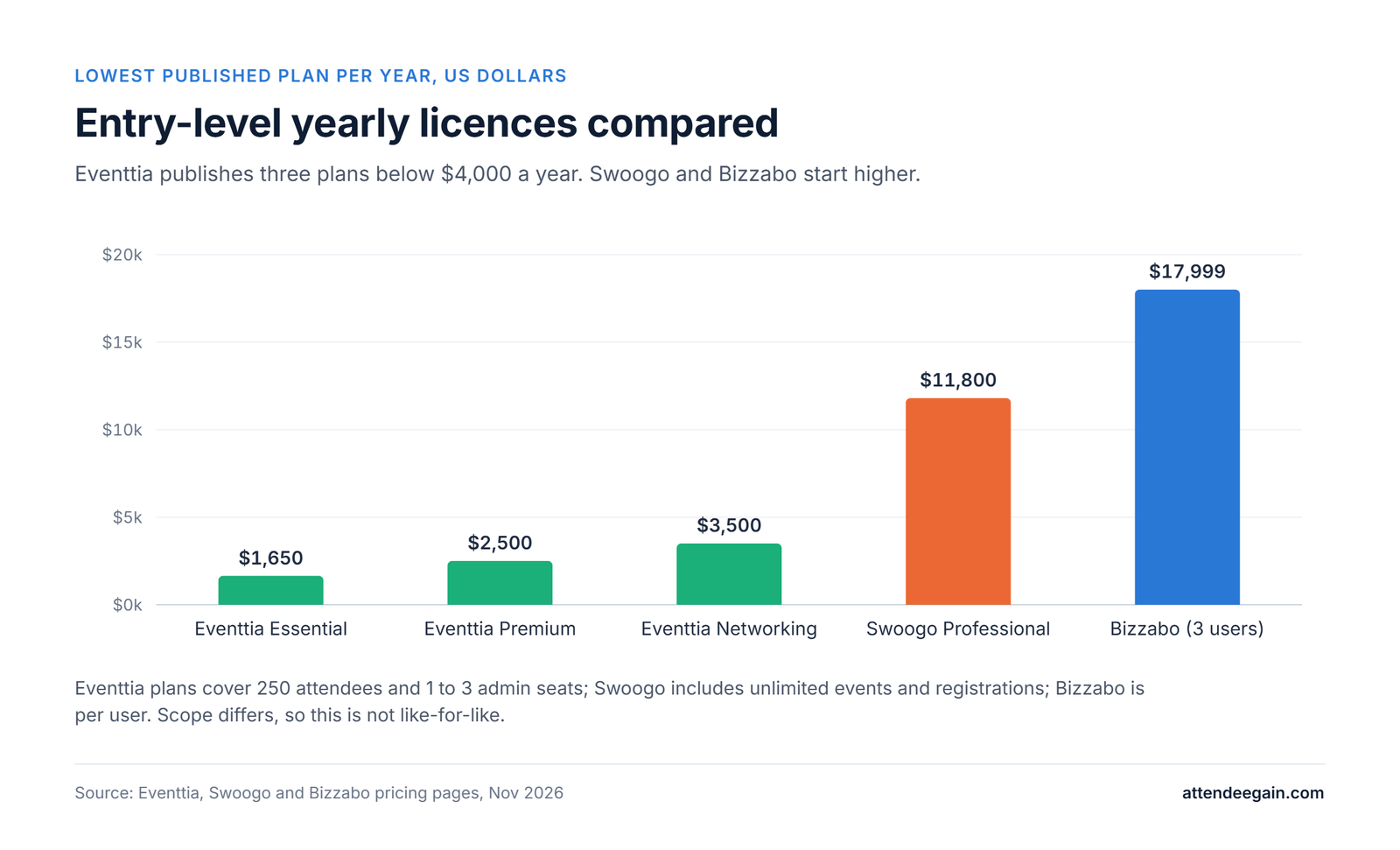
Zoho Backstage has a free plan and published plan limits, and Eventtia publishes its yearly licences. Cvent and Dreamcast quote on request.

Cvent alternatives by need. Small events in the Zoho ecosystem: Zoho Backstage, free plan up to 100 attendees. Mid-size events with a published yearly licence: Eventtia from $1,650 a year. Events in India and the UAE: Dreamcast, quote only. Venue sourcing, approvals and many events: Cvent, quote only.

Cvent vs Zoho Backstage, Eventtia and Dreamcast at a glance

PlatformBest forPricingNotes
CventEnterprise event programmesQuote onlyVenue sourcing, approvals and OnArrival onsite tools
Zoho BackstageSmall to mid-size events, teams on ZohoFree plan to 100 attendees; Essentials, Premium and Ultimate paid plans0% ticket commission on paid plans
EventtiaMid-market events and B2B networking$1,650 to $3,500 a year; Enterprise usually above $12,000No per-ticket fees; implementation and support included
DreamcastEvents in India and the UAEQuote onlyNo commission on sign-up revenue

Cvent vs Zoho Backstage, Eventtia and Dreamcast: feature by feature

Registration and ticketing

Cvent’s registration module handles approvals, multiple attendee types, hotel blocks and CRM sync, and is licensed on its own. Zoho Backstage’s paid plans list 0% commission ticketing, and the free plan includes a website builder, RSVP management, check-in and badging. Eventtia’s plans include online registration and payments with no per-ticket fees. Dreamcast offers multi-tier tickets, approval-based and invite-only registration, and RSVP quotas.

Event app and engagement

Zoho Backstage includes mobile apps from the free plan, networking lounges from Essentials and AI-powered matchmaking from Premium, and Ultimate adds a white-labelled attendee app. Eventtia adds a branded mobile app and a virtual stage on Premium, and matchmaking and one-to-one meeting scheduling on Networking. Cvent’s Attendee Hub covers the app, networking, chat, polling and video.

Onsite and check-in

Cvent’s OnArrival covers self-service kiosks, on-demand badges and session check-in with capacity control. Dreamcast lists fast check-in with badge printing, RFID, QR and facial recognition, self-service kiosks and turnstile access control, and claims 10-second check-ins, which is its own figure and not independently verified. Zoho’s free plan includes check-in and badging, and Eventtia’s Essential plan includes onsite check-in.

Scale and limits

Zoho Backstage limits attendees per event by plan: 100 on Free, 200 on Essentials, 1,000 on Premium and 5,000 on Ultimate, with more available as add-ons, and larger events go to sales. Eventtia’s licences work on credits, one per registration and valid for 12 months, with Enterprise for unlimited attendees. Cvent has no such ceilings, but you pay for modules. If your events run to several thousand attendees, check the limits first.

Integrations, security and AI

Zoho Backstage’s Premium plan adds webhooks, and as a Zoho product it fits the wider Zoho suite. Eventtia’s Enterprise plan adds SSO, role-based access, white label and unlimited API calls, and every Eventtia plan includes an MCP server that connects AI assistants such as Claude and ChatGPT. Cvent is known for deep CRM and reporting integrations. Dreamcast includes WhatsApp and email automation and an event CRM.

Bar chart of entry-level yearly licences: Eventtia Essential $1,650; Eventtia Premium $2,500; Eventtia Networking $3,500; Swoogo Professional $11,800; Bizzabo $17,999 for three users. Scope differs between vendors.

Cvent vs Zoho Backstage, Eventtia and Dreamcast pricing

Eventtia publishes four plans on a 12-month licence: Essential at $1,650 for 250 attendees and one admin seat, Premium at $2,500 with two seats, Networking at $3,500 with three seats, and Enterprise usually above $12,000 with unlimited attendees, licensed per admin user. There are no per-ticket fees, and implementation and support are included.

Zoho Backstage has a free plan for up to 100 attendees per event, and Essentials, Premium and Ultimate plans for larger events, with monthly or yearly billing (yearly saves 17%) and a pay-per-event option. Check its live pricing page for current amounts, because add-ons such as extra attendees and exhibitors are priced separately. Dreamcast shows no prices and says you keep 100% of sign-up revenue. Cvent is quote only, with Registration, Attendee Hub and OnArrival licensed as separate modules.

Published pricing. Zoho Backstage: free plan up to 100 attendees, paid plans for 200, 1,000 and 5,000 attendees with 0% ticket commission. Eventtia: Essential $1,650 a year for 250 attendees and one admin seat; Enterprise usually above $12,000. Dreamcast: quote only. Cvent: quote only.

How to compare quotes fairly

Set one scenario and price it everywhere: events per year, attendees per event, paid or free registration, mobile app, onsite check-in and integrations. Watch for per-attendee add-ons at Zoho, credit top-ups at Eventtia, and hardware and staffing at Dreamcast and Cvent.

Implementation, support and compliance

Eventtia includes implementation, support and version upgrades in every plan, and Zoho’s Ultimate plan adds a dedicated event success manager. Dreamcast works with enterprises and agencies on expos, MICE and government events across India and the UAE, and supports UIDAI-based verification at registration. Cvent projects often use an implementation partner, which is what we do. Whatever you pick, ask for data residency, SSO and security documents early.

Which should you choose?

  • Choose Cvent for enterprise programmes with approvals, hotel blocks, venue sourcing and cross-event reporting.
  • Choose Zoho Backstage for small to mid-size events and teams already on Zoho, starting free.
  • Choose Eventtia for a published yearly licence at mid-market scale, with an app, networking and no per-ticket fees.
  • Choose Dreamcast for events in India or the UAE where check-in speed, RFID or facial recognition and WhatsApp communication matter.

FAQ

Is Zoho Backstage free? It has a free plan for up to 100 attendees per event, with a website builder, RSVP management, check-in and badging, webcasting and mobile apps. Paid plans raise the limits and add features.

How much does Eventtia cost? $1,650 a year for Essential (250 attendees, one admin seat), $2,500 for Premium and $3,500 for Networking. Enterprise is usually above $12,000 a year.

Does Dreamcast publish pricing? No. Its site links to a pricing section without listing prices, and says you keep 100% of sign-up revenue with no commissions.

Can Zoho Backstage replace Cvent? For small and mid-size events, often. For venue sourcing, approvals and multi-event reporting at enterprise scale, Cvent covers more.

Where is Dreamcast based? India, with a UAE location.

Which is cheapest? Zoho Backstage’s free plan costs nothing for events up to 100 attendees. Above that, Eventtia’s published licences are the clearest to budget for.

Need help choosing or setting up?

AttendeeGain implements Cvent and works with Bizzabo, Swoogo, Whova and Splash. Tell us your event size and region and we will tell you which platform fits and what it will take to run it. See our Cvent expertise or contact us. For onsite check-in and badging, see onsite solutions.

Sources: Zoho Backstage pricing, Eventtia pricing, Dreamcast, Cvent pricing.

Cvent vs Zoho Backstage, Eventtia and Dreamcast (2026) Read More »

Swoogo vs Stova: pricing, features and fit

Swoogo vs Stova (2026): Pricing, Features and Fit

Swoogo vs Stova: the short answer

Swoogo vs Stova is a choice between a registration-first platform with a published price and a broad enterprise suite sold by quote. Eventbrite often turns up on the same shortlist, so this guide covers it too. It is written from the point of view of an implementation partner that builds on Swoogo.

Choose Swoogo if registration is the hard part of your events (branching forms, approvals, many events) and you want a price you can budget. Choose Stova if you want registration, mobile app, virtual, onsite and venue sourcing from one enterprise vendor, or you already run on Aventri or MeetingPlay. Choose Eventbrite only if you are selling tickets to the public.

Swoogo starts at $11,800 a year for its Professional plan. Stova’s packages page lists no prices. Eventbrite charges 3.7% + $1.79 per paid ticket plus 2.9% processing, and nothing for free events.

Decision guide. Choose Swoogo if registration is the hard part, with branching forms, approvals and many events; you want a published price and a team that builds its own event sites; and you want 30-plus integrations included. Choose Stova if you want registration, mobile app, virtual and onsite from one enterprise vendor; venue sourcing and meetings management matter; or you already run on Aventri or MeetingPlay.

Swoogo vs Stova at a glance

SwoogoStovaEventbrite
Built forRegistration-heavy corporate and association eventsEnterprise suites, sales kickoffs, trade shows and conferencesPublic ticketed events
Published price$11,800 a year (Professional)Quote only3.7% + $1.79 per paid ticket plus 2.9%
EventsUnlimited events and registrationsPackage-basedUnlimited
Mobile appPaid add-onModule, by quoteOrganiser app only
OnsiteCheck-in app included; Go Onsite Pro add-onKiosks, badge printing, access control, onsite staffCheck-in app
Venue sourcingNot offeredYes, within strategic meetings managementNot offered
Integrations30+ included, plus REST API and webhooksBy quoteApp marketplace with 100+ apps

What is Stova?

Stova is the combined company formed from Aventri, MeetingPlay and eventcore. MeetingPlay and Aventri merged and the business rebranded as Stova in 2022, so searches for “Swoogo vs Aventri” lead to the same comparison today. Its platform groups modules into Plan, Engage, Experience and Measure, and Stova says more than 700 organisations use it.

Swoogo vs Stova: feature by feature

Registration

Swoogo’s Professional plan includes branching forms, attendee approval workflows and automated workflows, and Enterprise adds unlimited visibility rules and multi-level conditional logic. Stova puts registration in its Plan stage alongside session and speaker management and an exhibitor resource centre. If your registration forms are complicated, test Swoogo’s form logic first.

Mobile app and engagement

Stova’s mobile app covers live agendas, speaker bios, venue maps, in-app networking, QR scanning, live polling, session ratings, gamification and push notifications, and its virtual tools include lounges, breakout rooms and live streaming. Swoogo’s Go Attend lets full users build mobile event apps, but the Mobile Event Apps product is a paid add-on. If the app is central to your event, Stova describes more app and virtual capability.

Onsite check-in

Swoogo includes a check-in app and sells Go Onsite Pro for advanced check-in. Stova lists check-in kiosks, badge printing, access control, session scanning, lead retrieval and onsite support staff with hardware setup.

Integrations and security

Swoogo includes 30+ integrations with no integration fees, plus a REST API and outbound webhooks. Enterprise adds SOC 2, ISO 27001, PCI and GDPR compliance, SSO and MFA, and a 99.9% uptime SLA. Stova’s home page does not list its security details, so ask for them during evaluation.

What each covers. Swoogo: branching registration forms and approval workflows, unlimited events and registrations, check-in app included, mobile app as a paid add-on. Stova: registration with session and speaker management, mobile app with networking and gamification, onsite kiosks and badge printing, and venue sourcing.

Swoogo vs Stova vs Eventbrite pricing in 2026

Swoogo Professional is $11,800 a year and includes one full user and one reporting user, unlimited events and registrations, a check-in app, 30+ integrations and one custom domain. Enterprise is quote only. Mobile apps, Go Onsite Pro, premium support, extra domains and SSO are paid add-ons with no published prices, and extra users are priced on request.

Stova does not publish prices: its packages page asks for a demo or consultation. Eventbrite charges 3.7% + $1.79 per paid ticket plus 2.9% processing and has no subscription for paid events, which makes it cheap for a few events and expensive at volume or low ticket prices.

Published pricing. Swoogo Professional: $11,800 a year with one full user, one reporting user, unlimited events and registrations and 30-plus integrations. Stova: quote only. Eventbrite: 3.7% plus $1.79 per paid ticket plus 2.9% processing, free events cost nothing. Cvent: quote only.

How to compare them fairly

Give Swoogo and Stova the same brief: events per year, attendees, the users who will build and report, integrations, mobile app and onsite needs. Ask Swoogo for the price at your team size with add-ons itemised in writing, and ask Stova for an itemised package. Compare total cost over the contract, not the headline.

Implementation, support and ownership

Swoogo Enterprise adds a customer success manager, premium support and personalised onboarding. Stova’s site lists a leadership team and an office in Bluffdale, Utah, but does not say who owns the company, so ask about ownership and roadmap as you would with any vendor that has merged brands. Whichever platform you choose, plan time for registration logic and integrations.

Which should you choose?

  • Choose Swoogo if registration is the hard part, you want a published price and your team will build its own sites.
  • Choose Stova if you want one enterprise vendor for registration, app, virtual, onsite and venue sourcing, or you already use Aventri or MeetingPlay.
  • Choose Eventbrite if you sell public tickets and need to be live today with no contract.
  • If you need Cvent-style approvals, hotel blocks and enterprise reporting, compare Cvent too. See our Cvent expertise.

FAQ

Is Stova the same as Aventri? Stova is the company formed when Aventri and MeetingPlay merged and rebranded in 2022, so the two names point to the same platform family today.

How much does Swoogo cost? Professional is $11,800 a year with one full user and one reporting user. Enterprise is by quote, and add-ons are not priced publicly.

Does Stova publish pricing? No. Its packages page asks for a demo or consultation.

Which is better for registration? Swoogo is built around registration logic and is the safer pick if forms and approvals are complicated. Stova covers registration within a larger suite.

Is Eventbrite a Swoogo or Stova alternative? Only for public ticketing. For corporate registration with approvals, several attendee types and CRM sync, Eventbrite is a different category.

Can I move from Eventbrite to Swoogo? Yes. Move between events, not during an open sale, and rebuild your registration logic rather than copying it.

Need help choosing or setting up?

AttendeeGain implements Cvent and works with Bizzabo, Swoogo, Whova and Splash. Tell us your event size and volume and we will tell you which platform fits and what it will take to run it. See our Swoogo expertise and Cvent expertise, or contact us.

Sources: Swoogo pricing, Stova, Eventbrite pricing.

Swoogo vs Stova (2026): Pricing, Features and Fit Read More »

Eventbrite alternatives: nine options compared by fees and features

Eventbrite Alternatives (2026): 9 Options Compared by Cost and Fit

Eventbrite alternatives: the short answer

The best Eventbrite alternatives depend on why you are leaving. If it is the fees, look at Luma, Humanitix, Tito or Ticket Tailor. If you have outgrown ticketing, look at Swoogo, Bizzabo or Cvent. This guide compares nine options on what they charge, what they do better and what you give up, written from the point of view of an event technology implementation partner.

Eventbrite charges 3.7% plus $1.79 per paid ticket, plus 2.9% payment processing, and publishing free events costs nothing. The fixed $1.79 is what hurts: on a $20 ticket the fees come to $3.11, or about 15.6%. Eventbrite changed owner in 2026, when Bending Spoons completed its acquisition in March, but the published per-ticket fee did not change.

Choose by the event, not by the lowest fee. A free community meetup, a paid workshop and a 2,000-person conference need different tools.

Eventbrite alternatives by need. Community meetups: Luma, free plan with 5% on paid tickets. Lowest fees on public events: Humanitix, 2.1% plus $0.99 per paid ticket. Simple ticket shop: Ticket Tailor, 60 pence per ticket. Conference ticketing: Tito, 3% per ticket. Nightlife and culture: Posh, 10% plus $0.99. Corporate registration: Swoogo from $11,800 a year. Flagship conferences: Bizzabo from $17,999 a year.

Eventbrite alternatives at a glance

PlatformBest forPublished price
LumaCommunities, meetups and small paid eventsFree plan with 5% on paid tickets; Plus $59 a month billed annually, 0% fee
HumanitixPublic events where low fees matter2.1% + $0.99 per paid ticket (1% + $0.99 for charities and schools)
TitoConferences that want a simple ticket shop3% per ticket, capped at €25 (2.5% for community and non-profit events)
Ticket TailorIndependent organisers who want no subscription£0.60 per ticket pay as you go, from £0.22 prepaid
EventzillaRegistration with extra attendee managementBasic $1.50 per registration; Pro 1.9% + $1.50; Plus 2.9% + $1.50
PoshNightlife, comedy and culture events10% + $0.99 per paid ticket (Posh’s own figure)
SwoogoCorporate registration with complex formsFrom $11,800 a year
BizzaboFlagship conferences and networkingFrom $17,999 a year (3 users)
CventEnterprise event programmesQuote only

Prices are the vendors’ own, checked in November 2026. Posh’s rate comes from Posh’s own article, and Ticket Tailor’s US page showed prices in pounds.

How Eventbrite’s fees work, and when they hurt

Eventbrite splits its charge into a service fee of 3.7% plus $1.79 per paid ticket and payment processing of 2.9%. Buyers pay by default, and you can absorb the fees instead. Free events cost nothing, and you do not need a subscription to sell paid tickets. Optional Pro plans run from $15 to $100 a month and add email volume and advanced features.

Because $1.79 is a flat amount, the effective rate falls as the ticket price rises. Worked out from the published rates, the all-in fee is $3.11 on a $20 ticket (about 15.6%), $4.43 on $40 (11.1%), $6.74 on $75 (9.0%) and $8.39 on $100 (8.4%). If your tickets cost less than about $30, the fee structure is the main reason to look elsewhere.

Bar chart of fees on a single $25 ticket, platform fee plus card processing: Luma Plus $1.03; Tito $1.78; Luma Free $2.28; Humanitix $2.54; Eventzilla Basic $3.22; Eventbrite $3.44. Luma Plus excludes its $59 monthly plan.

Eventbrite alternatives in detail

Here is what each option does, in the order we would try them for a public ticketed event.

Published pricing for four Eventbrite alternatives. Luma: free plan with 5% on paid tickets, or Plus at $59 a month billed annually with 0% fee. Humanitix: 2.1% plus $0.99 per paid ticket. Tito: 3% per ticket, capped at 25 euros. Ticket Tailor: 60 pence per ticket pay as you go, from 22 pence prepaid.

Luma

Luma’s free plan covers unlimited events and guests, up to 500 invites or newsletters a week and a 5% platform fee on paid events. Plus costs $59 a month billed annually, drops the platform fee to 0% and adds API access, Zapier, tax collection on ticket sales and up to 5,000 invites a week. Stripe’s card fee (typically 2.9% + 30 cents) applies on top of either plan.

It suits communities, meetups and small paid events. If you need multi-day agendas, approvals or badge printing, check carefully before you commit.

Humanitix

Humanitix charges 2.1% + $0.99 per paid ticket in the US, or 1% + $0.99 for charities and schools, and free events cost nothing. Card processing of 2.9% + $0.30 is listed on the paid plans. It says all of its profits go to charities that provide education, healthcare and basic necessities, which can be a selling point for your attendees.

Tito

Tito charges 3% per ticket (2.5% for charity, community and non-profit events), capped at €25 a ticket, with no setup fee or subscription. Payments go straight from Stripe or PayPal to your bank, so Tito never holds your money. Stripe’s own fees are charged separately. It fits conferences that want a simple ticket shop and reporting rather than a full event platform.

Ticket Tailor

Ticket Tailor has no subscription. You pay £0.60 per ticket as you go, or from £0.22 per ticket with prepaid credits (minimum 100 credits). Up to 5,000 free tickets a year carry no fee, although its FAQ gives a lower threshold of 2,000, so confirm which applies. Registered charities and not-for-profits get 50% off. Its US page showed prices in pounds, so confirm the dollar amount at checkout. Stripe processing in the US is listed at 2.9% + $0.30.

Eventzilla

Eventzilla’s Basic plan charges $1.50 per registration, Pro charges 1.9% + $1.50 and Plus charges 2.9% + $1.50, with a custom Scale plan for volume. Its own payment service adds 2.9% + $0.99 per transaction. Extras include Event Hub at $0.99 per registered attendee, done-for-you setup from $499 an event and a webinars add-on from $11.99 a month. Nonprofits get 25% off the platform fee.

Posh

Posh’s own article puts its fee at 10% + $0.99 per paid ticket and says it bundles free SMS to past attendees, instant payouts and a promoter programme called Kickbacks. It positions itself for nightlife, comedy, supper clubs and culture events. Treat its comparisons with care: the Eventbrite fees quoted in that article differ from the ones on Eventbrite’s own pricing page.

Swoogo, Bizzabo and Cvent: when ticketing is not enough

If you are selling registrations for corporate or association events rather than tickets to the public, the real alternatives are event management platforms. Swoogo starts at $11,800 a year and handles complex registration for unlimited events. Bizzabo starts at $17,999 a year (three users) and puts its depth into onsite networking and sponsor data. Cvent is quote-only and adds venue sourcing, approvals and enterprise reporting. We implement all three; see our Swoogo expertise, Bizzabo expertise and Cvent expertise pages.

What you lose by leaving Eventbrite

Eventbrite is a marketplace as well as a ticket shop, with built-in email marketing, social ads in select markets and an app marketplace with more than 100 integrations. Check where your sales come from before you move. If most buyers arrive from your own email list and social posts, a ticket shop with lower fees loses you little. If a share arrives through Eventbrite search, run one event on the new tool before moving everything.

Which Eventbrite alternative should you choose?

  • Choose Luma for communities, meetups and small events where a clean page and invites matter.
  • Choose Humanitix if you want low fees on public events and like the charity angle.
  • Choose Ticket Tailor if you want no subscription and predictable per-ticket pricing.
  • Choose Tito for a simple conference ticket shop with a capped percentage fee.
  • Choose Eventzilla if you want registration features and add-ons such as an event hub.
  • Choose Posh for nightlife, comedy and culture-led events.
  • Choose Swoogo, Bizzabo or Cvent when registration forms, approvals, sessions and reporting matter more than ticket fees.

FAQ

What is the cheapest Eventbrite alternative? On a $25 ticket, Luma Plus (about $1.03, plus its $59 monthly plan), Tito ($1.78) and Luma Free ($2.28) cost least, against $3.44 on Eventbrite. The ranking changes with ticket price and volume, so work it out for your own average ticket.

Does Eventbrite charge for free events? No. Publishing free events costs nothing.

Did Eventbrite’s fees change after the acquisition? Not the per-ticket fee. The service fee is still 3.7% + $1.79 per paid ticket plus 2.9% processing. TickPick, a competitor, reported in July 2026 that the old Flex plan was retired and Pro plans now run $15 to $100 a month.

Can I avoid ticket fees entirely? You can pass fees to buyers on most platforms, and Eventbrite charges buyers by default. Luma Plus removes its platform fee, but card processing still applies.

Which Eventbrite alternative is best for conferences? Tito suits simple conference ticketing. For conferences with sessions, sponsors and attendee data, look at Swoogo, Bizzabo or Cvent.

Can I move events from Eventbrite? Yes, but moving an event mid-sale is rarely worth it. Export your attendee list, start your next event on the new tool and tell past attendees where to find it.

Need help choosing or setting up?

AttendeeGain implements Cvent and works with Bizzabo, Swoogo, Whova and Splash. Tell us your event type and ticket volume and we will tell you which platform fits and what it will take to run it. See our Cvent expertise, Swoogo expertise and Bizzabo expertise, or contact us.

Sources: Eventbrite pricing, Luma pricing, Humanitix pricing, Tito pricing, Ticket Tailor pricing, Eventzilla pricing, TickPick on Eventbrite’s 2026 changes, Posh, Swoogo pricing, Bizzabo pricing.

Eventbrite Alternatives (2026): 9 Options Compared by Cost and Fit Read More »

Got an event approaching soon

15987
AttendeeGain Logo
Select an Option
Scroll to Top