November 2026

Best event management software for 2026: 10 platforms compared

Best Event Management Software (2026): 10 Platforms Compared

Best event management software: the short answer

The best event management software depends on your event type and volume. Here are ten platforms compared by what they do well, what they cost and where they run out of capability.

There is no single best platform. The right one depends on your event type, how many events you run, and what you can spend at that volume.

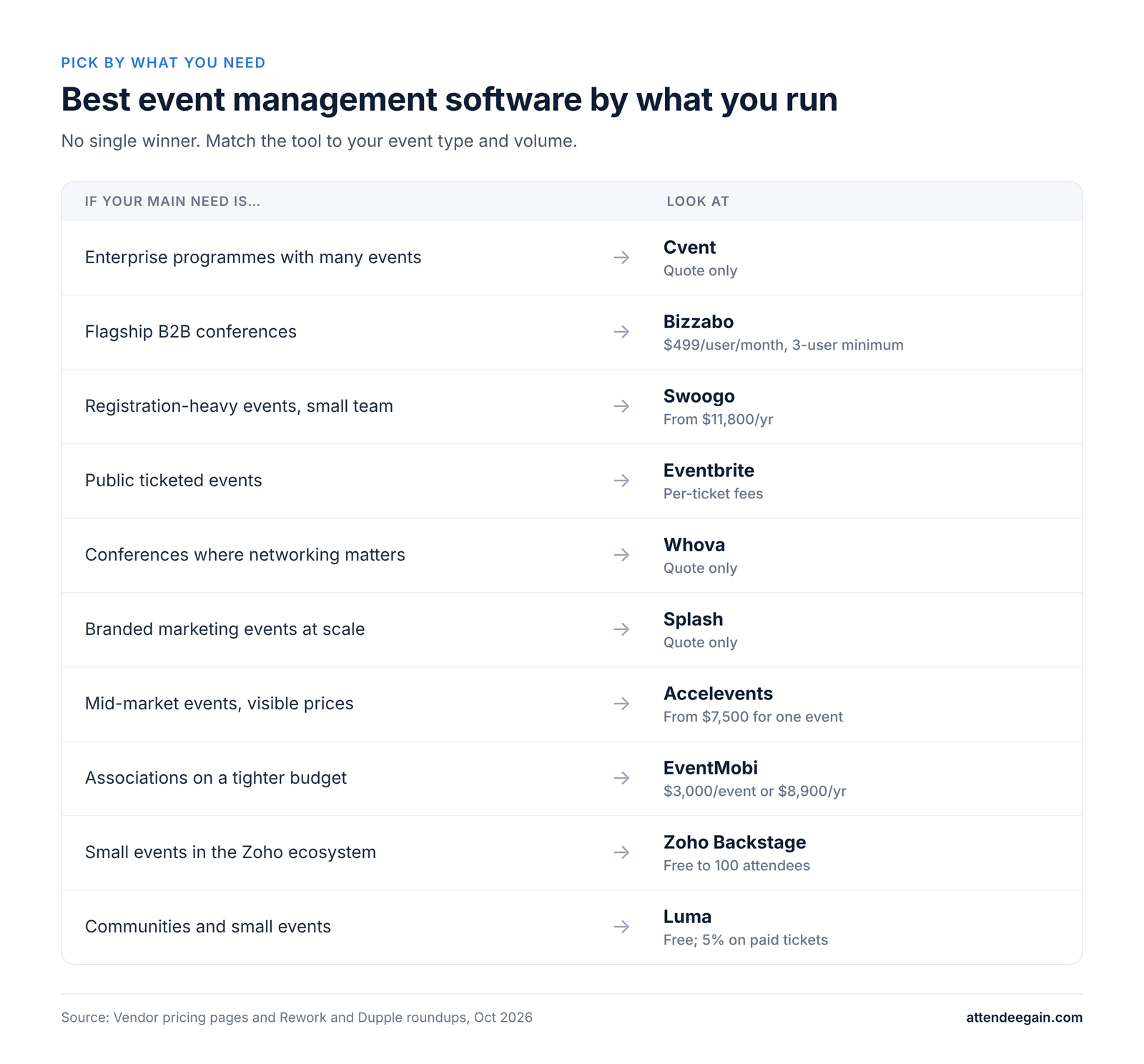
If you run…Look at
Enterprise programs with many eventsCvent
Flagship B2B conferences with a polished appBizzabo
Registration-heavy events with a small teamSwoogo
Public ticketed eventsEventbrite
Conferences and associations where networking mattersWhova
Branded marketing events at scaleSplash
Mid-market events and you want visible pricesAccelevents
Association or nonprofit events on a tighter budgetEventMobi
Small events inside the Zoho ecosystemZoho Backstage
Communities and small eventsLuma
Best event management software by what you run, from Cvent for enterprise to Luma for communities

How we picked

We grouped tools by the job they do, not by a score. For each we checked what the vendor publishes about pricing, what third-party roundups report, and where the product runs out of capability. Prices are the latest we could find and change often; where a figure is an estimate, we say so. We have not run every platform ourselves. AttendeeGain implements several of them (Cvent, Bizzabo, Swoogo, Splash and Whova), so we flag that on those entries. Many roundups in this space rank the author’s own product or carry affiliate links; this one does neither.

The 10 best event management platforms

1. Cvent: best for enterprise event programs

Cvent covers registration, venue sourcing, an attendee app, onsite check-in and cross-event reporting, licensed as separate solutions. It is the broadest platform here and the heaviest to run. Pricing is quote-only. It can be overkill if you run fewer than ten events a year. We implement it: see Cvent expertise.

2. Bizzabo: best for flagship B2B conferences

Bizzabo is known for a polished attendee app, CRM integration and its own onsite hardware. The price floor is $499 per user per month with a three-user minimum, about $18,000 a year, so it punishes small teams. See Bizzabo expertise.

3. Swoogo: best for registration-heavy events

Swoogo is known for flexible registration logic and unlimited registrations, licensed per user. Plans start around $11,800 a year (Professional, two seats). Its virtual features are thinner. See Swoogo expertise.

4. Eventbrite: best for public ticketed events

Eventbrite is free to publish for free events and charges fees on paid tickets, with a built-in discovery audience. On low-priced tickets the fees add up. Branding on checkout is limited.

5. Whova: best for attendee networking

Whova’s app and networking are the draw, and independent roundups rate it highly. Pricing is quote-only, with add-ons for registration and badging. See Whova expertise.

6. Splash: best for branded marketing events

Splash offers on-brand pages, email promotion and guest management with unlimited events and registrations on its Pro and Enterprise plans, priced by quote and by user license. It is lighter on complex logistics. See Splash expertise.

7. Accelevents: best for visible pricing

Professional starts at $7,500 for one event and Business at $13,500 for unlimited events, with unlimited admin seats and 24/7 support. Billing period and add-on prices are not stated on the page.

8. EventMobi: best for associations and nonprofits on a budget

EventMobi lists $3,000 per event or $8,900 a year with no registration fees. Hardware and badges cost extra.

9. Zoho Backstage: best for small events in the Zoho ecosystem

A free tier covers up to 100 attendees, with Essentials at $99 a month or $299 per event. Per-event licenses add up if you run many events.

10. Luma: best for communities and small events

Luma is free with a 5% fee on paid tickets, and Plus is $59 a month billed yearly. It is fast and attractive but lacks badges, exhibitors and deep CRM sync, so it is too light for large events.

Also worth a look: Stova (a combined enterprise suite, quote-only), EventsAir for complex conferences, and Brella for networking-first events.

Event management software pricing compared
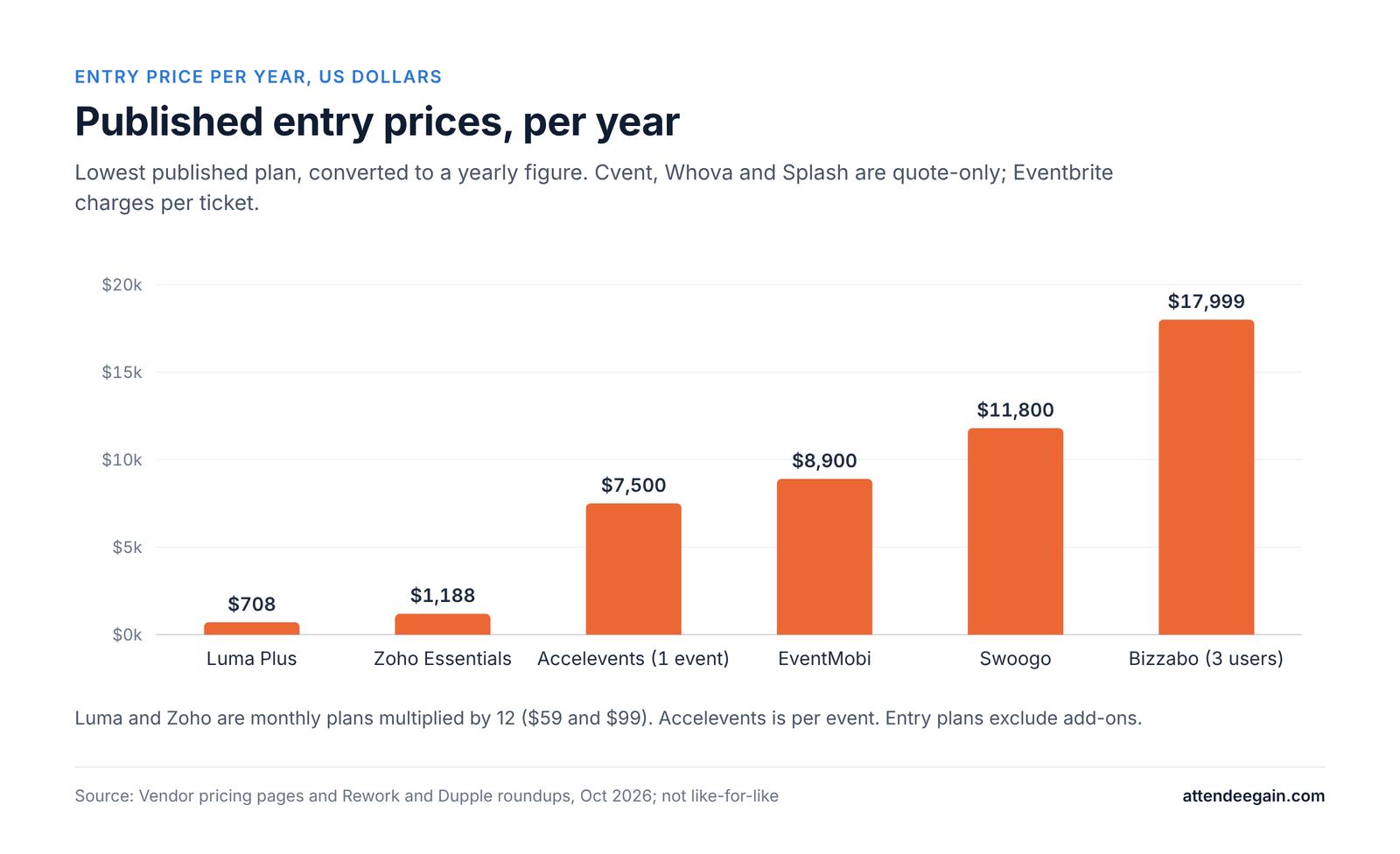
Published entry prices per year: Luma $708, Zoho $1,188, Accelevents $7,500, EventMobi $8,900, Swoogo $11,800, Bizzabo $17,999
PlatformPublished priceModel
CventNone (estimates $19,600 to $79,000+/yr)Quote; modules and registrants
Bizzabo$499/user/month, 3-user minimumPer user
SwoogoFrom $11,800/yrPer user, unlimited registrations
EventbriteFree events free; paid tickets 3.7% + $1.79 + 2.9% processing; Pro from $15/monthPer ticket
WhovaNoneQuote
SplashNone (estimates $12,500 to $36,500+/yr)Quote; user licenses
AcceleventsFrom $7,500 (1 event); $13,500 (unlimited)Plan
EventMobi$3,000/event or $8,900/yrPer event or annual
Zoho BackstageFree to 100 attendees; $99/month or $299/eventPer event or monthly
LumaFree (5% on paid tickets); Plus $59/month yearlyFree plus fee

Estimates come from third-party roundups, not the vendors.

What a ticket fee costs

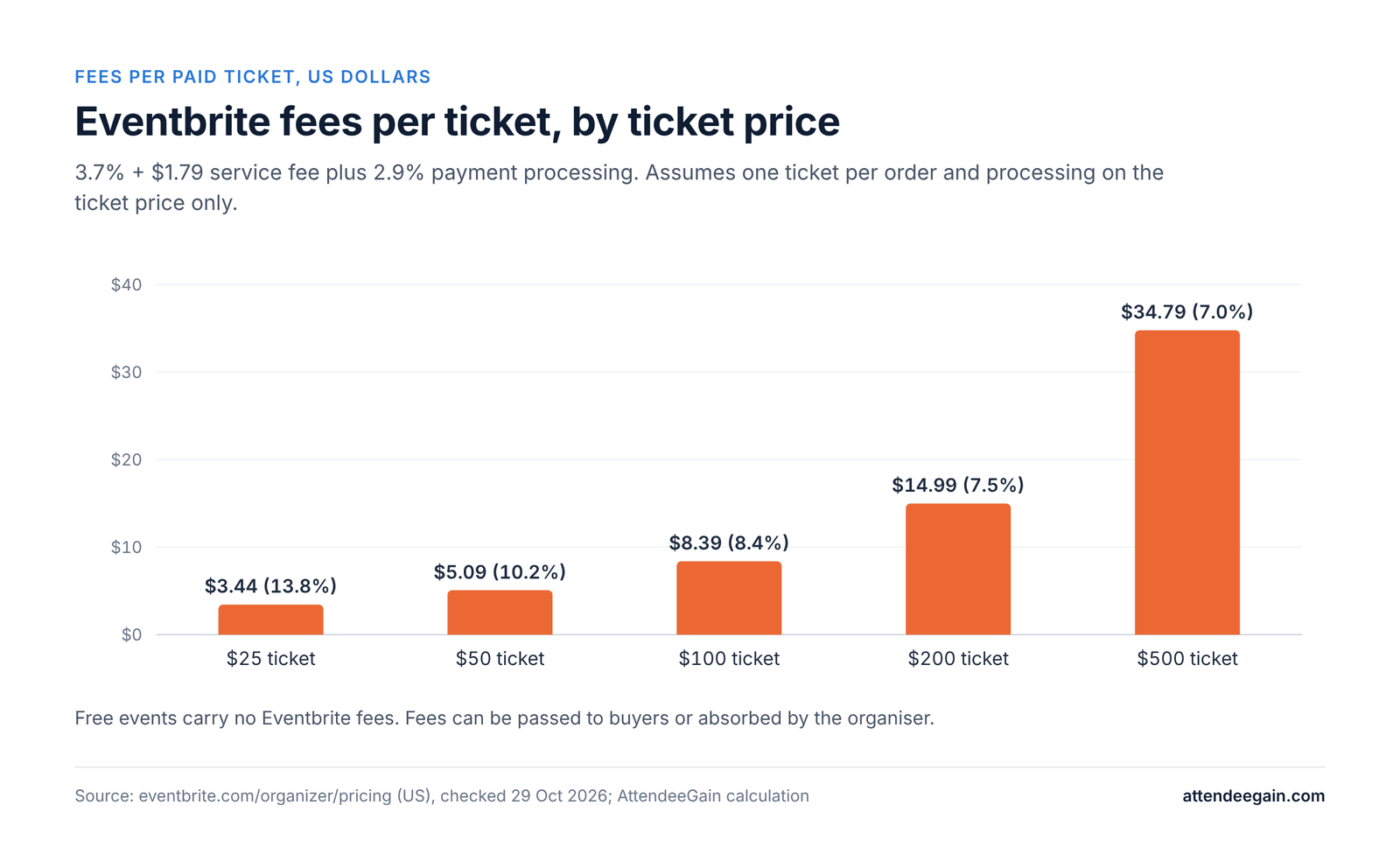
On a $50 Eventbrite ticket, 3.7% is $1.85, the fixed fee is $1.79 and 2.9% processing is $1.45, so about $5.09, or roughly 10% of the ticket. On a $20 ticket it is $0.74 + $1.79 + $0.58 = $3.11, about 16%. Per-ticket models are cheap when you sell few expensive tickets and costly when you sell many cheap ones. Flat-license tools such as Swoogo or Accelevents flip that.
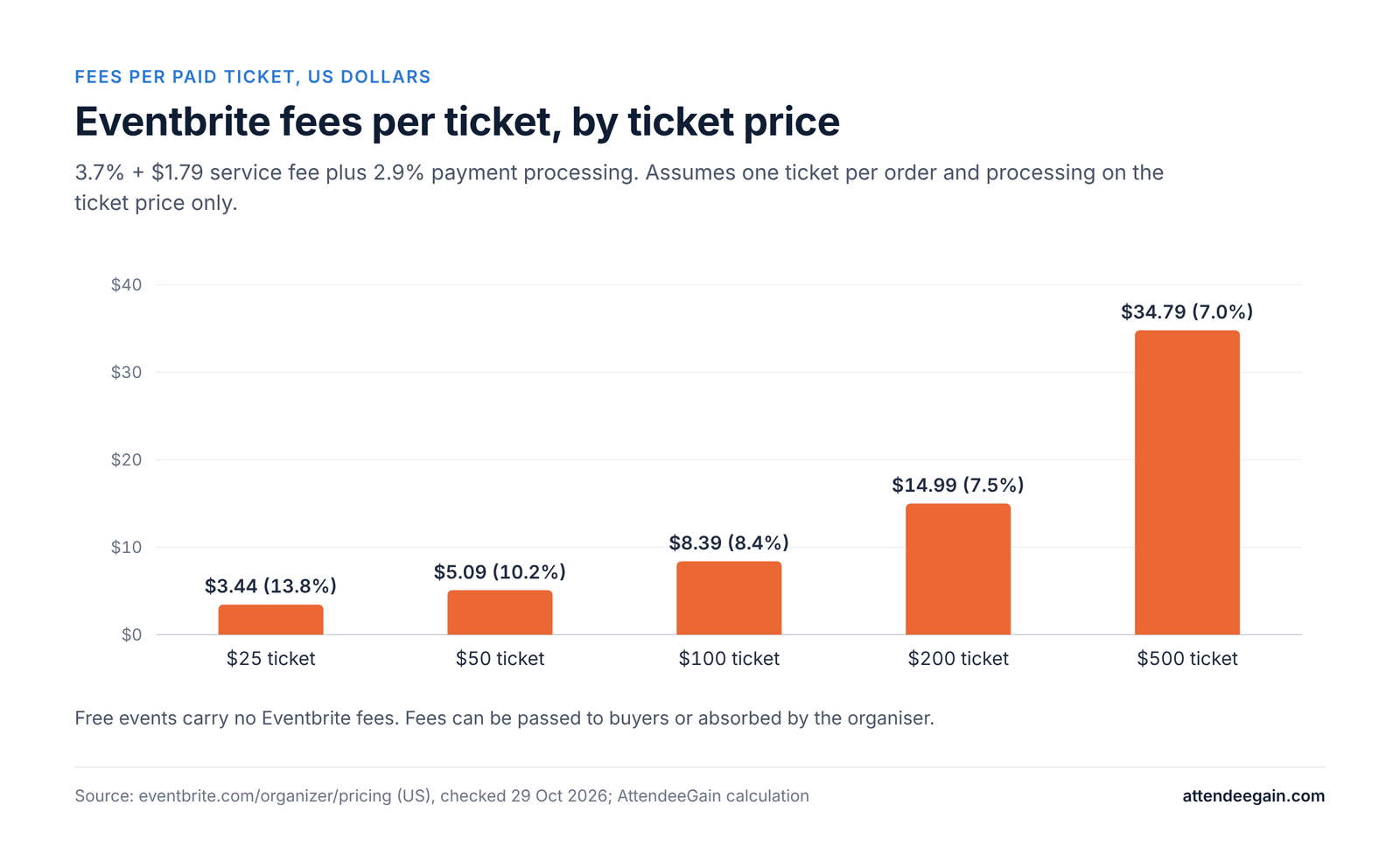
Eventbrite fees per ticket: 13.8% on a $25 ticket falling to 7.0% on a $500 ticket

Costs the price lists leave out

  • Implementation or build services.
  • Badge printers, kiosks and paper.
  • Payment processing on top of the platform fee.
  • Extra seats, since per-user pricing grows with your team.
  • Renewal increases; ask for a cap in writing.
  • Your team’s hours.

How to choose event management software

  1. Count your events and attendees. Under ten events a year, avoid heavy enterprise suites. Over fifty, per-ticket and per-event pricing gets expensive.
  2. Pick the event type. Public ticketed, B2B conference, association meeting, field marketing and internal events need different tools.
  3. List must-haves. Registration rules, payments, app, onsite check-in and badges, sponsor and exhibitor tools, virtual streaming, languages and currencies.
  4. List the systems it must feed. CRM, marketing automation, finance, SSO. Ask the vendor to show the data moving, not just claim an integration.
  5. Ask for security documents early. SOC 2 report or equivalent, data residency, retention and deletion terms.
  6. Price the scenario. Ask each shortlisted vendor to quote the same scenario, itemized.
  7. Run a pilot. Use a smaller event before committing to a flagship.

Where implementations go wrong

  • Starting too late. Registration rules, payments and integrations need testing time, and onsite needs a rehearsal.
  • Buying for features you will not use. Switching later is costly.
  • Treating the integration as done when it connects. Test field mapping, duplicates, refunds and cancellations.
  • Ignoring onsite. Badge printing, Wi-Fi, hardware and staff training sink more event days than software bugs.
  • No owner after launch. Someone must own the platform, reports and renewals.

If you want help with any of this, see our event registration platforms page.

FAQ

What is the best event management software? There is no single best. Cvent suits enterprise programs, Bizzabo flagship conferences, Swoogo registration-heavy events, Eventbrite public ticketing and Whova attendee networking.

What is the cheapest event management software? Eventbrite is free for free events, Luma is free with a 5% fee on paid tickets, and Zoho Backstage is free up to 100 attendees. The cheapest for you depends on ticket prices and volume.

How much does event management software cost? From free to tens of thousands of dollars a year. Published entry prices in this list run from free to about $18,000 a year, and several enterprise tools publish no price.

What is the difference between event management and event registration software? Registration software handles sign-up, payments and check-in. Event management software adds the app, agenda, sponsors, reporting and often venue sourcing.

Do I need an event app? For multi-track conferences, usually. For a single-room event, a mobile-friendly agenda page may be enough.

How long does implementation take? From days for a simple ticketed event to months for an enterprise rollout. Plan back from your first event date.

Need help choosing or implementing?

AttendeeGain implements Cvent, Bizzabo, Swoogo, Splash and Whova and can help you shortlist and set up the right platform. Start with our Cvent expertise, Bizzabo expertise, Swoogo expertise, Splash expertise and Whova expertise, or contact us.

Sources: Cvent, Bizzabo, Swoogo, Eventbrite and Accelevents pricing pages.

Best Event Management Software (2026): 10 Platforms Compared Read More »
Cvent vs Accelevents, Splash and InEvent compared

Cvent vs Accelevents, Splash and InEvent (2026)

Cvent vs Accelevents, Splash and InEvent: the short answer

Cvent vs Accelevents, Splash and InEvent are four platforms that overlap but suit different teams. Here is how they compare on features, pricing and fit.

  • Cvent suits large programs that need registration, venue sourcing, onsite, approvals and reporting in one governed system.
  • Accelevents suits mid-market teams that want a single platform for registration, app, check-in and exhibitor tools at published prices.
  • Splash suits marketing and field teams running many branded events such as roadshows, dinners and meetups. Cvent announced its acquisition of Splash in 2024, so they are now related products.
  • InEvent suits teams that want one platform for registration, onsite, virtual and hybrid with a lot of AI and badge tooling, and that are comfortable with a smaller vendor.
CventAcceleventsSplashInEvent
Best forEnterprise programsMid-market all-in-oneBranded marketing eventsAll-in-one, virtual and onsite
PricingQuotePublished: from $7,500 (1 event), $13,500 (unlimited)Quote (Pro, Enterprise)Quote
RegistrationDeep, approvalsUnlimited ticket types, bundles, codesSimple RSVP, guest listsForms, approvals, waitlists, payments
OnsiteOnArrivalCheck-in, badge printingQR check-inBadges, kiosks, NFC
Watch out forAdd-ons, learning curveBilling period and fees not statedLighter onsite and enterprise governancePricing not public
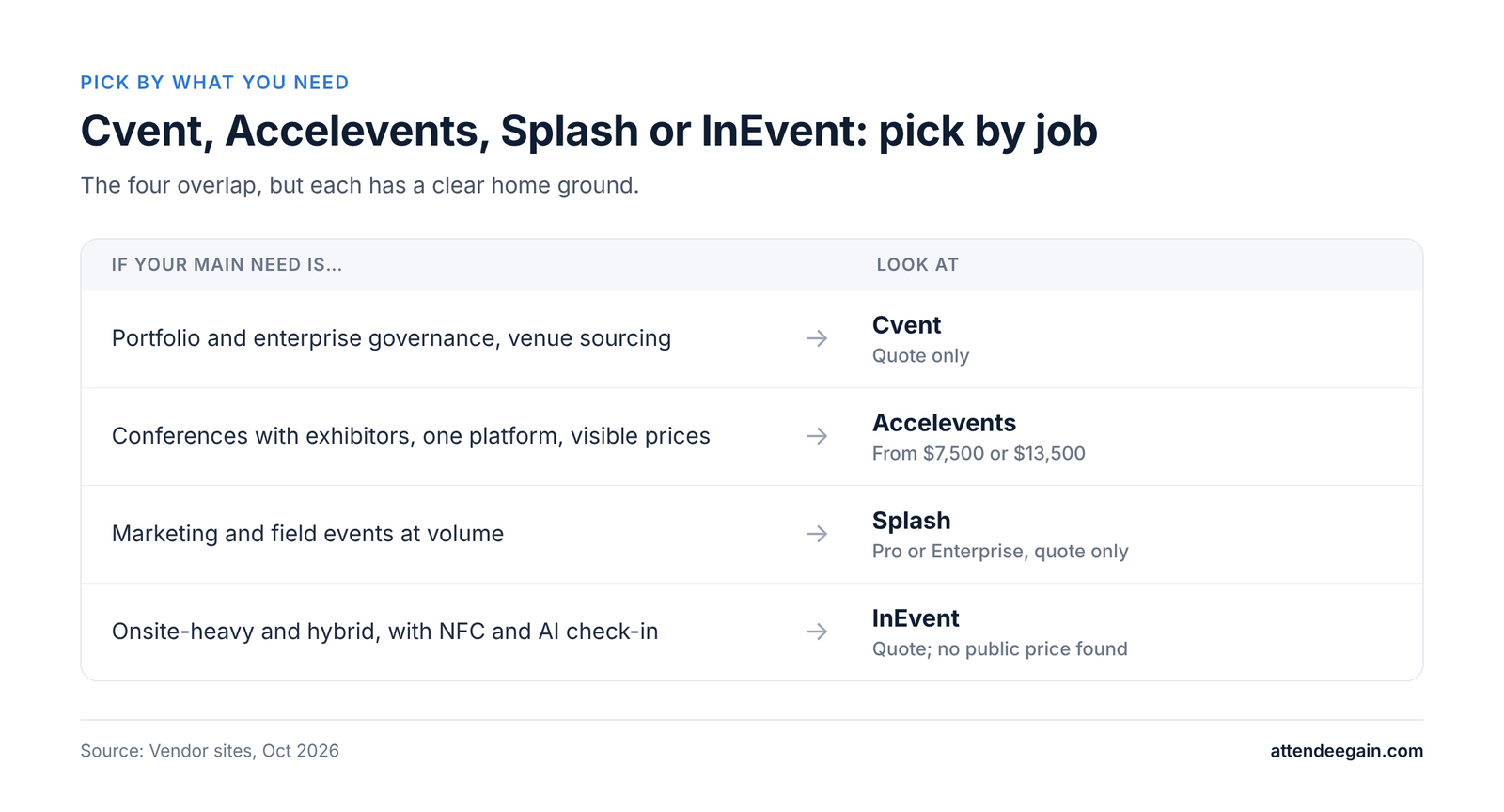
Cvent, Accelevents, Splash or InEvent: which to pick for governance, visible prices, field marketing or onsite

Feature by feature

Cvent vs Accelevents

Accelevents lists registration, check-in, badge printing, an event app, website and agenda builders, speaker management, networking, lead capture, exhibitor tools and reporting in one platform, and integrations with Salesforce, HubSpot and Marketo on its plans. Cvent covers the same ground as separately licensed solutions and adds venue sourcing and a much larger footprint. Accelevents’ own page rates itself above Cvent on G2 for ease of use, setup and support, but those are the vendor’s chosen figures. Check G2 yourself.

Cvent vs Splash

Splash is built for event marketing: drag-and-drop branded pages, brand kits, email promotion and guest management. Its plans (Pro and Enterprise) include unlimited events and registrations and one user license, with additional Builder, Host and Crew licenses. Enterprise adds user-request and approval workflows. Cvent has deeper registration logic, onsite, session tracking and reporting. Splash is lighter on those, which is the point: it is easier for marketers to use. Because Cvent announced its acquisition of Splash in 2024, ask Cvent how the two are being integrated and what that means for your roadmap and pricing.

Cvent vs InEvent

InEvent describes itself as an all-in-one platform for in-person, virtual, hybrid and webinar events. It lists customizable registration with approvals and waitlists, onsite badge printing and kiosks, NFC check-in, a mobile app, a Live Studio for broadcast, networking and meeting booking, and several AI features including an AI registration assistant and facial recognition check-in. It reports 1.1M events created and 900+ customers, against Cvent’s 8.3 million events managed. InEvent is a good fit if you want onsite hardware and virtual in one smaller vendor. Cvent is stronger for enterprise governance and venue sourcing.

Which fits which job

  • Marketing and field events: Splash.
  • Conferences with exhibitors, one platform, visible prices: Accelevents.
  • Onsite-heavy and hybrid with NFC and AI check-in: InEvent.
  • Portfolio and enterprise governance: Cvent.

Pricing compared

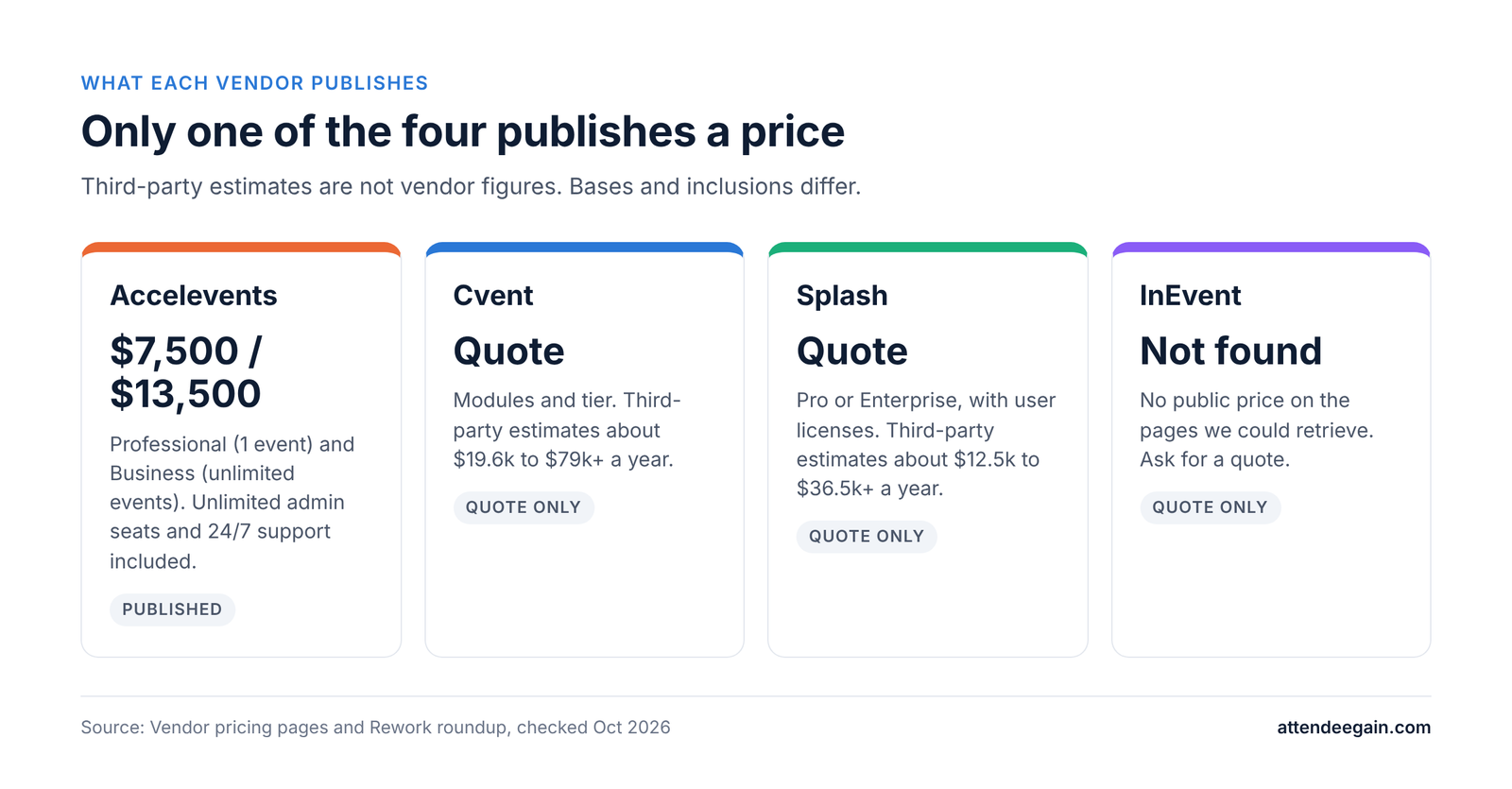
Only Accelevents publishes prices ($7,500 and $13,500); Cvent, Splash and InEvent are quote-only
PlatformWhat is publishedNotes
CventNothing. Custom quote; Professional tier includes 15 logins; Enterprise adds SSO, API, MFAThird-party roundups estimate about $19,600 to $79,000+ a year
AcceleventsProfessional from $7,500 (1 event); Business from $13,500 (unlimited events); Enterprise and White Label on requestUnlimited admin seats and 24/7 support included; billing period, transaction fees and add-on prices not stated
SplashNothing. Pro and Enterprise by quoteUnlimited events and registrations, one user license included; phone support needs a paid plan. Third-party estimates about $12,500 to $36,500+ a year
InEventNothing we could retrieveAsk for a quote

Estimates come from a Rework roundup and are not vendor figures.

How to compare

  1. Define your scenario: events per year, attendees, number of staff users, onsite needs.
  2. For Accelevents, ask what the billing period is, which payment fees apply and what the add-ons cost.
  3. For Splash, ask how many user licenses you need and what each type costs. User count can matter more than event count.
  4. For Cvent and InEvent, get itemized quotes with implementation and hardware.
  5. For all, ask for the renewal increase cap in writing.

A simple read: Accelevents is the easiest to budget because it shows a number. Splash is cheapest to scale in events but scales in users. Cvent has the most moving parts.

Implementation, support, security and AI

Implementation. Accelevents says most teams are fully operational within a few weeks of kickoff and offers to import registrations, attendees, speakers and exhibitors from Cvent, with events open for registration migrating first. A competitor article puts Splash launches at days to weeks and Cvent enterprise deployments at weeks to a few months. These are vendor claims; ask each for a written plan for your scope.

Support. Accelevents says all plans include 24/7 support with a 21-second average response and a customer success manager. Splash requires a paid support plan for phone support. Cvent lists 1,800+ client services staff. Ask what is included in your contract during event week.

Security. Accelevents says it is SOC 2 Type 2 audited and GDPR compliant, with SSO through Okta, Microsoft Entra, Ping Identity and Salesforce, though its pricing page marks SSO as an extra cost on White Label. Cvent Enterprise includes SSO, API and MFA. InEvent’s homepage makes no SOC 2 or GDPR claim; ask directly. Request current reports from all of them.

AI. InEvent lists the most AI features: an AI registration assistant, website builder, facial recognition check-in, speech transcription and business matchmaking. Cvent advertises AI agenda building. Ask each what data the AI uses and whether it is included in the price.

Switching. Moving off Cvent means exporting attendee, session and registration data and rebuilding forms, emails and sites. Accelevents advises starting months before contract end to leave time for legal, security and data export.

Which should you choose?

  • Stay with or choose Cvent if you need approvals, venue sourcing, cross-event reporting and enterprise controls.
  • Choose Accelevents if you want one platform for conferences and trade shows at a price you can see.
  • Choose Splash if marketers own the events and brand and speed matter more than deep logistics.
  • Choose InEvent if onsite hardware, NFC and hybrid delivery in one smaller vendor fit your needs.

FAQ

Does Cvent own Splash? Cvent announced its acquisition of Splash in 2024, according to a competitor article. Confirm current product plans with Cvent.

Is Accelevents cheaper than Cvent? Accelevents shows prices from $7,500 for one event and $13,500 for unlimited events. Cvent has no published price, so compare itemized quotes.

Is Splash good for large conferences? It is built for branded marketing events. Its onsite and enterprise governance are lighter than Cvent’s.

What does InEvent cost? We could not find a public price. Request a quote.

Can I migrate from Cvent? Yes. Export registrations, attendees, sessions and speakers, and rebuild forms and sites. Start months ahead.

Which is easiest to use? Splash and Accelevents are generally described as simpler than Cvent. Test each with your own team.

Need help choosing or setting up?

AttendeeGain implements Cvent and Splash and can advise on how they compare with Accelevents and InEvent. See our Cvent expertise and Splash expertise, or contact us. For check-in and badging, see onsite solutions.

Sources: Cvent pricing, Accelevents pricing, Splash pricing.

Cvent vs Accelevents, Splash and InEvent (2026) Read More »

Cvent Attendee Hub alternatives: 7 options compared

Cvent Attendee Hub Alternatives (2026): 7 Options Compared

Cvent Attendee Hub alternatives: the short answer

Cvent Attendee Hub alternatives range from simple networking apps to full enterprise platforms. Here are seven worth considering, what each costs, and what to check before you switch.

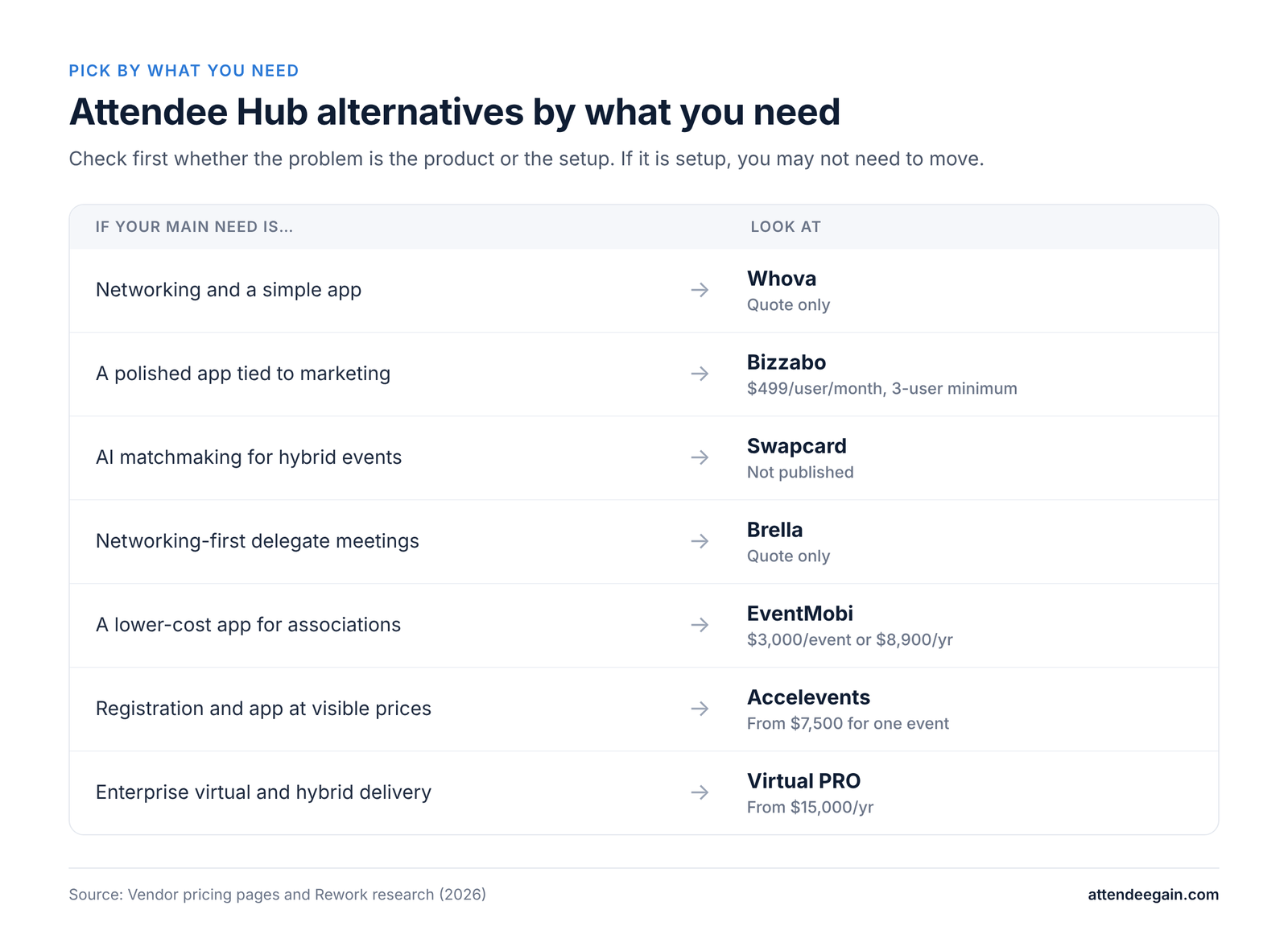
If Attendee Hub is too expensive or too much for your events, the best alternative depends on what you need fixed:

  • Attendee networking and a simple app: Whova.
  • A polished app tied to a marketing platform: Bizzabo.
  • AI matchmaking for hybrid events: Swapcard.
  • Networking-first meetings between delegates: Brella.
  • A lower-cost app for associations and nonprofits: EventMobi.
  • Registration, app and fundraising on published prices: Accelevents.
  • Enterprise virtual and hybrid delivery: Virtual PRO (formerly Hubilo).
Cvent Attendee Hub alternatives matched to need, from Whova for networking to Virtual PRO for virtual events

What Attendee Hub does

Attendee Hub is Cvent’s event app and attendee experience. Cvent lists a mobile event app, virtual experiences, chat and Q&A, polling, gamification, networking, AI-driven agenda building, exhibitor and sponsor activation, and live or on-demand video. It is licensed as its own solution next to Registration and OnArrival, with no published price.

Why teams look for alternatives

  • Cost. It is quoted on top of registration and onsite, and the total can be hard to forecast.
  • Complexity. Configuring agenda, sessions, notifications and sponsor placements takes admin time.
  • Customization. Branding and layout are constrained by the Cvent ecosystem. This is a common complaint but not one we could verify with data.
  • Fit. Smaller or single-event teams may not use half of it.

Before you switch

Check whether the problem is the product or the setup. An app that attendees ignore may be missing push notifications, a clean agenda, sponsor offers or an onsite push to download it. If the fix is configuration, you can keep your registration and reporting in Cvent and save a migration.

The 7 best Cvent Attendee Hub alternatives

1. Whova: best for networking and a simple app

Whova’s app centers on the agenda, attendee profiles and networking, and it scores highly in independent roundups for engagement. It suits conferences, associations and academic events. The catch: pricing is quote-only, and registration and badging are add-ons. See our Whova expertise.

2. Bizzabo: best for a polished app tied to event marketing

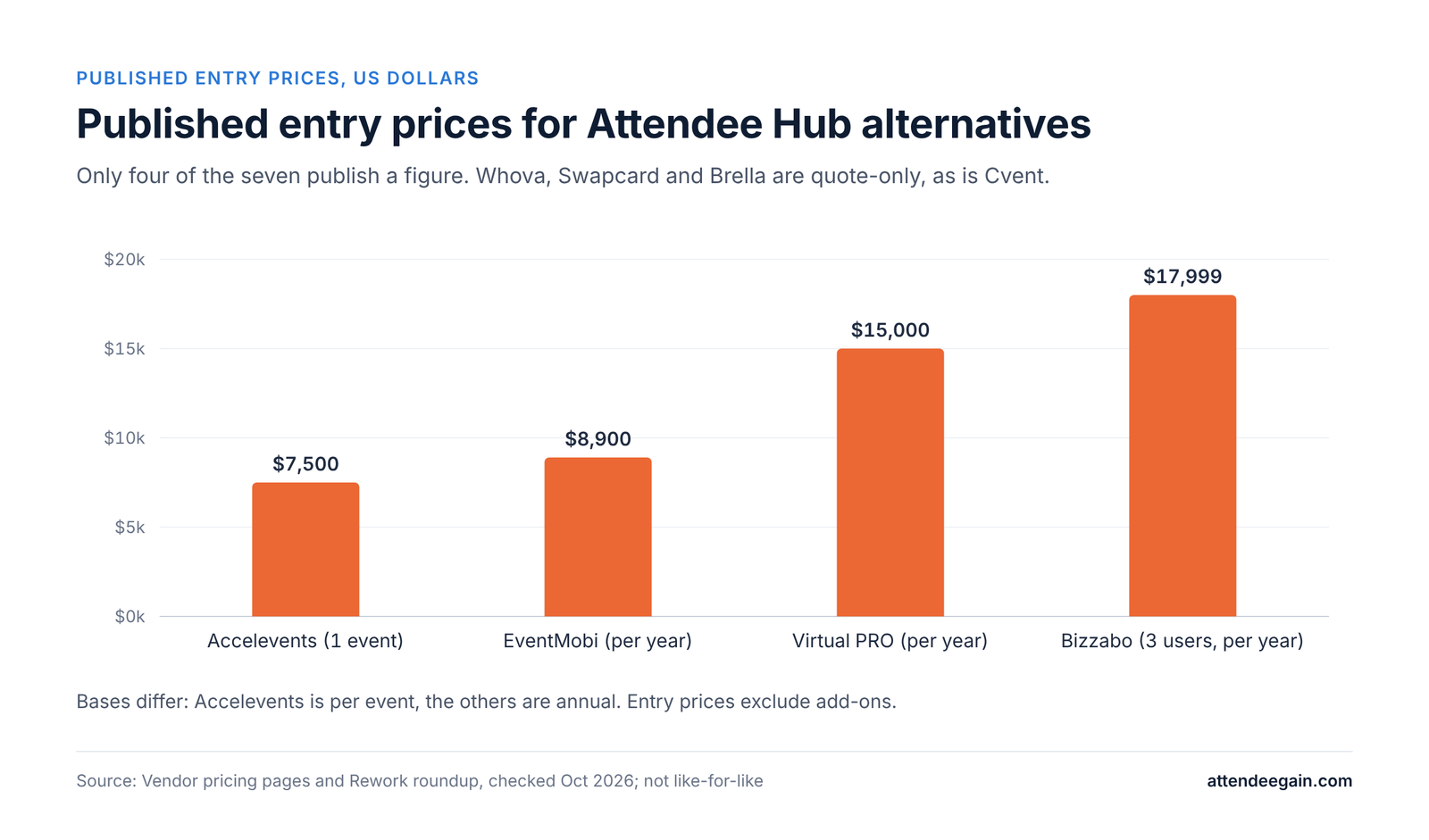
Bizzabo pairs a strong attendee app with marketing and CRM integration, and it has its own onsite hardware. The catch is the price floor: $499 per user per month with a three-user minimum, roughly $17,999 a year. See our Bizzabo expertise.

3. Swapcard: best for AI networking at hybrid events

Swapcard is built around attendee matchmaking and hybrid delivery. Pricing varies by size and features and is not published.

4. Brella: best for networking-first conferences

Brella focuses on AI matchmaking and meeting booking between delegates. It is narrow outside networking, so it is usually paired with a registration platform. Quote-only.

5. EventMobi: best low-cost app for associations and nonprofits

EventMobi lists $3,000 per event or $8,900 a year, with no registration fees. Hardware and badges cost extra, and it has no Cvent-style portfolio features.

6. Accelevents: best for visible pricing

Accelevents publishes its prices: Professional from $7,500 for one event and Business from $13,500 for unlimited events, with unlimited admin seats and 24/7 support. Billing period and transaction fees are not stated on the page, so ask.

7. Virtual PRO (formerly Hubilo): best for enterprise virtual and hybrid

Virtual PRO is purpose-built for virtual and hybrid delivery, with a published entry price of $15,000 a year for PRO 1 and a quote for PRO MAX. It is overkill for in-person only events.

Not on this list on purpose: Eventbrite and Zoho Backstage are ticketing and small-event tools, not Attendee Hub replacements. Swoogo is strong on registration but its virtual and app features are lighter. See our Swoogo expertise if registration is your real problem.

Alternatives compared: pricing and fit

Published entry prices for Attendee Hub alternatives: Accelevents $7,500 to Bizzabo $17,999; others quote-only
PlatformBest forPublished priceMain catch
Cvent Attendee HubEnterprise programsNone (quote)Licensed on top of Registration and OnArrival
WhovaNetworking, conferencesNone (quote)Add-ons for registration and badging
BizzaboPolished app, marketing link$499/user/month, 3-user minimumHigh price floor
SwapcardAI networking, hybridNone (quote)Pricing varies by scope
BrellaNetworking-first eventsNone (quote)Narrow outside networking
EventMobiAssociations, nonprofits$3,000/event or $8,900/yearHardware and badges extra
AcceleventsVisible pricingFrom $7,500 (1 event), $13,500 (unlimited)Billing period not stated
Virtual PROEnterprise virtual/hybridFrom $15,000/yearHigh entry price

Prices come from vendor pages or third-party roundups and change often. Confirm with the vendor.

Comparing total cost

An app price is only part of the cost. Add registration, onsite check-in and badging, integrations, implementation and the staff hours to run it. If you move the app but keep Cvent for registration, you also need the attendee data to flow between the two, which usually means an integration to build and test.

Migrating from Attendee Hub: what to plan

Switching the app means more than swapping a download link. Plan for:

  1. Data flow. Registration data must reach the new app: attendees, sessions, speakers, sponsors. Decide whether it comes by export, API or a connector, and test it with real records.
  2. Single sign-on and attendee access. Decide how attendees log in and whether it matches your registration platform.
  3. Content. Agenda, speaker bios, maps, sponsor listings and push notifications must be rebuilt.
  4. Onsite. Check-in and badge scans still need to talk to the app if you use them for session tracking or gamification.
  5. Reporting. Engagement data will sit in a different system than registration. Decide where the combined report lives.
  6. Timing. Do not switch in the weeks before an event. Pilot on a smaller event first.

Questions to ask any vendor

  • What is the total cost for our scenario, itemized, including implementation and payment fees?
  • Which registration platforms do you integrate with natively, and who builds and maintains the connection?
  • What certifications do you hold, and can we see the current report?
  • What does support look like during our event week?
  • Can we speak to a customer with our event size and registration platform?
  • What happens to our data if we leave?

FAQ

What is Cvent Attendee Hub? Cvent’s event app and attendee experience: mobile app, chat and Q&A, polling, networking, gamification, AI agenda building, exhibitor activation, and live or on-demand video.

How much does Attendee Hub cost? Cvent does not publish a price. It is quoted separately from Registration and OnArrival.

What is the best alternative to Attendee Hub? It depends on the problem: Whova for networking, Bizzabo for a polished app tied to marketing, EventMobi for lower cost, Accelevents for published prices.

Can I use another app and keep Cvent for registration? Often yes, but the attendee data has to flow between the two systems, and that integration needs building and testing.

Is Attendee Hub worth it? If you already run registration and onsite in Cvent and use its sponsor and engagement tools, usually. If you use only the basic app, a lighter option may cost less.

How long does it take to switch? It depends on the integration and content volume. Plan weeks, not days, and pilot on a smaller event.

Need help with Attendee Hub or choosing an app?

AttendeeGain sets up and optimizes Cvent, including Attendee Hub, and advises on alternatives. Tell us what is not working and we will say whether to fix it or move. See our Cvent expertise or contact us.

Sources: Cvent pricing, Accelevents pricing.

Cvent Attendee Hub Alternatives (2026): 7 Options Compared Read More »
Cvent vs EventsAir: pricing, features and fit for complex events

Cvent vs EventsAir (2026): Pricing, Features and Fit

Cvent vs EventsAir: the short answer

Cvent vs EventsAir is a choice between a broad enterprise platform and a specialist built for complex conferences. Here is how they compare on features, pricing, setup and fit.

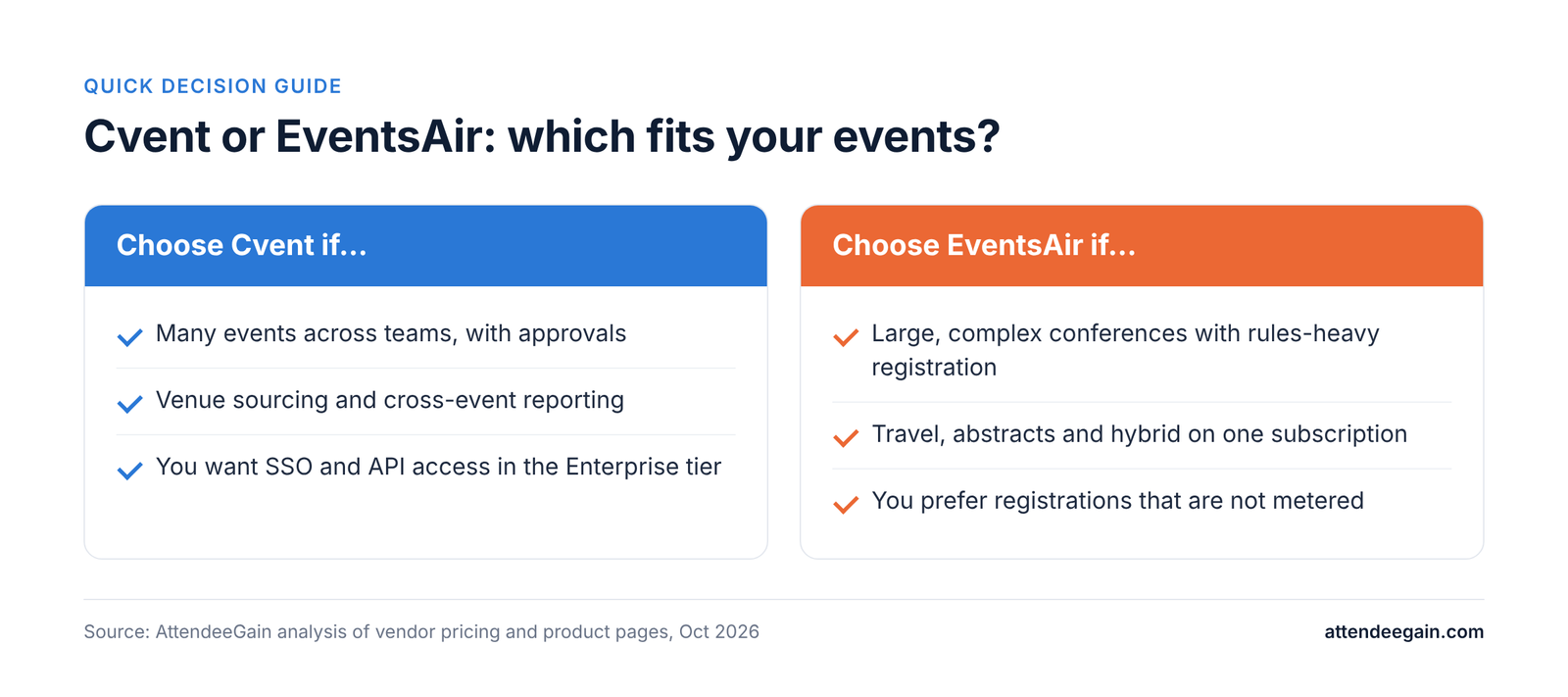
Choose Cvent if you want one of the largest event platforms, with registration, venue sourcing, onsite, an attendee app and cross-event reporting, and you have the admin capacity to run it. Choose EventsAir if you run complex conferences, association meetings or agency-managed events and want registration, onsite, travel, abstracts and hybrid delivery on a single subscription, with a smaller vendor and typically a shorter setup.

The pricing logic differs. EventsAir charges a subscription by plan: Single, Multi or Enterprise, which differ by number of events and platform users, and registrations are not metered. Cvent licenses modules separately on a quote. Neither publishes prices.

CventEventsAir
Best forEnterprise programs, many events a yearComplex conferences, associations, PCOs and agencies
OriginFounded 1999 (US)Founded 1990 as Centium Software (Australia), per a competitor article
Pricing modelQuote; Registration, Attendee Hub and OnArrival licensed separatelySubscription by plan: Single, Multi, Enterprise
Published pricesNoneNone
Signature strengthsVenue sourcing, approvals, scale, reportingRules-based registration, onsite, travel and accommodation, abstracts, broadcast studio
Watch out forAdd-ons, per-registrant fees, renewal upliftAdd-on services, extra payment processing fees, security details not public
Cvent vs EventsAir decision guide: Cvent for many events and approvals, EventsAir for complex conferences

Cvent vs EventsAir: feature by feature

Registration

EventsAir describes its registration as rules-based, so pricing, access and form fields change depending on who the attendee is. Cvent Registration supports multiple attendee types, approvals, purchase orders and conditional logic. Both handle complex scenarios. Cvent has more governance features for large organizations; EventsAir is often favored where registration rules are the hard part of the event.

Onsite

EventsAir covers check-in, kiosks and badge printing within its platform. Cvent sells OnArrival as a separate solution. Ask both for the hardware list, how offline mode works, and a reference event of your size.

Mobile app and engagement

EventsAir includes a mobile event app and networking. Cvent’s Attendee Hub adds chat and Q&A, polling, gamification, AI-driven agenda building, exhibitor and sponsor activation, and live or on-demand video. If a rich attendee app is the main reason to buy, compare the two with your own agenda.

Virtual and hybrid

EventsAir lists streaming and a broadcast studio as part of the platform. Cvent delivers virtual through Attendee Hub. Check what each charges for streaming and who produces the broadcast.

Operations beyond registration

EventsAir lists travel and accommodation, payment processing, abstract and speaker management and sponsor and exhibitor lead capture as modules. Cvent covers venue sourcing, budgeting and reporting across a portfolio. This is the clearest split: EventsAir is built around running one complex event well; Cvent is built around managing a program of events.

AI

EventsAir markets AI assistants under the name Air Intelligence. Cvent advertises AI agenda building. Neither claim is independently tested here; ask for a live demo and for details on what data the AI uses.

Integrations

EventsAir sells Smart Connectors as an add-on. Cvent Enterprise includes API access and SSO. List the systems you must connect and ask each vendor to show the data flowing, not only to confirm that an integration exists.

Cvent vs EventsAir pricing in 2026

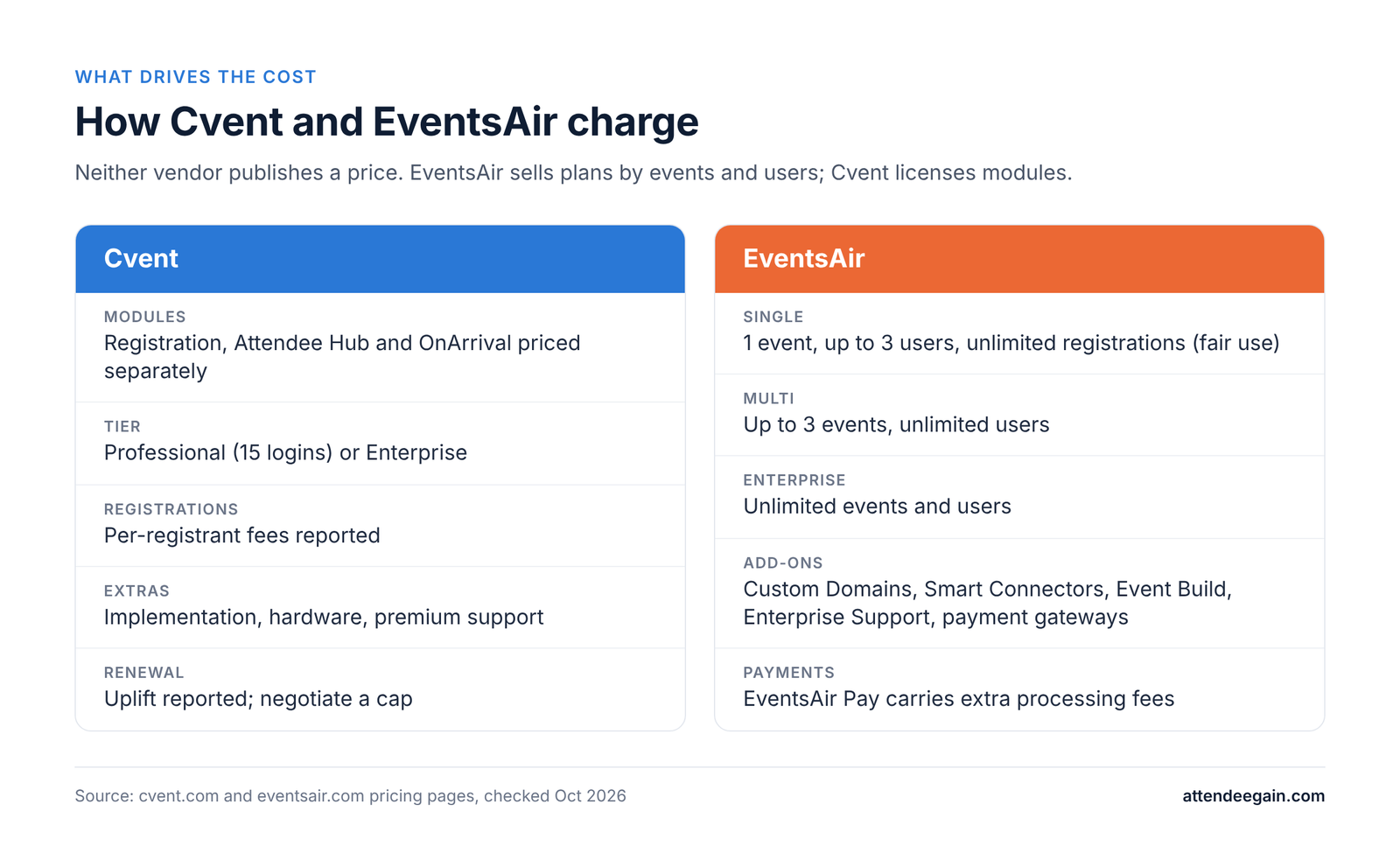
How Cvent and EventsAir charge: Cvent by module, EventsAir by plan of events and users

Neither vendor publishes a price, so any dollar figure you read comes from a quote someone else received.

EventsAir sells a monthly subscription in three plans. Single includes one event (more available), unlimited registrations under fair use, up to three platform users and unlimited meetings under 100 attendees. Multi includes up to three events and unlimited users. Enterprise offers unlimited events and users. All plans include in-person, virtual and hybrid features. Add-ons priced on request: Custom Domains, Smart Connectors, Event Build, Enterprise Support and Additional Payment Gateways. EventsAir Pay carries extra processing fees.

Cvent quotes each solution separately: Registration, Attendee Hub and OnArrival. The Professional tier includes 15 user logins. Enterprise adds SSO, API access, MFA and budget management. Third-party roundups put Cvent at roughly $19,600 to $79,000+ a year, and a competitor’s comparison says to ask for the per-registration rate, overage terms and renewal escalation in writing.

What drives costCventEventsAir
Core unitModules licensed, registrantsNumber of events and users on the plan
RegistrationsPer-registrant fees reportedNot metered (fair use)
ExtrasImplementation, hardware, premium support, add-on modulesEvent Build, Smart Connectors, Enterprise Support, payment gateways
PaymentsProcessing feesEventsAir Pay processing fees
RenewalUplift reported; negotiate a capAsk for the cap

How to compare

  1. Write down your scenario: events per year, attendee counts, languages, currencies, onsite needs, and number of staff who need logins.
  2. Ask each vendor for an itemized quote for that scenario, including implementation or build services and payment processing.
  3. For EventsAir, ask which plan your event volume forces and what the next plan costs. For Cvent, ask which modules are in the base quote.
  4. Get the renewal terms in writing before you sign.

If you run few, very large and complex events, EventsAir’s flat subscription may be easier to forecast. If you run many events across teams and need venue sourcing and cross-event reporting, Cvent’s model can pay off. Test both against your numbers.

Implementation, support, security and AI

Implementation. A competitor’s comparison claims EventsAir onboarding typically takes under four weeks and Cvent six or more. Treat that as a claim, not a benchmark. On both platforms, the time goes into registration rules, payment testing, integrations and onsite rehearsal, not into the software install. EventsAir offers Event Build as a paid service; Cvent has an implementation services team and partners.

Support. Cvent lists a client services team of 1,800+. Ask each vendor for support hours and response times during your event week, and whether onsite support is included.

Security. EventsAir’s public pages name no certifications and link to a separate Support & Security section. Ask both vendors for their current SOC 2 report or equivalent, data residency options, SSO and MFA availability, and data retention and deletion terms. On Cvent, SSO, API and MFA are in the Enterprise tier.

Scale and track record. EventsAir says it has run 400,000+ events and shows 4.5 stars on G2 and Capterra. Cvent shows 4.3 stars from 437 G2 reviews and says it manages 8.3 million events. Both are vendor-reported; check G2 and Capterra directly.

Switching. Moving between the two means exporting attendees, sessions, speakers and registrations and rebuilding forms, emails and agendas. Migrate events that are open for registration first and start months ahead of your contract end.

Which should you choose?

  • Pick Cvent if you run many events a year across teams, need venue sourcing, approvals and cross-event reporting, and want SSO and API access.
  • Pick EventsAir if your events are large and complex, with rules-heavy registration, travel and accommodation, abstracts, onsite and hybrid delivery, and you prefer a subscription that is not metered by registrations.
  • Either way, get itemized quotes for the same scenario and ask for security documents before the demo, not after.

FAQ

Is EventsAir cheaper than Cvent? Neither publishes prices. EventsAir does not meter registrations; Cvent reportedly adds per-registrant fees. Compare itemized quotes for your own scenario.

Who owns EventsAir? Its site shows a Centium Software copyright. A competitor article says it began as Centium Software in Australia in 1990. Confirm current ownership with the vendor.

Does EventsAir have a mobile app? Yes, a mobile event app with networking is part of the platform.

Does Cvent have a broadcast studio? Cvent delivers virtual through Attendee Hub with live and on-demand video. EventsAir lists a broadcast studio.

Which is easier to implement? A competitor article claims EventsAir is faster to onboard. Ask both for a written timeline for your scope.

Can I switch? Yes, with a data export and a rebuild of forms and agendas. Start months ahead.

Need help choosing or setting up?

AttendeeGain implements Cvent and can advise on how it compares with other platforms. Tell us your event volume and complexity and we will recommend what fits. See our Cvent expertise, platform integration and onsite solutions, or contact us.

Sources: Cvent pricing, EventsAir pricing.

Cvent vs EventsAir (2026): Pricing, Features and Fit Read More »

Cvent vs Whova: pricing, features and which to pick

Cvent vs Whova (2026): Pricing, Features and Which to Pick

Cvent vs Whova: the short answer

Cvent vs Whova is a choice between a full event lifecycle platform and an attendee-app-first tool. Here is how they compare on features, pricing, setup and fit, written from the point of view of an implementation partner.

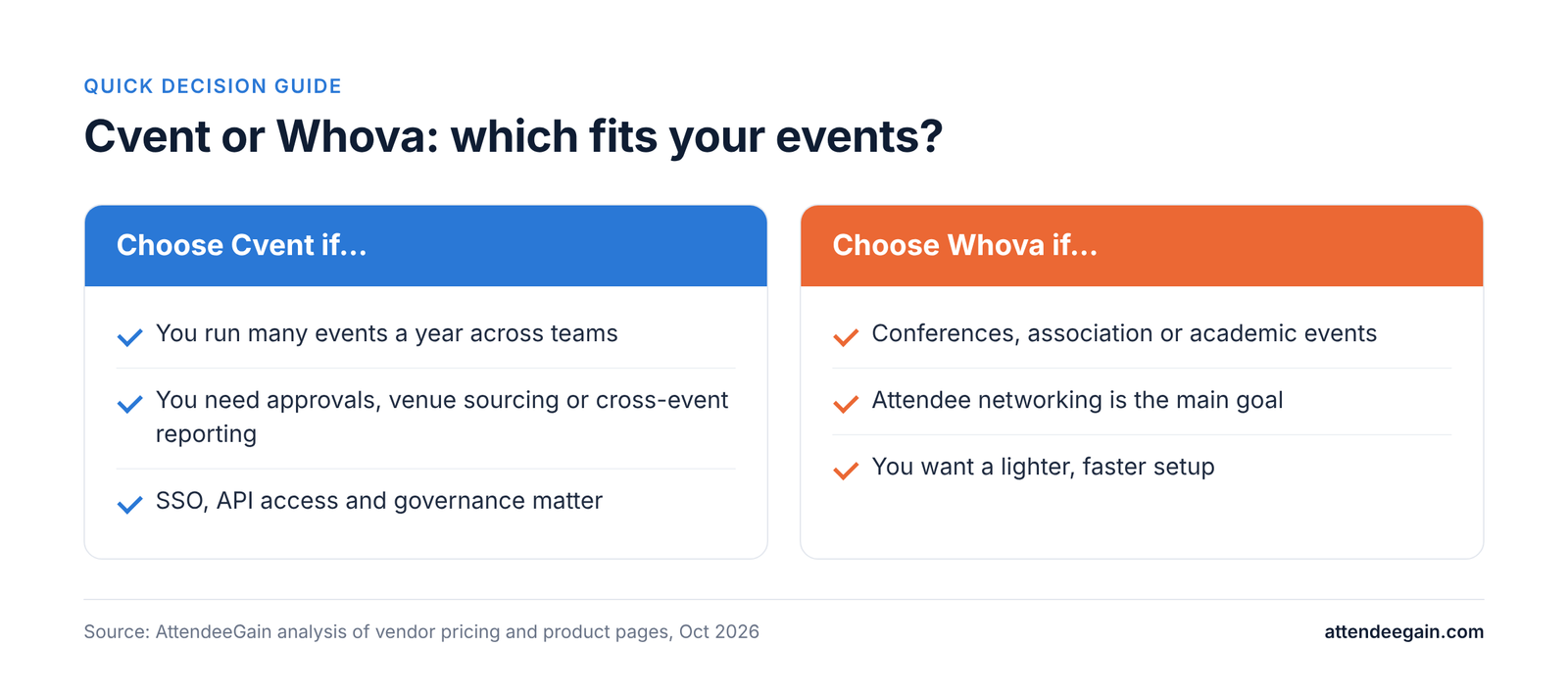
Choose Cvent if you run a portfolio of events and need registration, venue sourcing, onsite, approvals and reporting inside one governed system. Choose Whova if you run conferences, association meetings or academic events where the attendee app and networking do most of the work, and you want a lighter setup.

The two are priced differently, not just at different levels. Cvent licenses modules (Registration, Attendee Hub, OnArrival) on a quote. Whova publishes no prices at all and quotes by event size and add-ons. Neither can be compared on a list price, so the pricing section below works from what each vendor says it charges for and what third parties report.

CventWhova
Best forEnterprise event programs, many events a yearConferences, associations, academic and nonprofit events
Strongest atEnd-to-end lifecycle, onsite, approvals, reportingAttendee app, networking, simple setup
Pricing modelQuote; modules licensed separately; Professional or Enterprise tierQuote by event type, duration and attendee count
Published pricesNoneNone
Admin effortHigher; usually needs a trained admin or partnerLower
Watch out forAdd-ons, per-registrant fees and renewal upliftAdd-on costs for registration and badging, no price visibility
Cvent vs Whova decision guide: choose Cvent for many events and approvals, Whova for conferences and networking

Cvent vs Whova: feature by feature

Registration and ticketing

Cvent Registration is a separate licensed solution. It handles multiple attendee types, approvals, conditional logic and payments, and it is the part teams most often need help configuring. Whova offers Registration & Ticketing as an add-on to its event app, with instant payouts for paid events. For a single conference with a few ticket types, Whova is quicker to stand up. For events with approval chains, group bookings or purchase orders, Cvent has more depth.

Event app and attendee engagement

This is Whova’s home ground. Its app is built around the agenda, attendee profiles, networking and community features, and independent roundups consistently rate it highly for engagement. Cvent’s equivalent is Attendee Hub, which covers the mobile app, chat and Q&A, polling, gamification, networking, AI-driven agenda building, exhibitor and sponsor activation, and live or on-demand video. Cvent’s version goes further on sponsor and exhibitor tooling and on tying engagement back to registration data. Whova’s is simpler for attendees and organizers to get right.

Onsite check-in and badging

Cvent sells this separately as OnArrival, with staffed and self-serve check-in, on-demand badges and session scanning. Whova lists name badge tools under its event management products. If check-in speed at thousands of attendees matters, ask each vendor for hardware requirements and a reference customer of your size. Do not rely on published throughput numbers; the ones in circulation come from competitor blogs.

Hybrid and virtual

Both support hybrid. Cvent folds virtual into Attendee Hub with streaming and on-demand video. Whova lists Hybrid & Virtual Events as its own product line. Check how streaming is delivered (native or third-party) and what it costs, because this is where quotes diverge.

Integrations and reporting

Cvent Enterprise adds SSO, API access and MFA, and cross-event reporting is a core selling point. Whova is lighter here. If your CRM, marketing automation or finance stack must receive registration and attendance data automatically, list the exact objects and fields you need and ask each vendor to show them working, not just claim an integration exists.

Cvent vs Whova pricing in 2026

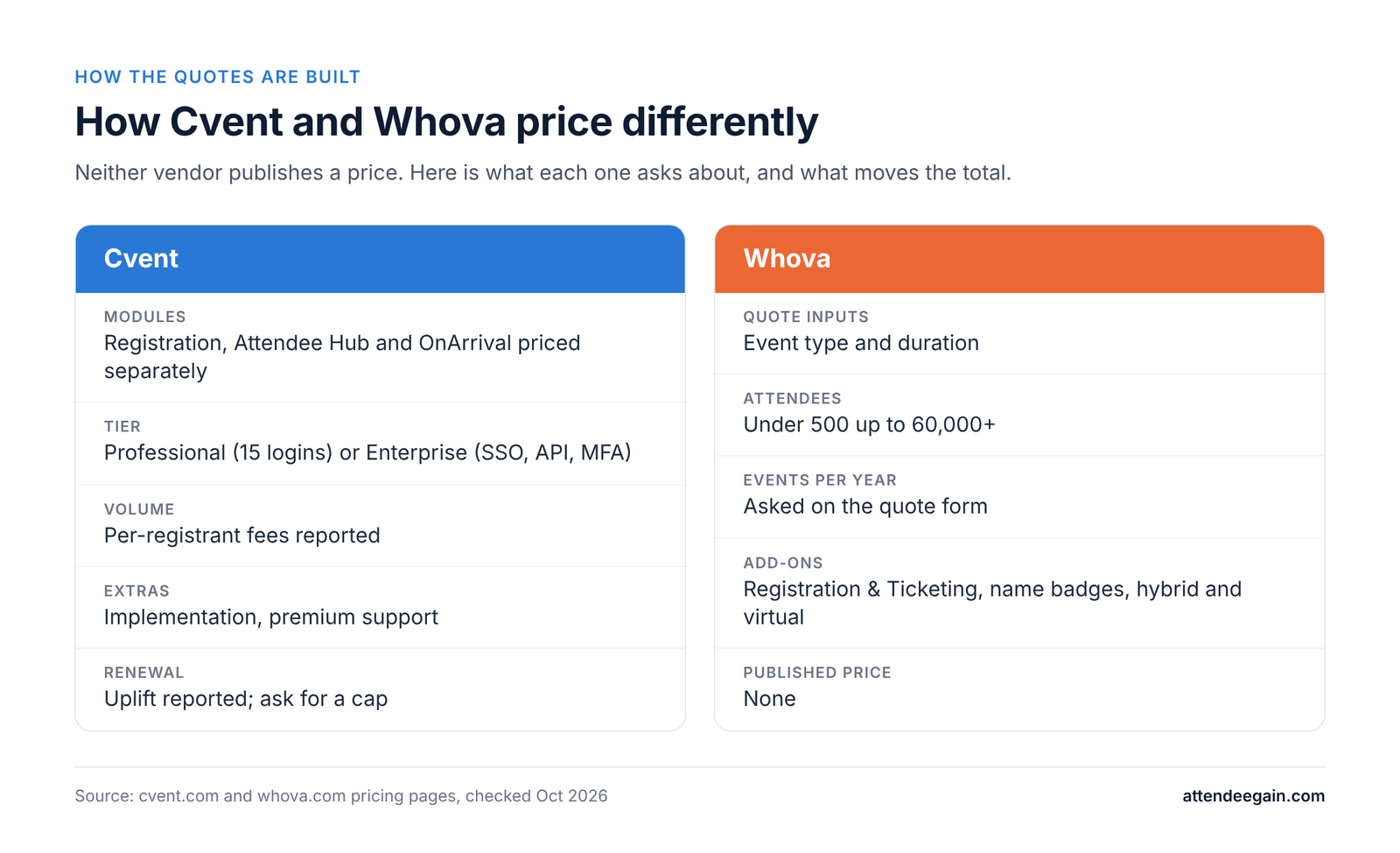
How Cvent and Whova quotes are built: Cvent by module and tier, Whova by event type, size and add-ons

Neither vendor publishes a price. Cvent’s pricing page offers custom quotes: Registration, Attendee Hub and OnArrival are each priced on their own, a Professional tier includes 15 user logins, and an Enterprise tier adds SSO, API access, MFA and budget management. Whova’s pricing page is a quote form that asks for event type, duration, expected attendees (from under 500 to over 60,000) and events per year.

What third parties report, treated as estimates:

CventWhova
Reported annual costAbout $19,600 to $79,000+ a year (Rework); a median near $19,550 (Nunify)Often quoted per event; one roundup lists $1,499 for up to 500 attendees over two days up to $5,999 (Fliplet)
Per-attendee or per-ticket chargesPer-registrant fees on top of the license, reportedReported processing fee on paid tickets of about 3.0% + $0.99 (Nunify)
Extras that move the totalAttendee Hub, OnArrival, implementation, premium support, renewal upliftRegistration & Ticketing, name badges, hybrid and virtual

Treat these as ranges to test, not facts. All three sources sell competing products, and the Whova figures from different sources do not agree with each other.

How to compare them fairly

  1. Fix the scenario. Example: one 800-person, two-day conference with paid registration, onsite badge printing and a mobile app, run once a year. Then a second scenario: six events across the year, 300 to 2,000 attendees each.
  2. Ask both vendors for a written quote for both scenarios, with every line itemized.
  3. Add what quotes leave out: implementation or build services, badge hardware and paper, payment processing, and your team’s hours.
  4. Ask each for renewal terms. For Cvent, ask for the per-registration rate, overage terms and renewal escalation percentage in writing. For Whova, ask whether the event price holds if attendance grows.

One rule of thumb: Whova’s per-event model tends to look cheaper for one or two events a year. Cvent’s license model tends to look better once you run many events and the fixed cost spreads. Check it against your own numbers before you believe it.

Implementation, support, security and AI

Implementation. Cvent setups usually need a trained admin or an implementation partner, because registration rules, approvals, integrations and the app all have to be configured and tested together. Whova is lighter to configure, and many conference teams self-serve with a demo and onboarding support. Whichever you pick, budget time for data import, branded pages, payment testing and a dress rehearsal of check-in.

Support. Cvent lists a client services team of 1,800+ people and tiered support; ask which tier your contract includes and what response times apply during your event week. Whova offers a demo and onboarding; ask what live support looks like onsite.

Security. Ask both for their current SOC 2 report or equivalent, data-residency options, SSO and MFA availability, and how attendee data is deleted after the event. On Cvent, SSO, API access and MFA sit in the Enterprise tier. We could not verify Whova’s certifications from its public pages, so request them in writing.

AI. Cvent advertises AI-driven agenda building in Attendee Hub. For any AI feature, ask what data it uses, whether it can be turned off, and whether it is included in the license or charged separately.

Switching. Moving from Whova to Cvent, or the reverse, means exporting attendees, sessions, speakers and registration answers, then rebuilding forms, emails and the app. Start months before your contract ends, and migrate events that are open for registration first.

Which should you choose?

  • Pick Cvent if you run many events a year, need approvals, multi-stakeholder governance, cross-event reporting or SSO and API access, and have an admin or partner to run it.
  • Pick Whova if you run a small number of conferences, association meetings or academic events, attendee engagement matters most, and you want a faster, lighter setup.
  • Run both side by side only if you have a clear split, for example Cvent for flagship events and Whova for community meetups. Two systems mean two data sets to reconcile.

FAQ

Is Whova cheaper than Cvent? For one or two events a year it often is, but neither vendor publishes prices, so get itemized quotes for the same scenario.

Does Whova publish its pricing? No. Its pricing page is a quote request based on event type, duration, attendee count and events per year.

Does Cvent have a mobile event app? Yes. Attendee Hub covers the mobile app, networking, chat, polling and live or on-demand video, and is licensed separately from Registration.

Which is better for networking? Whova is widely rated as strong for attendee networking. Cvent’s Attendee Hub also includes networking, so test both with your own agenda and audience.

Which is easier to implement? Whova is generally lighter. Cvent takes longer to configure but covers more.

Can I switch from one to the other? Yes. Export attendees, sessions and speakers, then rebuild forms and the app. Start months before your contract ends.

Need help choosing or setting up?

AttendeeGain implements Cvent and works with Whova, Bizzabo, Swoogo and Splash. Tell us your event size and volume and we will tell you which platform fits and what it will take to run it. See our Cvent expertise and Whova expertise, or contact us. For onsite check-in and badging, see onsite solutions.

Sources: Cvent pricing, Whova pricing.

Cvent vs Whova (2026): Pricing, Features and Which to Pick Read More »

Swoogo alternatives: the right pick by event type

Swoogo Alternatives (2026): The Right Pick by Event Type

Why teams look for Swoogo alternatives

Swoogo is one of the best-liked platforms in the category. It holds a 4.9 out of 5 rating on G2, its registration logic is among the deepest available, and it charges no per-registration fee. Teams rarely leave because it is bad. They leave because their needs have changed shape.

The three usual triggers:

  • Seat costs. Professional is US$11,800 a year for one full user and one reporting user. Events and registrations are unlimited; people are not. A team of five needs more seats, and Swoogo does not publish the rate.
  • No native virtual production. Swoogo’s Event Hub wraps a streaming provider you bring. Teams running serious virtual or hybrid programmes end up paying for a second platform.
  • No venue sourcing. If your team spends time on venue RFPs and hotel contracts, Swoogo does not help with that part of the job.

A fourth, smaller trigger: the add-on list. Kiosk check-in (Go Onsite Pro), the attendee app (Go Attend), SSO, sub-accounts, premium support and Call for Speakers are all extra.

When to stay. If you run many events with a small, stable admin team, Swoogo’s flat licence is hard to beat. Price your real team on Swoogo first; the alternative may not save money.

The best Swoogo alternatives, by event type

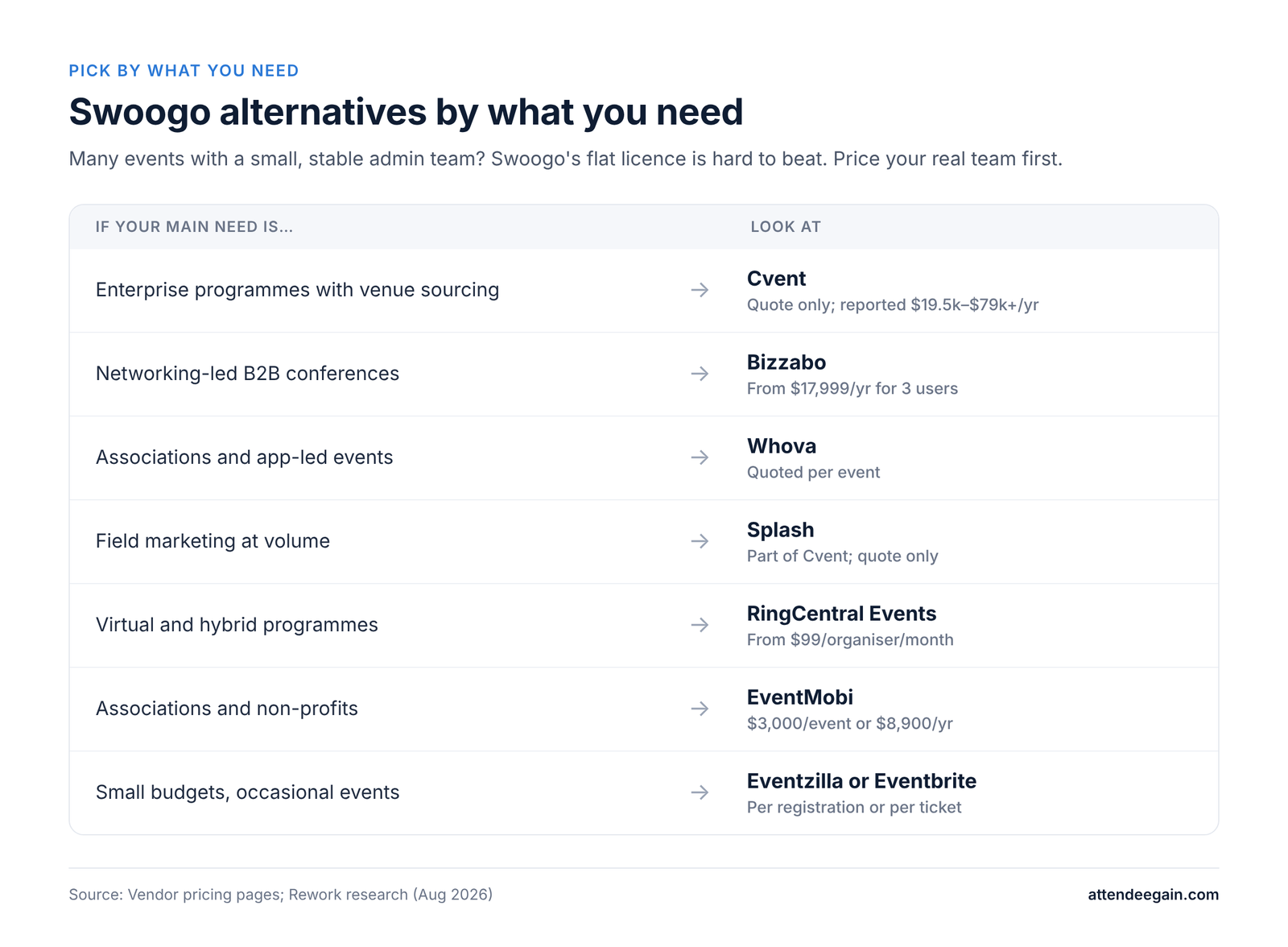
Swoogo alternatives by what you need: a guide matching each event need to the platform to look at, with starting prices.

Large enterprise programmes with venue sourcing: Cvent

Cvent adds what Swoogo leaves out: a venue marketplace of roughly 340,000 properties, hotel room blocks through Passkey, native virtual production, approvals and budgets. Professional includes 15 user logins, which helps larger teams. Pricing is quote only, and Docket estimates typical licences at about $19,550 to $79,000 or more a year. You give up Swoogo’s ease of use and speed. See our Cvent expertise.

B2B conferences where onsite networking matters: Bizzabo

Bizzabo has the same unlimited-events model, a built-in streaming studio and Klik SmartBadge wearables for networking and sponsor leads. It costs $499 per user per month with a three-user minimum ($17,999 a year). It does not escape per-user pricing; it moves the floor higher. CRM integrations are an add-on, whereas Swoogo includes them.

Conferences and associations that live in the app: Whova

Whova focuses on the attendee app, agenda and networking. Pricing is quoted per event after a demo. Its registration builder is far simpler than Swoogo’s.

Field marketing at volume: Splash

Splash, now part of Cvent, builds fast, on-brand pages for many smaller events tied to demand generation. Pricing is quote only; Rework cites third-party reports of $12,500 to $36,500 or more a year.

Virtual and hybrid programmes: RingCentral Events

RingCentral Events (formerly Hopin) charges from $99 per organiser per month with unlimited events and registrations, and includes native streaming. Weak for in-person check-in and badging.

Associations and non-profits: EventMobi

EventMobi charges $3,000 per event or $8,900 a year for unlimited events, with no registration fees. Badges, hardware and streaming are paid extras.

One enterprise suite: Stova

Stova, formed from Aventri, MeetingPlay and eventcore, covers registration through virtual delivery. No published pricing.

Small budgets and occasional events: Eventzilla or Eventbrite

Eventzilla charges from $1.50 per registration or $1,999 a year flat for 500 registrations. Eventbrite is free for free events and charges per paid ticket, with a public discovery marketplace. Both are much lighter than Swoogo.

Prices are as published by each vendor or reported by Rework or Docket as of October 2026.

Swoogo alternatives compared

The pricing model matters more than the headline price. Swoogo bets your constraint is registration volume, not headcount; several alternatives bet the opposite.

PlatformBest forPricing modelStarting priceWhat you gain over SwoogoWhat you give up
CventEnterprise, venue sourcingQuoteReported $19.5k to $79k+/yrSourcing, room blocks, native virtualEase of use, speed
BizzaboB2B conferences, networkingPer user$17,999/yr (3 users)Klik, streaming studioIncluded integrations
WhovaAssociations, app-led eventsPer event, quotedQuoteAttendee app and networkingRegistration depth
SplashField marketingQuoteReported $12.5k to $36.5k+/yrFast branded pagesComplex conferences
RingCentral EventsVirtual and hybridPer organiser$99/organiser/monthNative streamingOnsite tools
EventMobiAssociations, non-profitsPer event or per year$3,000/event or $8,900/yrNo seat-based pricingBuilder depth
StovaOne enterprise suiteQuoteQuoteBroad suite incl. virtualTransparency
EventzillaSmall, occasional eventsPer registration or flat$1.50/reg or $1,999/yrLow entry costAlmost all depth
EventbritePublic ticketed eventsPer ticketFree for free eventsDiscovery marketplacePrivate-event features
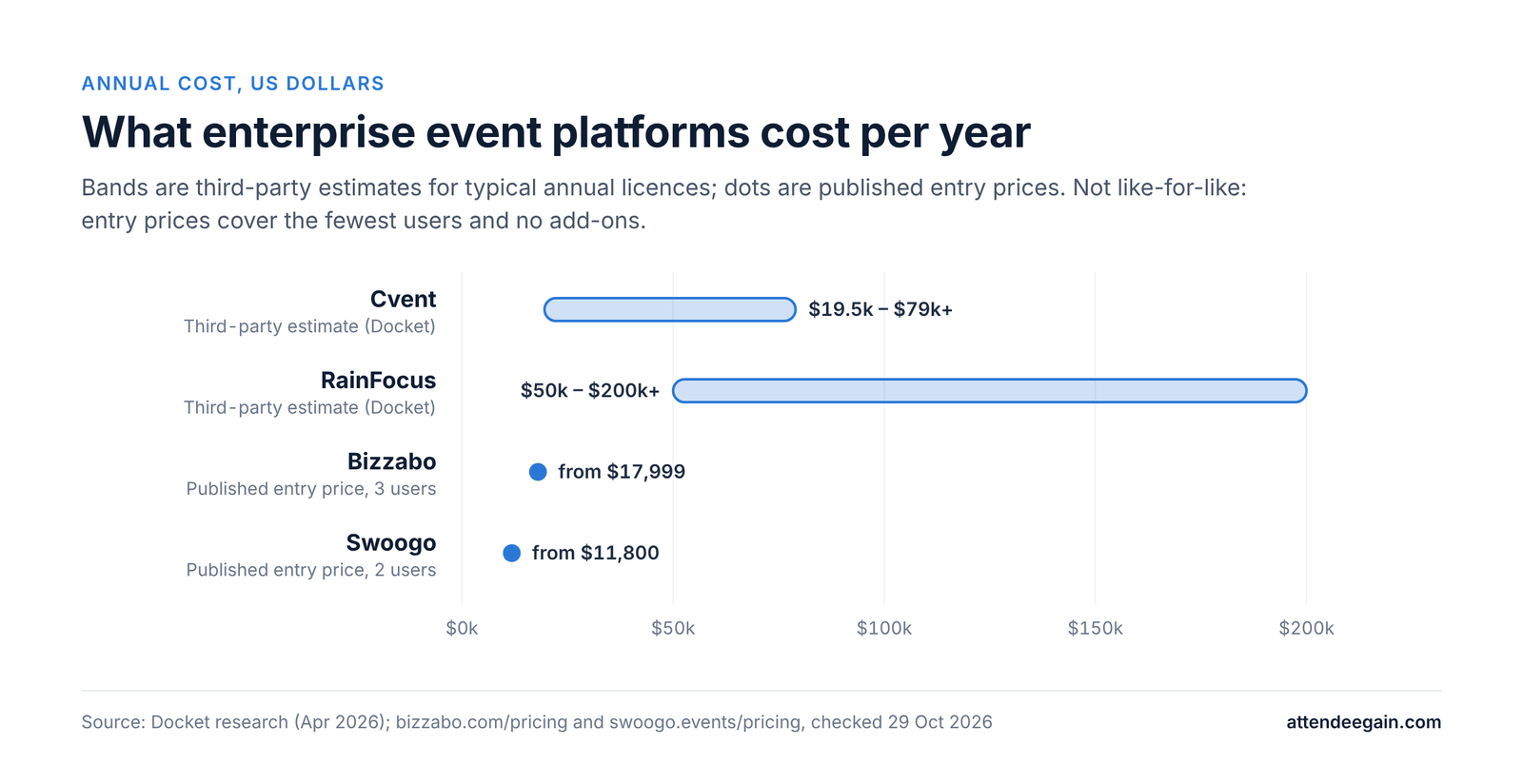
Annual cost comparison. Cvent typical licence estimated at $19.5k to $79k+ a year; RainFocus $50k to $200k+; Bizzabo published entry price $17,999 for 3 users; Swoogo $11,800 for 2 users.

For reference, Swoogo Professional is US$11,800 a year for two users, with unlimited events and registrations.

Questions to ask any Swoogo alternative

  1. What does it cost for our team size? Count builders, reporting users and onsite staff, then ask for a year-one figure.
  2. Can it match our registration logic? Bring your most complex Swoogo form to the demo and ask them to rebuild it live.
  3. Are integrations included? Swoogo includes 30+ with no integration fees; many alternatives charge for CRM sync.
  4. How is virtual handled? Native streaming, or your own provider?
  5. What security do you hold? Swoogo has SOC 2, ISO 27001 and 27701, and PCI DSS Level 1. Match it.
  6. What uptime do you commit to? Swoogo’s Enterprise plan includes a 99.9% uptime SLA.
  7. How fast is support during a live event? Swoogo promises a first response within 15 minutes in business hours.

Migrating off Swoogo

Contacts, registrations and reports export cleanly. Conditional logic does not: every branch of every form has to be rebuilt, and complex Swoogo forms can take longer to recreate than teams expect. Map each form’s logic in a spreadsheet before you start, rebuild your most complex event first as a test, and run one event in parallel before letting the Swoogo licence lapse.

Frequently asked questions

What is the best Swoogo alternative? Cvent for enterprise programmes with venue sourcing, Bizzabo for networking-led conferences, RingCentral Events for virtual programmes, EventMobi for associations.

Is Swoogo really unlimited? Unlimited events and registrations, yes. Users are not unlimited; Professional includes two.

Is there a cheaper alternative to Swoogo? For small teams running few events, Eventzilla, EventMobi or Eventbrite can cost less. For many events with a small team, Swoogo is often the cheapest option.

Which alternative has the best registration logic? Cvent comes closest for complex corporate registration, though it takes longer to build. Most lighter tools are far simpler than Swoogo.

When should we stay on Swoogo? When you run many events with a small admin team, do not need venue sourcing, and already have a streaming provider you like.

Thinking about a move?

We build on Swoogo and on the main alternatives. Talk to our team and we will help you price your real team on each option. See our Swoogo expertise or contact us.

Swoogo Alternatives (2026): The Right Pick by Event Type Read More »

Cvent vs Eventbrite: enterprise platform or ticketing

Cvent vs Eventbrite (2026): Enterprise Platform or Ticketing Tool?

Cvent vs Eventbrite: the short answer

Cvent vs Eventbrite is not a like-for-like comparison, because one is built for corporate programmes and the other for selling tickets.

Eventbrite is a ticketing and discovery tool for public events. Cvent is a management platform for corporate and association event programmes. They overlap on registration, but they are built for different buyers.

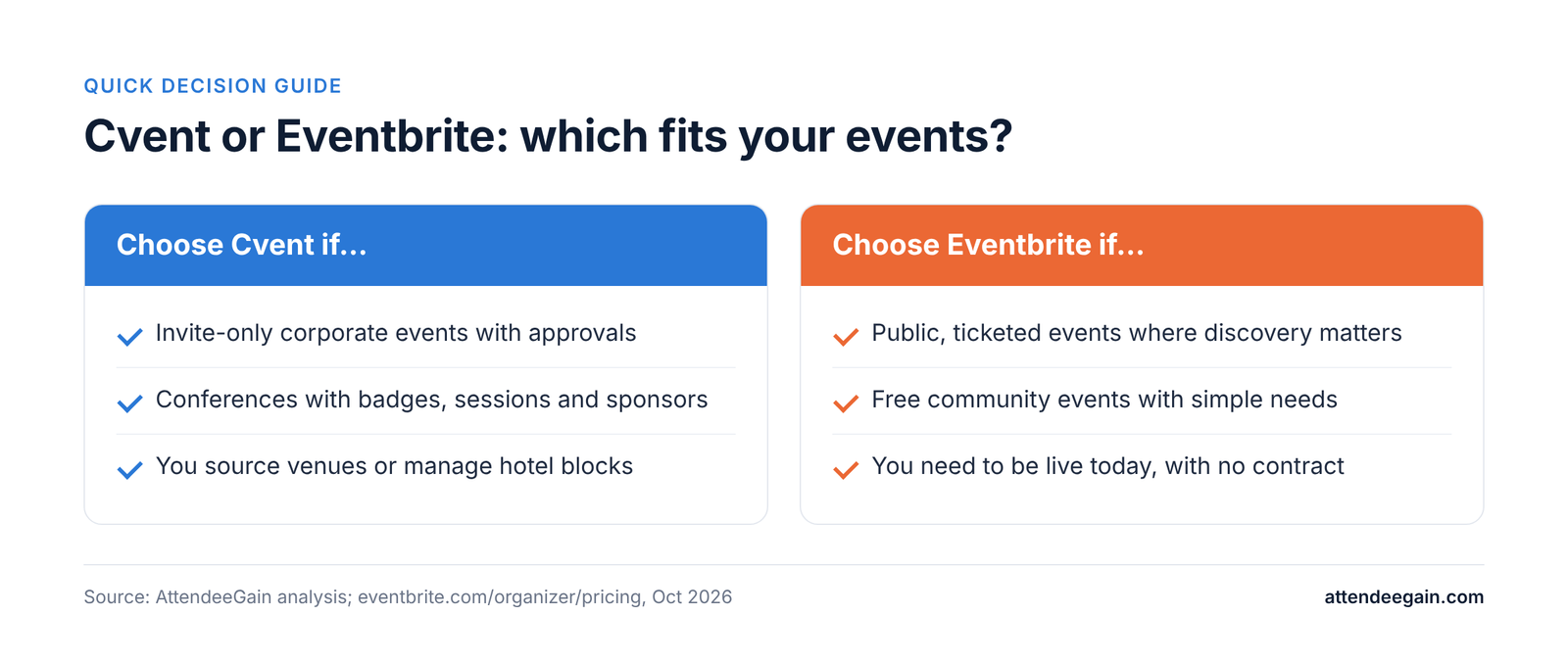
Choose Eventbrite if you sell tickets to the public, want people to find your event on its marketplace, and need to be live today with no contract. Choose Cvent if you run invite-only or corporate events with approvals, multiple attendee types, hotel blocks, onsite badging and CRM reporting.

Most organisations that ask this question are growing out of Eventbrite. The signs: events have become private rather than public, registration needs logic Eventbrite cannot handle, finance wants budget tracking, or the per-ticket fees on paid events have grown into real money.

Cvent vs Eventbrite at a glance

CventEventbrite
Built forCorporate, association and enterprise event programmesPublic, ticketed events of any size
Pricing modelAnnual licence, quote onlyFree for free events; per-ticket fees on paid tickets
Paid ticket feesSet by your contract and payment setup3.7% + $1.79 service fee per ticket, plus 2.9% processing per order
ContractAnnual, often multi-yearNone for self-serve
Public discoveryNo marketplaceMarketplace Eventbrite says reaches about 89 million monthly users
Registration logicMultiple attendee types, approvals, housing and travelTicket types, add-ons, custom questions
Venue sourcing and room blocksYesNo
OnsiteOnArrival kiosks, on-demand badges, session check-inOrganizer app with ticket scanning
Event appAttendee HubNo dedicated attendee event app
CRM depthDeep Salesforce and other connectorsIntegrations through its app marketplace
Setup timeWeeks for a first eventMinutes to hours

Cvent vs Eventbrite feature-by-feature

Registration

Eventbrite handles ticket types, early-bird and VIP tiers, promo codes, add-ons and custom questions well, and attendees can check out in under a minute. It stops short of corporate needs such as manager approvals, different registration paths per attendee type, and capturing hotel and travel in the same form. Cvent does all of those, at the cost of a longer build.

Event pages and branding

Eventbrite pages are quick to publish but follow Eventbrite’s layout, and reviewers on SelectHub point to limited customisation for a heavily branded look. Cvent’s Site Designer supports full branding and custom code, with more time needed to get it right.

Marketing and discovery

This is Eventbrite’s real advantage. Its marketplace puts public events in front of people already looking for something to attend, and it adds email campaigns, Eventbrite Ads and social ad tools. Cvent has no public marketplace; its marketing tools are built for known invite lists.

Onsite

Eventbrite’s organizer app scans tickets and supports contactless payment at the door. Cvent’s OnArrival adds self-service kiosks, on-demand badge printing, session check-in with capacity control, and staffed onsite support. For a 3,000-person conference with badges, Cvent is the safer choice.

Data and reporting

Eventbrite reports on ticket sales and audience demographics. Cvent adds configurable reporting across many events, budgets and deep CRM sync, which is why reviewers single out its Salesforce integration.

Support

Eventbrite offers email support and 24/7 chat for paid events, with priority phone support for large organisers through its sales team. SelectHub notes frequent reviewer complaints about support quality. Cvent offers 24/7 support from a 1,800-person client services team.

Cvent vs Eventbrite pricing: Eventbrite’s fees worked out

Eventbrite is free for free events. For paid events, it charges a 3.7% + $1.79 service fee per ticket and a 2.9% payment processing fee per order. By default the buyer pays the fees, but you can choose to absorb them. Eventbrite Pro, which adds higher email volumes, starts at $15 a month.

Here is roughly what those fees add up to. Figures assume one ticket per order and the processing fee on the ticket price only, so treat them as estimates.

Bar chart of Eventbrite fees per paid ticket: $25 ticket $3.44 (13.8%); $50 ticket $5.09 (10.2%); $100 ticket $8.39 (8.4%); $200 ticket $14.99 (7.5%); $500 ticket $34.79 (7.0%).
EventTicket priceFees per ticket (approx.)Total fees (approx.)
Free internal summit, 500 people$0$0$0
Paid workshop, 300 people$200$14.99about $4,500
Paid conference, 300 people$500$34.79about $10,400
Paid conference, 1,000 people$500$34.79about $34,800

Whether those fees come out of your budget or your attendees’ pockets is a choice, but someone pays them.

Cvent publishes no prices. It sells annual Professional and Enterprise editions, with venue sourcing, Passkey, lead capture and other modules as extras. Docket’s research estimates typical annual licences at about $19,550 to $79,000 or more; that is a third-party figure, not Cvent’s.

The crossover point. For free events, Eventbrite costs nothing and Cvent will rarely make financial sense on price alone. For a programme of paid events, Eventbrite’s fees can reach the same range as a Cvent licence. At that point the decision should turn on features, not fees.

Cvent vs Eventbrite security and compliance

Both handle payments securely and serve large organisations. Cvent holds SOC 2 Type II, ISO 27001 and PCI DSS certifications and offers SSO and multi-factor authentication in its Enterprise edition, which is what corporate IT and procurement typically require for internal events. If your security team needs a vendor questionnaire answered, ask Eventbrite’s sales team for its current compliance documentation before committing a corporate programme to it.

Reliability

Both run very large volumes of events. Eventbrite publishes a public status page; so does Cvent. For a flagship event, check each status history for outages in the months you run events, and ask about live-event support.

Switching from Eventbrite to Cvent

This is the common direction. Export past attendee lists and order history from Eventbrite before you leave; Cvent can import contacts. Expect to rebuild event pages, registration paths and emails, and to train at least one person properly on Cvent. Plan the first Cvent event as a smaller one, not your flagship, and keep Eventbrite for public-facing events if discovery still matters to you. Some organisations run both.

Cvent vs Eventbrite: which should you choose?

Cvent vs Eventbrite decision guide: when to choose Cvent and when to choose Eventbrite; the same points appear in the table below.
Your situationBetter fitWhy
Public, ticketed events where discovery mattersEventbriteMarketplace reach and fast setup
Free community or internal events, no complex needsEventbriteNo cost for free events
Invite-only corporate events with approvalsCventRegistration logic and governance
Conferences with badges, sessions and sponsorsCventOnArrival, Attendee Hub, exhibitor tools
You source venues or manage hotel blocksCventSupplier network and Passkey
High-volume paid events where fees are piling upCompare bothFees may now rival a licence

Cvent vs Eventbrite FAQs

Is Eventbrite free? Yes for free events. Paid tickets carry a 3.7% + $1.79 service fee and 2.9% processing per order.

Is Cvent better than Eventbrite? For corporate and association programmes, yes. For public ticketed events where discovery matters, Eventbrite is usually the better fit.

Can Eventbrite handle a corporate conference? It can sell the tickets. It lacks approvals, complex registration paths, venue sourcing and Cvent-level onsite badging.

Does Cvent have a public marketplace like Eventbrite? No. Cvent is built for known audiences and invite lists.

Can we use both? Yes. Some organisations keep Eventbrite for public events and use Cvent for corporate programmes.

Sources: Eventbrite pricing, Cvent pricing.

Outgrowing Eventbrite?

We set up Cvent for teams moving from simpler ticketing tools, including registration builds and onsite check-in. Talk to our team. See our Cvent expertise and event registration services, or contact us.

Cvent vs Eventbrite (2026): Enterprise Platform or Ticketing Tool? Read More »

Cvent vs ON24: what the acquisition means

Cvent vs ON24 (2026): What the Acquisition Means for Webinar Buyers

Cvent vs ON24: the short answer

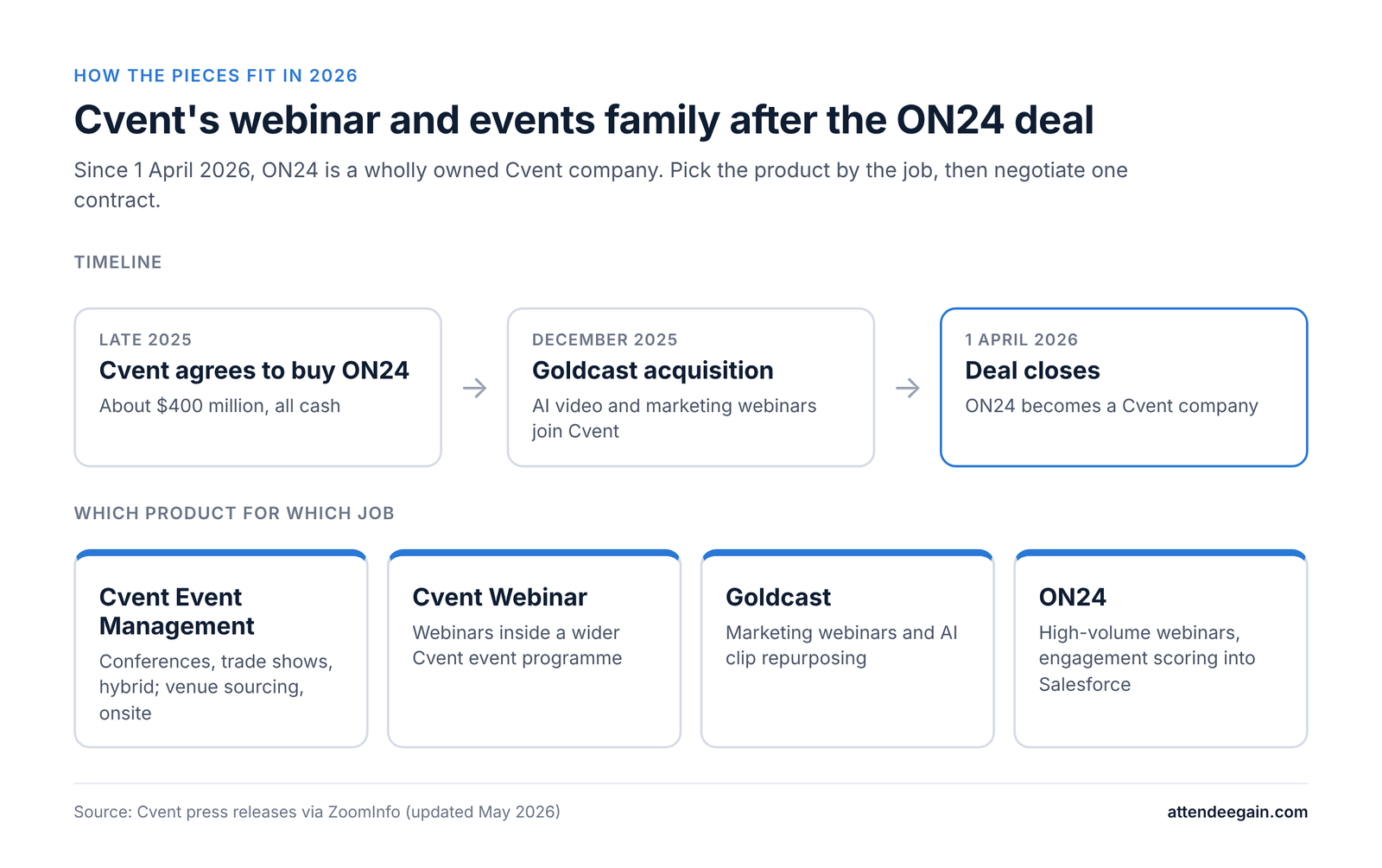
Timeline and product guide: Cvent agreed to buy ON24 in late 2025, acquired Goldcast in December 2025, and closed the ON24 deal on 1 April 2026. Cvent Event Management, Cvent Webinar, Goldcast and ON24 each suit a different job.

Cvent and ON24 are no longer competitors. Cvent agreed to buy ON24 in late 2025 and closed the roughly $400 million deal on 1 April 2026; ON24 now operates as a wholly owned Cvent company. Cvent had already bought Goldcast, an AI video platform, in December 2025.

So the question has changed from “which vendor?” to “which product inside Cvent?”:

  • Cvent (Registration, Attendee Hub, OnArrival) is for running in-person, hybrid and virtual events end to end, from venue sourcing to check-in.
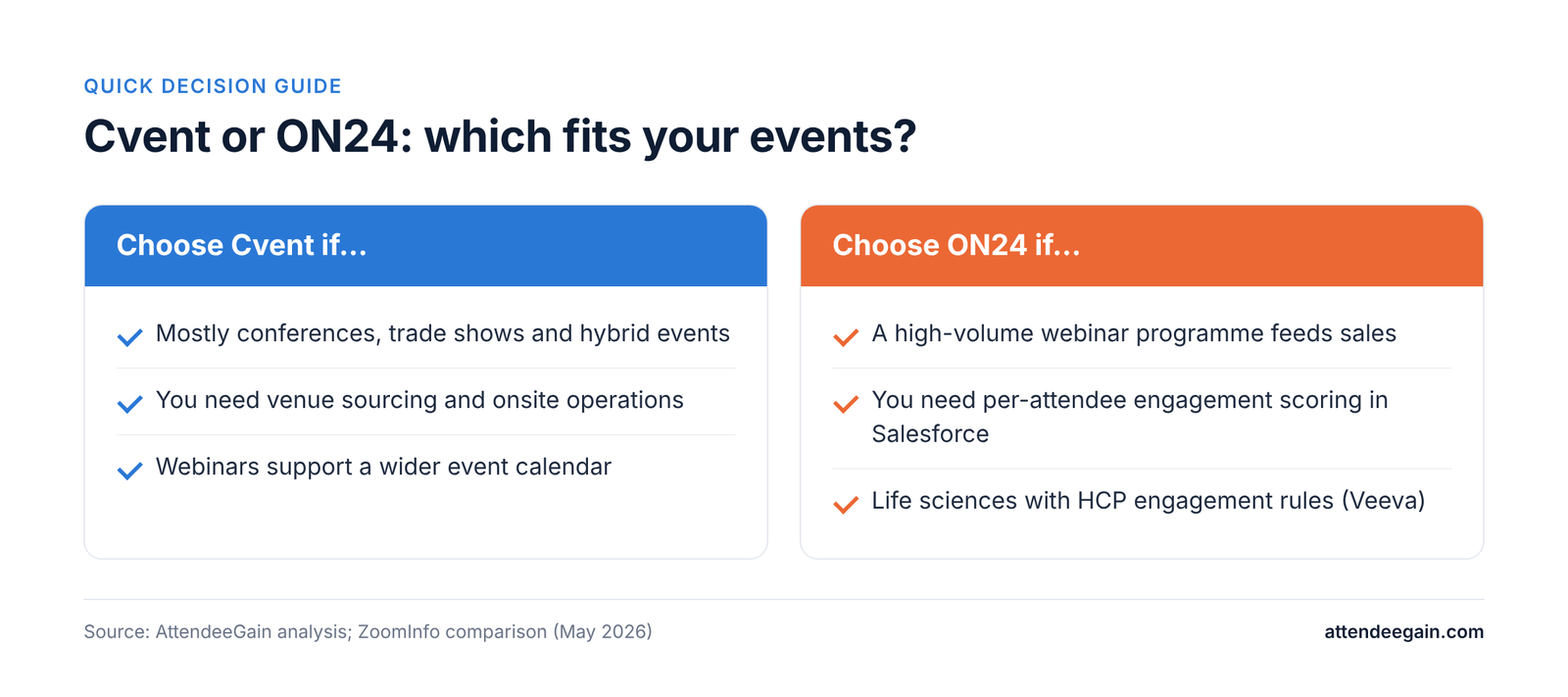
  • ON24 is for webinar-led demand generation: high-volume webinars, detailed engagement scoring per attendee, and content repurposing that feeds sales.
  • Goldcast and Cvent Webinar sit in between, and are worth comparing if your webinars are marketing-led but not ON24-scale.

If your programme is mostly conferences and trade shows, start with Cvent. If it is mostly webinars that feed your CRM, ON24 is still the specialist. Either way, you are now negotiating with one company, which changes how you should buy.

Cvent vs ON24 at a glance

CventON24
Core jobFull event lifecycle: sourcing, registration, onsite, virtualEnterprise webinars and digital engagement
OwnershipCvent (owned by Blackstone)Cvent company since 1 April 2026
In-person eventsCore strength: OnArrival, iCapture, Jifflenow, PasskeyNot its focus
WebinarsCvent Webinar, plus Goldcast and ON24 in the groupWebcast Elite: live, simulive, on-demand, up to 10 presenters
Engagement dataAttendee Hub engagement and sponsor scoringPer-attendee Engagement Score and Prospect Engagement Profile in Salesforce
Content repurposingGoldcast AI clips and postsACE engine: blogs, clips, social posts, emails from recordings
AICventIQACE, Key Moments
Life sciencesApproval workflows, spend trackingHCP engagement tracking with Veeva integration
PricingQuote only; Professional and Enterprise editionsQuote only; Essentials, Standard, Advanced packages
Free trialNo; PayGo for basic registrationNo

Feature-by-feature

Webinars

ON24 is the specialist. Its Webcast Elite studio runs live, simulive and on-demand webinars with up to 10 presenters, and separates producer, presenter and moderator roles for teams running many webinars a month. Cvent Webinar is tied directly into Cvent registration and suits teams whose webinars support a wider event programme. Goldcast focuses on marketing webinars and AI repurposing.

In-person and hybrid events

Cvent wins clearly. Venue sourcing, hotel room blocks, OnArrival check-in and badging, iCapture trade-show lead capture and Jifflenow meeting scheduling have no ON24 equivalent. ON24 handles hybrid sessions but is not an onsite operations platform.

Engagement data and the CRM

This is where ON24 earns its place. Every poll answer, question, download and minute watched is tied to a named registrant and scored. The Prospect Engagement Profile gathers that history across webinars and embeds it in Salesforce, so reps see a contact’s content journey without leaving the CRM. Cvent captures engagement in Attendee Hub and syncs to the major CRMs, with more emphasis on events and sponsors than on content consumption.

Content after the event

ON24’s ACE engine turns recordings into blog posts, eBooks, social posts, follow-up emails and clips, and its Key Moments feature uses audience engagement to pick the best clips, including vertical video. Within Cvent, Goldcast provides AI repurposing of recordings.

Mobile

Cvent has a full attendee app. ON24 offers a mobile viewing experience rather than a dedicated event app, and reviewers note gaps against the desktop experience.

Regulated industries

Both hold strong certifications. ON24 has the edge in life sciences, where HCP engagement tracking and the Veeva integration matter.

Pricing and how to buy now

Neither publishes prices. Cvent quotes by edition and module; ON24 sells Essentials, Standard and Advanced packages based on features and contact volume. Neither offers a free trial, though Cvent has a pay-as-you-go option for basic registration.

The acquisition changes the negotiation more than the price list. With one parent company, ask these before you sign anything:

  • Can we buy ON24 on its own, or only bundled? ZoomInfo reports Cvent has committed to continued investment in ON24, but standalone availability should be confirmed with sales.
  • Will a bundle reduce the total, and does the discount survive renewal?
  • Which webinar product is on the long-term roadmap? With Cvent Webinar, Goldcast and ON24 in one group, ask which will be the primary product in two years, and what happens to your contract if products are merged.
  • How will data move between them? Integration work is ongoing; ask what is live today versus planned.
  • Can we keep our current ON24 terms at renewal? Existing customers should check renewal language carefully.

If your contract is up within a year, consider a shorter term until the product roadmap is clearer.

AI features

  • Cvent’s CventIQ (launched June 2025) covers planning and operations: AI-assisted venue RFP responses, writing help, personalised session recommendations, live transcripts and feedback summaries.
  • ON24’s ACE focuses on content and engagement: generating blogs, emails, social posts and clips from recordings, and scoring audience engagement. ACE runs on Microsoft Azure OpenAI, and customers keep ownership of content they provide and generate.

Security and compliance

CventON24
SOC 2 Type IIYesYes
ISO 27001 and 27701YesYes
SOC 1 Type II, PCI DSSYesNot stated
Data residencyAWS, US and EU regionsSeparate North America and EU data centres
AI data useCventIQ data not used to train models; AI can be switched offCustomers own content in ACE

Reliability

Both run large live programmes. For webinars, a failed stream is visible to every attendee at once, so ask for each product’s uptime record, SLA and live-event support model in writing. Now that both sit in one company, also ask whether support teams and escalation paths have changed since the acquisition.

Switching or consolidating

Many organisations already run Cvent for events and ON24 for webinars. Consolidating onto one product is tempting now, but webinar histories, engagement scores and Salesforce mappings do not always transfer cleanly between products. Before you consolidate, export engagement history from ON24, document every CRM field mapping, and run one webinar series in parallel.

Which should you choose?

Cvent vs ON24 decision guide: when to choose Cvent and when to choose ON24; the same points appear in the table below.
Your situationBetter fitWhy
Mostly conferences, trade shows and hybrid eventsCventOnsite, sourcing and lead capture ON24 does not do
High-volume webinar programme feeding salesON24Engagement scoring and Salesforce profiles
Webinars support a wider event calendarCvent WebinarOne registration system and data set
Marketing webinars with heavy content reuseON24 or GoldcastACE or Goldcast repurposing; compare both
Life sciences with HCP engagement rulesON24Veeva integration and HCP tracking
You run both big events and big webinar programmesBoth, bought togetherNegotiate one contract with clear product commitments

Frequently asked questions

Did Cvent buy ON24? Yes. The deal closed on 1 April 2026, for about $400 million. ON24 operates as a wholly owned Cvent company.

Can I still buy ON24 without Cvent? The ON24 platform remains active. Whether it is sold standalone or bundled should be confirmed with sales.

What is the difference between ON24, Goldcast and Cvent Webinar? ON24 is the enterprise webinar and engagement-data specialist. Goldcast focuses on marketing webinars and AI video repurposing. Cvent Webinar is tied into Cvent registration for webinars that sit inside a wider event programme.

Will ON24 be merged into Cvent? Cvent has not published an integration timeline. Ask about the roadmap before signing a multi-year term.

Which is better for in-person events? Cvent, by a wide margin.

Sources: Cvent pricing, ZoomInfo: Cvent vs ON24, ON24 Trust Center.

Need help planning around the change?

We help teams build and integrate Cvent programmes, including webinar data flowing into the CRM. Talk to our team about your event and webinar mix. See our Cvent expertise and analytics and reporting services, or contact us.

Cvent vs ON24 (2026): What the Acquisition Means for Webinar Buyers Read More »

Bizzabo alternatives: a practical guide by event type

Bizzabo Alternatives (2026): A Practical Guide by Event Type

Why teams look for Bizzabo alternatives

Bizzabo is a strong platform for marketing-led B2B conferences. Teams usually start looking elsewhere for one of four reasons.

  • The add-on stack. The base plan is $499 per user per month, billed annually, with a three-user minimum ($17,999 a year), and it includes unlimited events and registrations. But CRM and martech integrations, sponsor and speaker portals, advanced networking, a custom-branded app, API access, SSO, branding, Advanced Onsite and Klik are listed as add-ons.
  • Per-user pricing. Every extra team member adds $5,988 a year. For a large events team that adds up.
  • Annual commitment only. Bizzabo states it requires an annual subscription, so teams running one or two events a year pay for capacity they do not use.
  • Fit. Bizzabo is built around conferences and marketing. Teams that need venue sourcing, deep registration logic or an association-style community app may be better served elsewhere.

Before switching, price your current Bizzabo setup line by line. Sometimes dropping an unused add-on at renewal solves the cost problem.

Before you switch: a checklist

  • Do you use Klik? If your sponsors rely on Klik lead capture or your team uses its engagement heatmaps, no alternative here replaces it. Check whether Klik can stay: Bizzabo says Klik works with third-party event platforms.
  • Which add-ons do you actually use? List them. The answer often changes the comparison.
  • How many people need to build events? Per-user pricing differs a lot between vendors.
  • Is CRM sync essential? On Bizzabo it is an add-on; on Swoogo it is included; on Cvent it is a priced module.
  • Do you need venue sourcing or room blocks? Only Cvent covers that at scale.
  • When does your contract renew? Start evaluating two quarters before.

The best Bizzabo alternatives, by event type

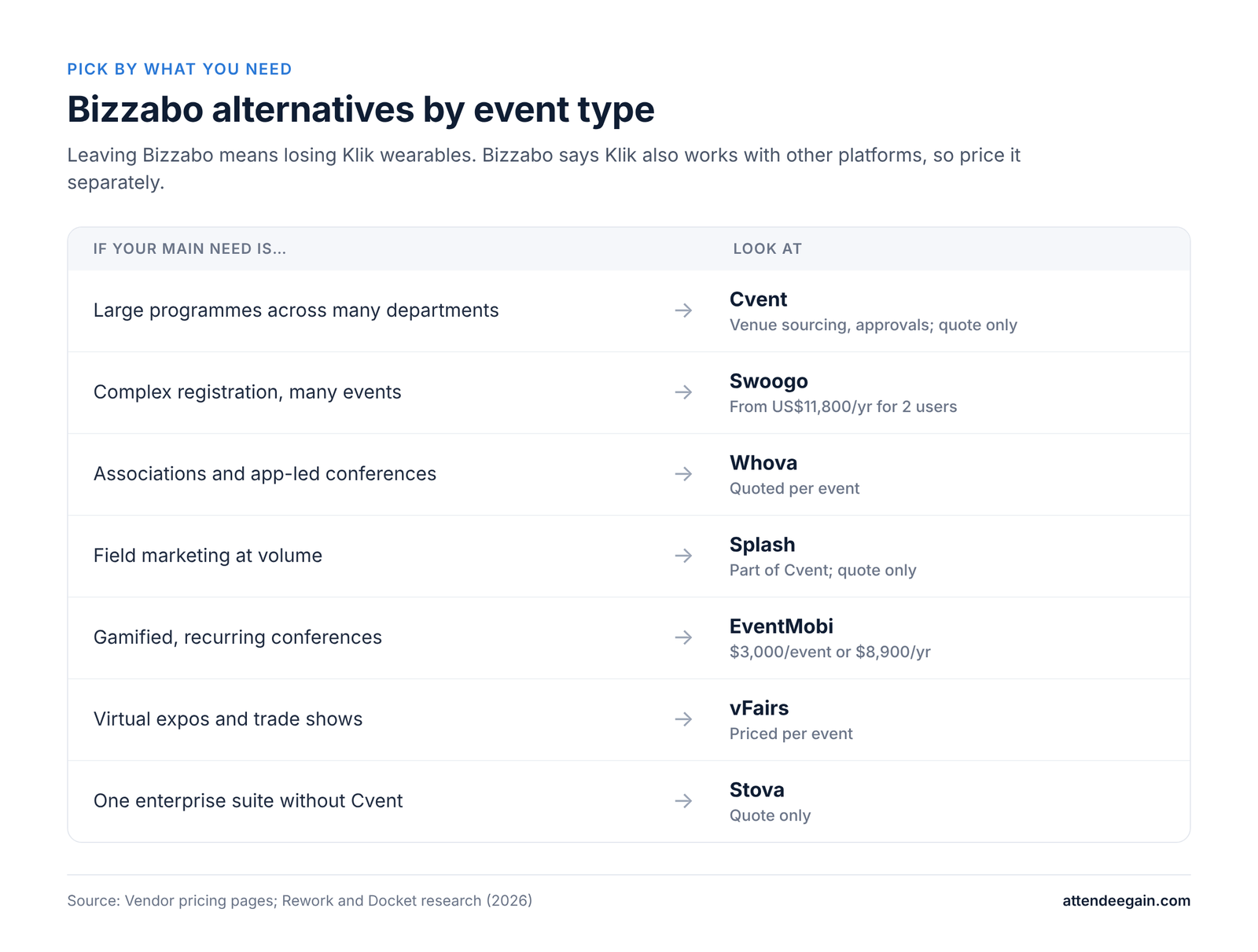
Bizzabo alternatives by event type: a guide matching each event need to the platform to look at, with starting prices.

Large, multi-department enterprise programmes: Cvent

Cvent is the move when your events outgrow a marketing tool: venue sourcing across roughly 340,000 venues, hotel room blocks, budget approvals and governance for many users. Pricing is quote only. The trade-off is a steeper learning curve; Cvent runs formal certification for a reason. See our Cvent expertise.

Complex registration and many events: Swoogo

Swoogo is the closest alternative for teams who mainly need registration and event websites. It offers unlimited conditional logic, unlimited events and registrations, 30+ integrations with no integration fees, and in-house support. Professional is US$11,800 a year for one full user and one reporting user. You give up Klik and native video production.

Conferences and associations that live in the app: Whova

Whova is built around the attendee app and in-app networking, and is widely used for association meetings and academic conferences. Pricing is quoted per event after a demo. Docket reports $2,000 to $10,000 per event. Lighter on marketing automation and CRM depth than Bizzabo.

Field marketing events at volume: Splash

Splash is designed for many smaller, on-brand events such as dinners, roadshows and launches. It is now part of Cvent. Not suited to multi-track conferences.

Gamified, app-led recurring conferences: EventMobi

EventMobi publishes pricing from $3,000 per event or $8,900 a year, with no per-registration fees. Hardware rental, streaming and badges are paid extras.

Virtual expos and trade shows: vFairs

vFairs offers immersive virtual environments and exhibitor booths, priced per event. Docket reports $5,000 to $20,000 per event. Lighter for in-person logistics.

Enterprise suite without Cvent: Stova

Stova combines the former Aventri, MeetingPlay and eventcore products. Quote only, with an enterprise sales process. Some users report rough edges as the products merge.

Prices are as published by each vendor or, where marked, reported by Docket, as of October 2026.

Bizzabo alternatives compared

PlatformBest forStarting priceWhat you gain over BizzaboWhat you give up
CventEnterprise, multi-department programmesQuote onlyVenue sourcing, room blocks, governanceEase of use; Klik
SwoogoComplex registration, frequent eventsUS$11,800/yr (2 users)Unlimited logic; integrations includedKlik; native video
WhovaAssociations and conferencesReported $2k to $10k per eventPer-event pricing; community appMarketing and CRM depth
SplashField marketing eventsQuote onlyFast on-brand pages at volumeMulti-track conference tools
EventMobiRecurring app-led conferences$3,000/event or $8,900/yrPer-event option; gamificationKlik; enterprise marketing tools
vFairsVirtual expos and trade showsReported $5k to $20k per eventImmersive virtual boothsIn-person depth
StovaEnterprise suiteQuote onlyBroad merged suiteSimplicity; published pricing

For reference, Bizzabo starts at $17,999 a year for three users, with unlimited events and registrations.

Migrating off Bizzabo

Export first: contacts and attendee records with custom fields, session attendance, sponsor lead data, and past reports for year-on-year comparison.

Rebuild on the new platform: registration flows, event websites, email templates, CRM mappings and any sponsor portal setup.

Decide about Klik separately. Bizzabo says Klik works with third-party event platforms, so keeping Klik for a flagship event while moving everything else is an option worth pricing.

Run one event in parallel. Keep Bizzabo live until your first event on the new platform has closed and its reports reconcile.

Questions to ask any Bizzabo alternative

  1. What will it cost for our real team and calendar? Count every builder, every event and every add-on, then ask for one year-one figure.
  2. How will our sponsors capture leads? If they use Klik today, ask what replaces it, or whether you can keep Klik alongside the new platform.
  3. Is CRM sync included, and is it native? On Bizzabo it is an add-on; make sure the alternative is not the same or worse.
  4. What security certifications do you hold, and is SSO extra? Bizzabo lists SOC 2 Type II, ISO 27001, GDPR, CCPA and ADA compliance; your new platform should match.
  5. What uptime do you commit to in the contract? Bizzabo publishes a 99.99% figure for H1 2025; ask alternatives for a contractual SLA, not a marketing number.
  6. Which AI features are live now? Bizzabo has an organiser copilot and an attendee assistant, Bizzy. Ask each alternative to show its equivalent working.
  7. Can we start with one event? Per-event pricing is the most common reason teams leave Bizzabo’s annual model, so ask whether it is available.

Frequently asked questions

What is the best Bizzabo alternative? Cvent for large enterprise programmes, Swoogo for registration-heavy teams, Whova for associations and app-led conferences.

Is there a cheaper alternative to Bizzabo? Swoogo, EventMobi and Whova can all cost less for the right team, especially small teams or those running few events. Compare full quotes for your calendar.

Can I keep Klik if I leave Bizzabo? Bizzabo says Klik works with third-party platforms and apps, so ask for a Klik-only quote.

Does any alternative match Bizzabo’s networking? Whova is strong on in-app networking. None of the alternatives here offers wearable badges like Klik.

Can I buy Bizzabo for a single event? No. Bizzabo requires an annual subscription, which is why per-event platforms appeal to occasional organisers.

Get a second opinion

We build on Bizzabo and on most of the alternatives above. Talk to our team and we will help you decide whether to switch, renegotiate or rebuild. See our Bizzabo expertise or contact us.

Bizzabo Alternatives (2026): A Practical Guide by Event Type Read More »

Cvent alternatives: what to use instead and when to stay

Cvent Alternatives (2026): What to Use Instead, and When to Stay

Why teams look for Cvent alternatives

Most teams searching for Cvent alternatives are not leaving a broken product. They are paying for a platform built for a bigger programme than the one they run.

Cvent is still the category leader. Gartner named it a Leader in its Magic Quadrant for Event Marketing and Management Platforms for a third consecutive year in 2026, and its supplier network covers roughly 340,000 hotels and venues. No alternative on this list replaces that.

The reasons people look elsewhere are consistent across the articles we reviewed:

  • Price you cannot see. Cvent publishes no prices. Docket’s research puts typical annual licences at roughly $19,550 to $79,000 or more, plus per-registrant fees of $7 to $12 and first-year implementation of $5,000 to $50,000. These are third-party estimates, not Cvent figures.
  • Time to proficiency. Technical setup often takes weeks, and teams report months before new staff are fully comfortable.
  • Capability you never use. Venue sourcing, room blocks and diagramming are valuable for multi-city programmes and idle for a team running four regional events a year.
  • Contract terms. Multi-year agreements with auto-renewal mean the decision window opens well before renewal.

If those sound familiar, read the next section before booking demos elsewhere.

Before you switch: is it Cvent, or your setup?

Some Cvent frustrations come from the platform. Many come from how it was configured. Switching fixes the first kind; it only moves the second kind to a new tool.

Work through this checklist before you commit to a migration:

  • Are you paying for modules nobody uses? Ask your account manager for a module-by-module usage review. Dropping an unused module at renewal can cut cost without changing platform.
  • Is registration slow to build because of the platform, or because every event starts from scratch? Cvent supports event templates; teams that build them well cut build time sharply.
  • Is the Salesforce sync failing because of the connector, or the field mapping? Many “integration problems” are mapping decisions nobody owns.
  • Does your team know the platform? If nobody has been trained, a new platform will feel easier for a while, then hit the same wall.
  • When does your contract renew, and what notice does it require? Put the date in the calendar now.
  • Do you need venue sourcing or room blocks? If yes, most alternatives will not replace that part of Cvent.

If most boxes point at setup, a rebuild or a training sprint is usually cheaper and faster than a migration. If they point at fit, the alternatives below are worth a serious look.

The best Cvent alternatives, grouped by what you need

Cvent alternatives by what you need: a guide matching each event need to the platform to look at, with starting prices.

A numbered “top 14” list hides the real question: which part of Cvent are you replacing? We have grouped the alternatives by job.

If you run B2B conferences and care most about attendee experience

Bizzabo is the closest like-for-like for marketing-led conference programmes. It costs $499 per user per month, billed annually, with a three-user minimum ($17,999 a year), and includes unlimited events and registrations. Its Klik SmartBadge wearables are a genuine differentiator for networking and sponsor leads. CRM integrations, SSO and API access are add-ons. No venue sourcing.

RainFocus is the enterprise option for teams running 50 or more events a year with heavy personalisation and data needs. Docket reports pricing of roughly $50,000 to $200,000+ a year, and implementation measured in months. It is not a cost-saving move.

If registration is the core of your events

Swoogo offers unlimited conditional logic, unlimited events and registrations, and in-house support with a 15-minute first response. Professional is US$11,800 a year for one full user and one reporting user; extra users are priced on request. Virtual video comes from your own streaming provider.

If you need one enterprise suite, just not Cvent

Stova merges the former Aventri, MeetingPlay and eventcore products into one platform covering registration, virtual and onsite. It does not publish prices and the sales process resembles Cvent’s. Some users report gaps while the merged products settle.

If your events are mostly field marketing, dinners and roadshows

Splash builds on-brand event pages quickly for high volumes of smaller events. Note that Cvent acquired Splash, so this is an alternative within the Cvent family, not away from it.

If you run conferences or association meetings and want a strong app

Whova is known for its attendee app and in-app networking, and is widely used by associations and academic conferences. Pricing is quoted after a demo; Docket reports $2,000 to $10,000 per event.

EventMobi suits recurring association conferences, with published pricing from $3,000 per event or $8,900 a year and no per-registration fees.

If virtual and hybrid are the priority

vFairs offers immersive virtual environments and exhibitor booths on per-event pricing. RingCentral Events (formerly Hopin) publishes an entry price of $99 per organiser per month. Virtual PRO (formerly Hubilo) starts at $15,000 a year.

If you mainly sell tickets to public events

Eventbrite brings a public discovery marketplace and self-serve setup, with per-ticket fees instead of an annual licence. Eventzilla offers per-registration pricing or a flat plan from $1,999 a year. Neither is a full Cvent replacement for corporate programmes.

Prices are as published by each vendor or, where marked, reported by Docket or Rework as of October 2026.

Cvent alternatives compared

PlatformBest forStarting priceVenue sourcing
BizzaboMarketing-led B2B conferences, networking$17,999/yr (3 users)No
SwoogoComplex registration, frequent eventsUS$11,800/yr (2 users)No
RainFocusVery large multi-event enterprise programmesReported $50k to $200k+/yrNo
StovaOne enterprise suite, not CventQuote onlyNo
SplashField marketing pages at volumeQuote onlyNo
WhovaConferences and associations, strong appReported $2k to $10k per eventNo
EventMobiRecurring association conferences$3,000/event or $8,900/yrNo
vFairsImmersive virtual and hybrid, exposReported $5k to $20k per eventNo
RingCentral EventsVirtual-first programmes$99 per organiser per monthNo
Virtual PROEnterprise virtual and hybrid$15,000/yrNo
EventbritePublic ticketed eventsPer-ticket feesNo
EventzillaBudget, high-volume registration$1,999/yr flat, or per registrationNo

The last column is the point: none of these replaces Cvent’s venue marketplace. If sourcing matters, plan for a separate tool or keep Cvent for that job.

Migrating off Cvent: what moves and what does not

Data moves; builds do not. Plan the migration around that.

Export before you go: the full contact and attendee database with custom fields and session history, past registration and financial reports for year-on-year comparison, CRM field mappings, and any floor plans you will reuse.

Rebuild on the new platform: registration paths and logic, event websites and email templates, integrations and approval workflows. Budget time for each; vendors’ “live in weeks” estimates usually assume a simple first event.

Run in parallel for one cycle. Keep Cvent available, read-only if possible, until your first event on the new platform has closed and its reports have been checked against the old ones.

Time it to the contract. Start evaluation at least two quarters before renewal so you are not forced into another term.

Questions to ask any Cvent alternative

Feature lists look alike in demos. These questions separate the platforms that will hold up from the ones that will not.

  1. What is the full year-one cost for our calendar? Licence, users, per-registrant fees, onsite hardware, integrations, implementation. Ask for one number.
  2. Which of our Cvent workflows will not exist on your platform? Venue sourcing, room blocks, approvals and budgeting are the usual gaps.
  3. Is your CRM integration native, and who maps the fields? Ask for a technical walkthrough with your CRM admin present.
  4. What security certifications do you hold? SOC 2 Type II and ISO 27001 are the usual minimum; ask for current reports, and whether SSO costs extra.
  5. What uptime do you commit to in the contract, and what happens if you miss it? A published uptime figure is not the same as an SLA.
  6. What AI features are live today, and which are on the roadmap? Ask to see them working on your data, not a demo account.
  7. What does support look like during a live event? Response times, phone access, and whether day-of support costs extra.
  8. Can we run one event before committing to a full year? Several alternatives offer per-event pricing; Cvent typically does not.

Frequently asked questions

What is the best Cvent alternative? It depends on the job. Bizzabo for marketing-led conferences, Swoogo for registration-heavy programmes, Stova or RainFocus for a full enterprise suite, Whova or EventMobi for associations.

Is there a cheaper alternative to Cvent? Several publish lower entry prices, including Swoogo, EventMobi, Eventzilla and RingCentral Events. Compare full year-one costs for your calendar, not entry prices.

Does any alternative offer venue sourcing like Cvent? Not at Cvent’s scale. Its supplier network of roughly 340,000 venues has no direct equivalent.

Is Splash an alternative to Cvent? Splash is now part of Cvent, so it is an alternative within the Cvent family for field-marketing events.

Should I switch if we only run a few events a year? Often yes, but check first whether a smaller Cvent package or a cleaner setup would solve the problem for less.

How long does migrating off Cvent take? Vendors cite a few weeks to a few months depending on complexity. Allow for one event cycle running in parallel.

Not sure whether to switch or fix?

We are Cvent specialists who also build on Bizzabo, Swoogo, Splash and Whova. Talk to our team and we will review your setup and tell you honestly whether a rebuild or a move is the better investment. See our Cvent expertise or contact us.

Cvent Alternatives (2026): What to Use Instead, and When to Stay Read More »

Got an event approaching soon

15987
AttendeeGain Logo
Select an Option
Scroll to Top